Skip to content
logo-darklogo-darklogo-darklogo-dark
  • Tool Categories
    • 🎨Art & Creative Design505
    • 🏢Business Management644
    • 💻Coding & Development514
    • 👮Detection83
    • 🧠General Use728
    • 🏥Health & Wellness55
    • 📷Image & Photo Analysis100
    • 🖼️Image Generation & Editing618
    • 📐Interior & Architectural Design37
    • 🎓Learning & Education483
    • ⚖️Legal & Finance90
    • 🎭Lifestyle & Entertainment236
    • 📢Marketing & Advertising627
    • 🎧Music & Audio138
    • 👔Office & Workplace1,014
    • 🔬Research & Data Analysis373
    • 👥Social Media245
    • 🎥Video Generation & Editing426
    • 👧🏻Virtual Companion135
    • 🎤Voice Generation & Editing381
    • ✍️Writing & Editing808
    • All Categories
    • AI Use Cases
  • News
  • Events
    • Academic Conferences
    • Developer Conferences
    • Expos / Trade Shows
    • Industry Summits
    • Workshops / Training
    • All Events
    • Past Events
  • Saved Tools
  • Suggest a Tool
    ✕
    Home › Image Generation & Editing › Background Removal› iMyFone MagicPic
    iMyFone MagicPic

    iMyFone MagicPic

    An AI-powered tool for removing and changing backgrounds in photos, free and fast

    The iMyFone MagicPic tool is a sophisticated AI-powered photo editing software designed to make removing and changing images’ backgrounds effortless and efficient. It utilizes advanced AI algorithms to automatically remove backgrounds with a single click, enabling users to replace the existing backgrounds with their choice of solid colors, stunning templates, or custom backgrounds.

    The software caters to various needs, from creating social media posts and e-commerce images to designing ID photos and digital scrapbooks. Additionally, MagicPic supports batch processing, allowing the simultaneous editing of 1000+ photos, thereby saving significant time and effort for its users.

    MagicPic stands out for its user-friendly interface and powerful AI capabilities that require no prior photo editing skills from the user. It offers features such as real-time preview, ensuring users are satisfied with their edits, and fast processing times due to its built-in AI. The software aims to make photo editing accessible and cost-effective, eliminating the need for expensive photoshoots.

    Users can easily customize their images to create eye-catching photos and banners. With over 8 years of brand presence, MagicPic has garnered positive feedback from numerous satisfied customers across over 80 countries, highlighting its effectiveness as a photo background editing tool.

    Visit iMyFone MagicPic ↗
    Categories
    🖼️ Image
    ✂️ Background Removal ✏️ Photo Editing 🧹 Object Removal 🏞️ Background Generation
    🎥 Video
    ✏️ Video Editing
    🎨 Art
    🖌️ Graphic Design

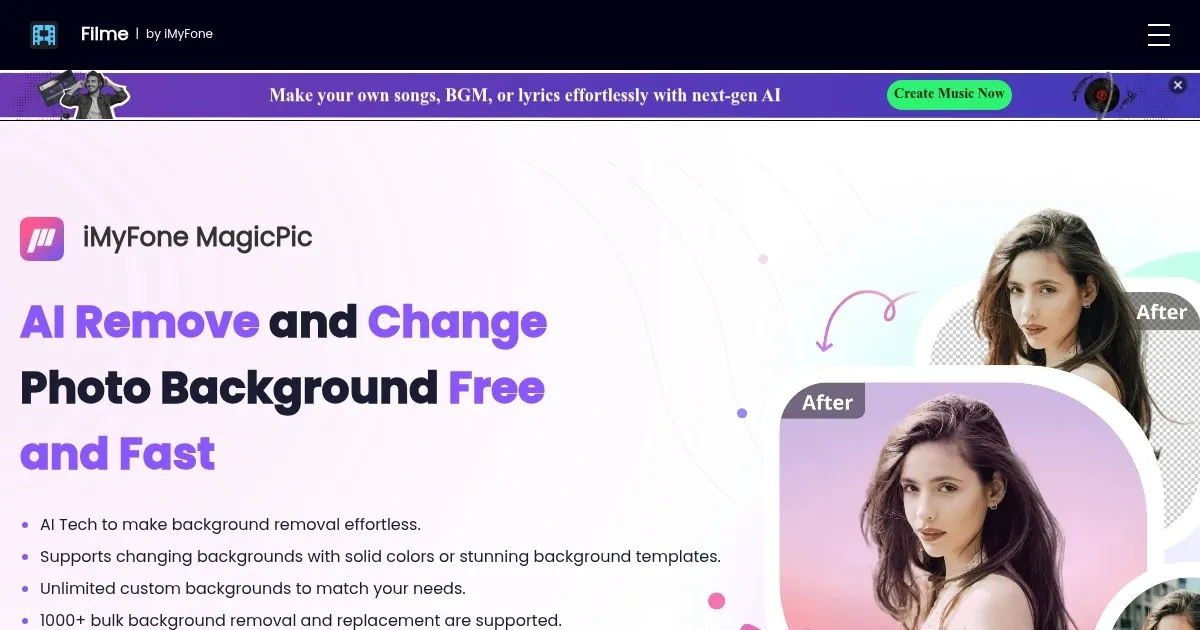
    Homepage Screenshot 📸

    iMyFone MagicPic screenshot

    Video Overview 🎬

    iMyFone MagicPic - Video Overview

    What are the key features? ✨

    • Background removal: MagicPic uses advanced AI to remove backgrounds from images with a single click.
    • Background replacement: You can replace image backgrounds with solid colors, various templates, or custom images.
    • Batch processing: The tool simultaneously supports bulk background removal and replacement for over 1000 photos.
    • Real-time preview: This feature allows users to see changes as they make them, ensuring the final result meets their expectations.
    • Easy to use: MagicPic features a simple interface that requires no prior photo editing skills.

    Who is it for? 🤔

    iMyFone MagicPic is aimed at a broad range of users, including social media enthusiasts, e-commerce businesses, marketers, and anyone else needing quick and easy photo background editing. The tool is handy for those who require batch processing capabilities and high-quality results without extensive photo editing knowledge.

    Examples of what you can use it for 💡

    • Enhance photos for social media with creative and professional-looking backgrounds
    • Improve product photos by removing distracting backgrounds
    • Create eye-catching posters and flyers by easily changing the backgrounds of images
    • Quickly produce ID photos with plain, regulation-compliant backgrounds
    • Design personalized scrapbooks by customizing photo backgrounds to match different themes and occasions

    Pros & Cons ⚖️

    • Say goodbye to ugly background
    • Maker your photos look much better
    • Easy to use
    • There are quite a few tools in this market, not sure this one's the best

    FAQs 💬

    What does MagicPic actually do?
    MagicPic removes photo backgrounds automatically using AI to create transparent cutouts, and it also lets you replace them with colors, templates, or custom images.
    Is it suitable for beginners?
    Yes, it requires no photo editing skills. The one-click AI removal and simple interface make it accessible for anyone.
    Can it process multiple photos at once?
    Absolutely, it supports batch processing so you can handle large numbers of images simultaneously, which saves a ton of time.
    What kind of images work best?
    It performs well on product photos, portraits, and complex scenes. The AI handles detailed edges reasonably well, though very fuzzy subjects might need minor tweaks.
    Does it require an internet connection to use the AI?
    No, it's a downloadable desktop software, so the core AI processing runs locally on your PC after installation.
    What output formats does it support?
    It produces high-quality transparent PNG files, ready for design, e-commerce, or further editing.
    How accurate is the automatic background removal?
    The AI delivers clean results in most cases, especially for clear subjects, and you get real-time previews to make adjustments if needed.

    Ready to try iMyFone MagicPic?

    An AI-powered tool for removing and changing backgrounds in photos, free and fast

    Visit iMyFone MagicPic ↗


    iMyFone MagicPic alternatives 🔗

    1. PhotoRoom PhotoRoom An AI-powered photo editing tool that removes backgrounds and enhances photos with user-friendly features.
    2. Remove.bg Remove.bg A free online tool that automatically removes backgrounds from images
    3. Removal.AI Removal.AI Quickly remove the background from the image for free using artificial intelligence
    4. Retoucher Retoucher Removes image backgrounds instantly and adds custom ones for professional photos
    5. Pixelcut Pixelcut A suite of AI-powered image editing and upscaling tools
    6. Fotor Fotor Enhances and edits photos with AI-powered tools and creative features
    Share
    iMyFone MagicPic screenshot enlarged
    Best AI Tools

    Discover the best AI tools for any use case

    Explore
    • Tool Categories
    • AI Use Cases
    • AI Events
    • AI News
    • Saved Tools
    Company
    • About Us
    • Contact Us
    • Media & Partnerships
    • Suggest a Tool
    Legal
    • Privacy Policy
    • Terms of Service
    Copyright © 2026 Best AI Tools 415 Mission Street, 37th Floor, San Francisco, CA 94105