logo-darklogo-darklogo-darklogo-dark
  • Tool Categories
    • ๐ŸŽจArt & Creative Design505
    • ๐ŸขBusiness Management644
    • ๐Ÿ’ปCoding & Development514
    • ๐Ÿ‘ฎDetection83
    • ๐Ÿง General Use728
    • ๐ŸฅHealth & Wellness55
    • ๐Ÿ“ทImage & Photo Analysis100
    • ๐Ÿ–ผ๏ธImage Generation & Editing618
    • ๐Ÿ“Interior & Architectural Design37
    • ๐ŸŽ“Learning & Education483
    • โš–๏ธLegal & Finance90
    • ๐ŸŽญLifestyle & Entertainment236
    • ๐Ÿ“ขMarketing & Advertising627
    • ๐ŸŽงMusic & Audio138
    • ๐Ÿ‘”Office & Workplace1,014
    • ๐Ÿ”ฌResearch & Data Analysis373
    • ๐Ÿ‘ฅSocial Media245
    • ๐ŸŽฅVideo Generation & Editing426
    • ๐Ÿ‘ง๐ŸปVirtual Companion135
    • ๐ŸŽคVoice Generation & Editing381
    • โœ๏ธWriting & Editing808
    • All Categories
    • AI Use Cases
  • News
  • Events
    • Academic Conferences
    • Developer Conferences
    • Expos / Trade Shows
    • Industry Summits
    • Workshops / Training
    • All Events
    • Past Events
  • Saved Tools
  • Suggest a Tool
โœ•
Home › Image Generation & Editing › Photo Editing› Magic Studio
Magic Studio

Magic Studio by aarzoo

A suite of AI image creation and editing tools for different use cases

Magic Studio is a cutting-edge AI-based tool designed to facilitate the creation of beautiful images easily and efficiently without the need for advanced design skills. It serves a range of purposes, including creating winning product pages, ads, social media posts, and more, within minutes.

The platform boasts features such as instantly cleaning up images by removing unwanted objects, people, or text with simple brush strokes, transforming scenes with a single click by changing image backgrounds and generating images merely from text descriptions. This user-friendly tool is designed to be so straightforward that even a five-year-old could use it, making professional-level image editing accessible to everyone.

Popular worldwide, Magic Studio has attracted over 20 million users who have edited 150 million images. It caters to both personal and commercial projects, ensuring data safety and supporting various image formats. The platform offers a PRO plan for users seeking more advanced features and finer control, which is especially recommended for desktop or laptop use for more powerful editing capabilities.

Beyond basic image editing, Magic Studio also provides specialized tools like Magic Eraser, Background Remover, AI Image Generator, Image Upscaler, and more, making it a comprehensive solution for virtually all image editing needs. The tool has garnered praise for its simplicity and effectiveness, offering a significant time-saving alternative to traditional graphics editing software.

Visit Magic Studio ↗
Categories
๐Ÿ–ผ๏ธ Image
โœ๏ธ Photo Editing ๐Ÿ–ผ๏ธ Image Generation โœ‚๏ธ Background Removal ๐Ÿงน Object Removal ๐Ÿช„ Text to Image ๐ŸŒŸ Photo Enhancing ๐Ÿž๏ธ Background Generation ๐Ÿง‘โ€๐ŸŽค Avatar Generation ๐Ÿ›๏ธ Product Photography
๐ŸŽจ Art
๐Ÿ–ผ๏ธ Design Generation ๐ŸŽจ Art Generation

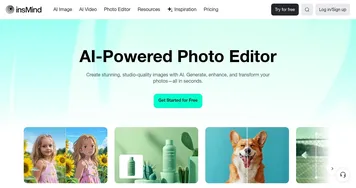
Homepage Screenshot 📸

Magic Studio screenshot

What are the key features? ✨

  • AI image creation: Create fancy images with AI models like DALL-E.
  • Object & background removal: Easily remove objects, people, or backgrounds from images with a simple brush stroke or click.
  • Image enhancements: Upscale images to 4K, blur backgrounds, and convert image formats without losing quality.
  • Text-to-image generation: Generate images from text descriptions (prompts), allowing for creativity without design skills.
  • Easy to use: The tool features an intuitive design that makes it accessible for all users, even those without prior design experience.

Who is it for? 🤔

Magic Studio is aimed at individuals and businesses needing high-quality images without extensive design skills. It caters to social media managers, e-commerce sellers, marketers, educators, and anyone else looking to enhance their visual content. Its ease of use and features make it suitable for both professional and personal projects, thus appealing to a broad audience.

Examples of what you can use it for 💡

  • Create eye-catching posts for social media platforms
  • Generate high-quality product images for online stores
  • Design compelling visuals for ads and marketing materials without hiring professional designers
  • Enhance personal photos, create art, or craft unique visuals for personal use
  • Develop visually engaging educational content for presentations, e-learning, or classroom use

Pros & Cons ⚖️

  • Turns everyone into a photo-editing professional
  • Multiple image editing tools under one roof
  • Good for different use cases
  • This is a highly competitive market and we're not sure this is the best tool out there

FAQs 💬

What is Magic Studio?
Magic Studio is an AI-powered platform that lets anyone edit and create professional-looking images easily, without needing design skills. It offers tools for removing objects, generating images from text, and more.
Do I need design experience to use Magic Studio?
No, it's designed for everyone, even beginners. The tools are intuitive and AI handles most of the complex work.
What are the main tools available in Magic Studio?
Key tools include Magic Eraser for removing unwanted objects, Background Remover for changing backgrounds, AI Image Generator for creating pictures from text descriptions, and Image Upscaler for enhancing resolution.
Can I use Magic Studio on my phone?
Yes, there's a mobile app available for iOS and Android, and you can also use it on desktop for more precise editing.
Is Magic Studio suitable for commercial use?
Yes, many users create product photos, ads, social media posts, and professional headshots with it.
Does Magic Studio support different languages?
The site and tools are available in multiple languages, including English, Spanish, French, German, and others.
How does the AI Image Generator work?
You simply type a text description of what you want, and the AI creates unique images based on your prompt.
Can I remove unwanted objects from my photos?
Yes, with the Magic Eraser tool, you brush over objects, people, or text, and AI removes them cleanly.
Is there a way to blur backgrounds for professional portraits?
Yes, the Background Blur tool automatically detects the subject and applies a professional blur effect.
What file formats does Magic Studio support?
It handles common formats like JPG, PNG, HEIC, and WEBP, with converters available for some.

Ready to try Magic Studio?

A suite of AI image creation and editing tools for different use cases

Visit Magic Studio ↗


Magic Studio alternatives 🔗

  1. Imagen Imagen Generates photorealistic images from detailed text prompts
  2. Black Forest Labs Black Forest Labs Generates high-quality images from text prompts with precision and speed
  3. Stable Diffusion Stable Diffusion Generates high-quality images from text prompts with versatile styles
  4. Adobe Express Adobe Express Creates on-brand content with AI-driven design and video tools
  5. Adobe Firefly Adobe Firefly Generates images, videos, audio, and vectors using AI.
  6. Freepik AI Freepik AI Creates AI images and videos with fluid motion, detailed textures, and synced audio up to 1080p
Share
Magic Studio screenshot enlarged
Best AI Tools

Discover the best AI tools for any use case

Explore
  • Tool Categories
  • AI Use Cases
  • AI Events
  • AI News
  • Saved Tools
Company
  • About Us
  • Contact Us
  • Media & Partnerships
  • Suggest a Tool
Legal
  • Privacy Policy
  • Terms of Service
Copyright © 2026 Best AI Tools 415 Mission Street, 37th Floor, San Francisco, CA 94105