logo-darklogo-darklogo-darklogo-dark
  • Tool Categories
    • ๐ŸŽจ Art
    • ๐Ÿข Business
    • ๐Ÿ’ป Coding
    • ๐Ÿ‘ฎ Detection
    • ๐Ÿง  General
    • ๐Ÿฅ Health
    • ๐Ÿ“ท Image Analysis
    • ๐Ÿ–ผ๏ธ Image
    • ๐Ÿ“ Architecture
    • ๐ŸŽ“ Education
    • โš–๏ธ Legal/Finance
    • ๐ŸŽญ Lifestyle
    • ๐Ÿ“ข Advertising
    • ๐ŸŽง Music
    • ๐Ÿ‘” Work
    • ๐Ÿ”ฌ Research
    • ๐Ÿ‘ฅ Social
    • ๐ŸŽฅ Video
    • ๐Ÿ‘ง๐Ÿป Companion
    • ๐ŸŽค Voice
    • โœ๏ธ Writing
    • All Categories
    • AI Use Cases
  • News
  • Events
    • Academic Conferences
    • Developer Conferences
    • Expos / Trade Shows
    • Industry Summits
    • Online Events
    • Workshops / Training
    • All Events
    • Past Events
  • Saved Tools
  • Suggest a Tool
โœ•
Home › Legal & Finance › Accounting› Midday
Midday

Midday

Streamlines invoicing, time tracking, and financial management for freelancers

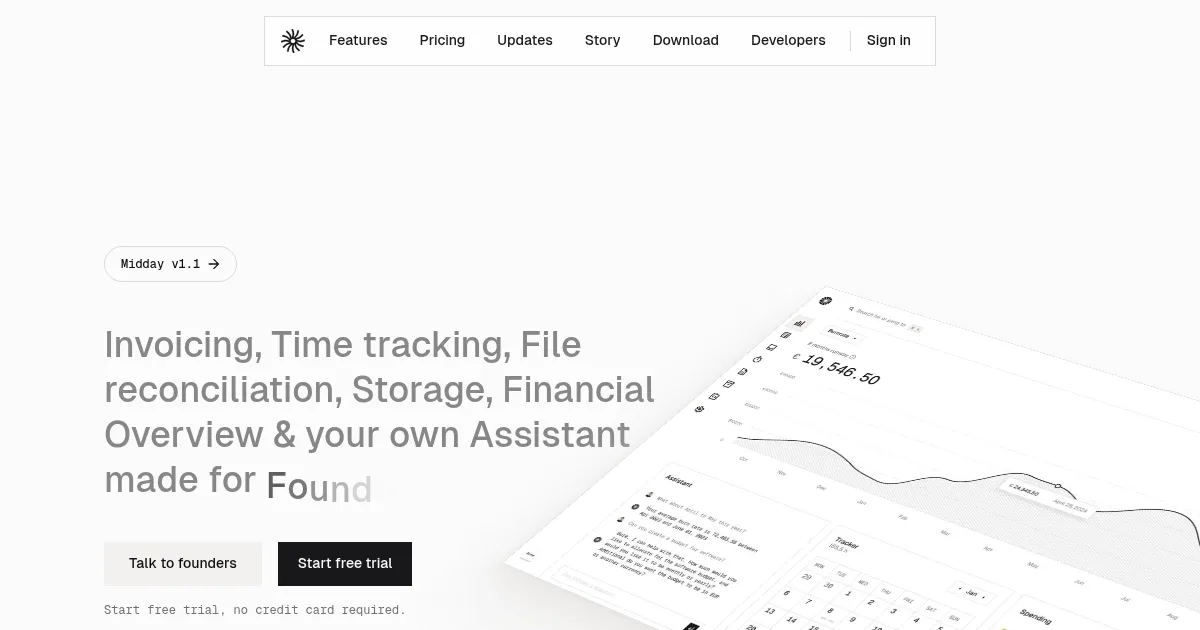
Midday is an AI-powered platform that automates invoicing, time tracking, file reconciliation, and financial management for freelancers and small businesses. It connects to over 20,000 banks in 33 countries, providing real-time insights into revenue, expenses, and burn rate. The platform integrates features like Invoicing, Time Tracker, Magic Inbox, Vault, and Assistant to streamline operations. Users can create professional invoices, track project hours, store documents securely, and export data in CSV format for accountants. The Assistant offers tailored financial insights based on user queries.

The Invoicing feature allows users to create web-based invoices, add taxes or discounts, and monitor payment statuses. Time Tracker logs project hours, sets billable rates, and generates invoices directly. Magic Inbox matches receipts to transactions automatically, reducing manual work. Vault provides secure storage with smart search for contracts and receipts. Seamless Export simplifies accountant-ready data exports. The platform’s open-source nature allows self-hosting for advanced users.

Compared to QuickBooks and Xero, Midday focuses on freelancers with a modern, AI-driven approach. QuickBooks offers more robust features for larger businesses, while Xero excels in multi-user collaboration. Midday’s pricing is subscription-based, competitive with similar tools, though specific costs vary.

Users may appreciate the automation and clean interface but could find the initial setup complex. Bank integration limitations may affect some users. The Slack integration adds value for team communication.

To maximize Midday, start with the free trial, connect your bank, and test the Assistant with specific questions. Export a sample CSV to ensure compatibility with your accountant’s needs.

Visit Midday ↗

Categories

โš–๏ธ Legal/Finance

๐Ÿงพ Accounting ๐Ÿ’ฐ Finance ๐Ÿ’ต Tax Assistant

๐Ÿข Business

๐Ÿ“‹ Project Management

๐Ÿ‘” Work

โšก Work Productivity ๐Ÿ“„ Document Generation ๐Ÿ“Š Report Generation โœ… Task Management

๐Ÿง  General

๐Ÿฆ™ Open Source Model

Screenshot 📸

Midday screenshot

Video Overview 🎬

What are the key features? ✨

  • Invoicing: Creates professional web-based invoices with tax, discount, and logo options.
  • Time Tracker: Logs project hours, sets billable rates, and generates invoices.
  • Magic Inbox: Automatically matches receipts to transactions for streamlined reconciliation.
  • Vault: Securely stores contracts and receipts with smart search functionality.
  • Assistant: Provides tailored financial insights based on user queries.

Who is it for? 🤔

Midday is ideal for freelancers, contractors, consultants, and micro-business owners who need a streamlined way to manage finances without the complexity of enterprise tools. It suits those juggling multiple projects, seeking automation for invoicing and receipt matching, and wanting clear financial insights. Tech-savvy solo entrepreneurs, especially those comfortable with open-source tools, will find its flexibility appealing.

Examples of what you can use it for 💡

  • Freelance Designer: Tracks project hours and generates invoices directly from logged time.
  • Consultant: Uses Magic Inbox to match receipts to transactions, simplifying expense tracking.
  • Solo Entrepreneur: Stores contracts in Vault for easy access during client negotiations.
  • Small Agency Owner: Monitors revenue and burn rate across multiple bank accounts.
  • Contractor: Exports CSV files for seamless accountant handoffs.

Pros & Cons ⚖️

  • Connects to 20,000+ banks globally
  • AI Assistant offers clear insights
  • Open-source for self-hosting flexibility
  • Limited bank support for some users
  • Initial setup may feel complex

FAQs 💬

What banks does Midday support?
Midday connects to over 20,000 banks in 33 countries, including major institutions in the US, Canada, UK, and Europe.
Is Midday suitable for non-tech-savvy users?
The interface is user-friendly, but initial setup may require some technical comfort.
Can I self-host Midday?
Yes, Middayโ€™s open-source nature allows self-hosting on your cloud infrastructure.
Does Midday integrate with other tools?
It currently integrates with Slack, with more app integrations planned.
How does the Assistant work?
The Assistant answers financial queries in plain language, offering tailored insights.
Is there a free trial?
Yes, Midday offers a free trial with no credit card required.
Can I export data for my accountant?
Midday provides Seamless Export for accountant-friendly CSV files.
Does Midday support multiple currencies?
Yes, it offers unified currency overviews across accounts.
Is the Vault secure for sensitive documents?
The Vault uses secure storage with automatic document classification.
How does Magic Inbox save time?
It automatically matches receipts to transactions, reducing manual reconciliation.

Ready to try Midday?

Streamlines invoicing, time tracking, and financial management for freelancers

Visit Midday ↗

Midday alternatives 🔗

  1. Monarch Monarch A financial management platform that allows users to track, organize, and budget
  2. AngelList Relay AngelList Relay Transform unstructured data from your inbox into an organized dashboard by simply forwarding an email
  3. SimplyWise SimplyWise An AI app that streamlines expense tracking and document organization
  4. Keeper AI Accountant Keeper AI Accountant Ask an AI accountant service from Keeper, a smart tax filing app for freelancers
  5. TaxGPT TaxGPT Streamlines tax research and automates workflows for tax professionals with AI precision
  6. WellyBox WellyBox An AI virtual assistant for receipts that automates manual admin tasks
Share
Midday screenshot enlarged
Promote Midday
light badge
Copy Embed Code
dark badge
Copy Embed Code
neutral badge
Copy Embed Code
Best AI Tools

Discover the best AI tools for any use case

About Us | Contact Us | Suggest an AI Tool
Privacy Policy | Terms of Service
Copyright © 2026 Best AI Tools 415 Mission Street, 37th Floor, San Francisco, CA 94105