logo-darklogo-darklogo-darklogo-dark
  • Tool Categories
    • 🎨Art & Creative Design505
    • 🏢Business Management644
    • 💻Coding & Development514
    • 👮Detection83
    • 🧠General Use728
    • 🏥Health & Wellness55
    • 📷Image & Photo Analysis100
    • 🖼️Image Generation & Editing618
    • 📐Interior & Architectural Design37
    • 🎓Learning & Education483
    • ⚖️Legal & Finance90
    • 🎭Lifestyle & Entertainment236
    • 📢Marketing & Advertising627
    • 🎧Music & Audio138
    • 👔Office & Workplace1,014
    • 🔬Research & Data Analysis373
    • 👥Social Media245
    • 🎥Video Generation & Editing426
    • 👧🏻Virtual Companion135
    • 🎤Voice Generation & Editing381
    • ✍️Writing & Editing808
    • All Categories
    • AI Use Cases
  • News
  • Events
    • Academic Conferences
    • Developer Conferences
    • Expos / Trade Shows
    • Industry Summits
    • Workshops / Training
    • All Events
    • Past Events
  • Saved Tools
  • Suggest a Tool
✕
Home › Image Generation & Editing › Photo Editing› PhotoGrid
PhotoGrid

PhotoGrid

Creates photo collages and edits images with AI-powered tools for stunning visuals

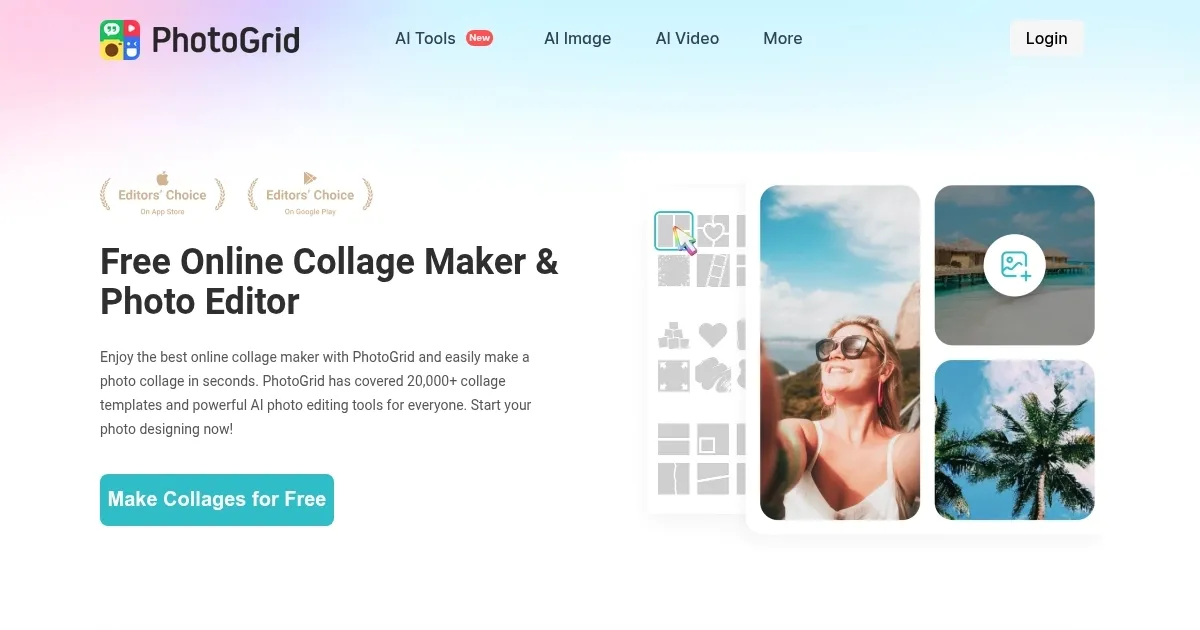
PhotoGrid is an AI-powered online collage maker and photo editor that enables users to create collages, apply enhancements, and generate content using advanced tools. It provides access to over 20,000 templates for layouts, supports image uploads from devices or cloud storage, and includes features like cropping, resizing, and brightness adjustments. The app operates on both web and mobile platforms, offering free usage with optional premium enhancements for additional capabilities.

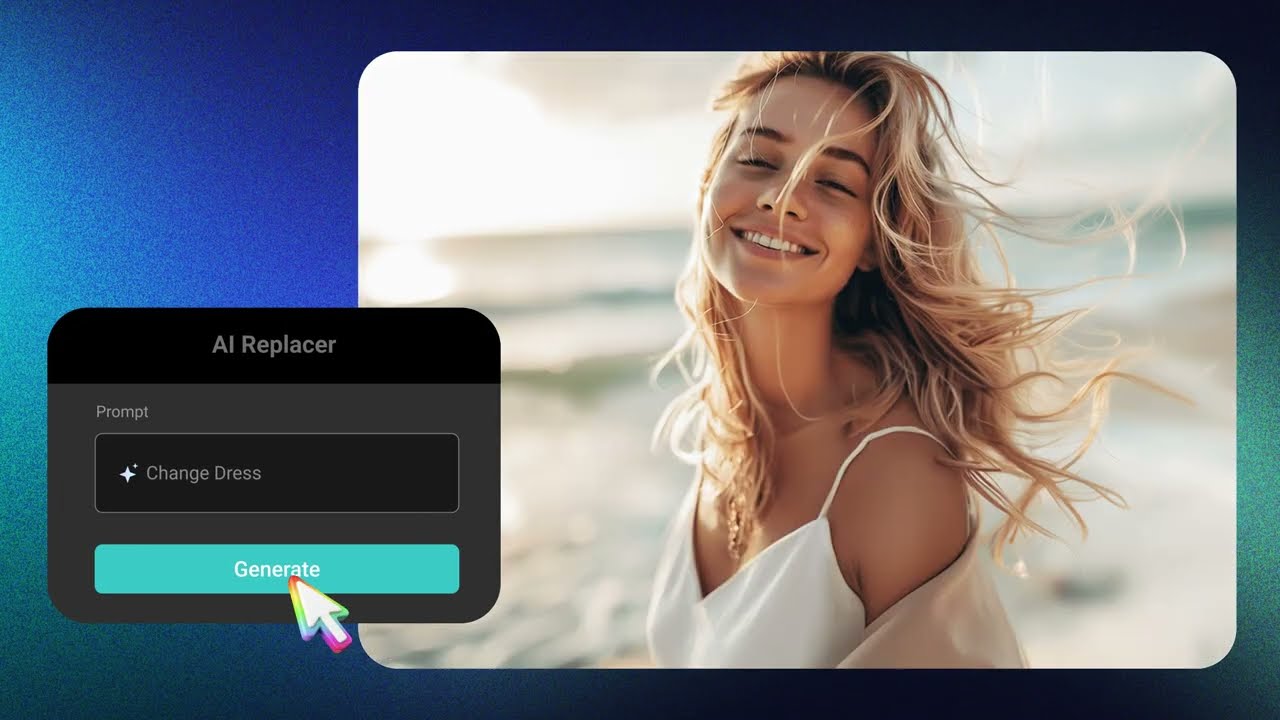
Key AI functionalities include AI Replacer for object substitution, AI Filter with over 75 creative styles such as Disney or yearbook effects, and AI Expand to extend image boundaries. Users can also utilize AI Headshot for professional portraits and AI Hug to produce short hugging videos from photos. These tools leverage machine learning to analyze and modify images, delivering results in seconds without watermarks in the free version.

Compared to competitors, PhotoGrid emphasizes photo-specific edits over broad design, differing from Canva (Canva), which integrates more graphic elements. PicsArt (PicsArt) shares AI editing strengths but may include more ads, while PicCollage (PicCollage) focuses on mobile collages with extensive stickers. General pricing positions PhotoGrid as free-centric, similar to rivals that offer tiered access.

Users appreciate the ease of combining photos into collages, the variety of templates for social media or e-commerce, and the speed of AI enhancements. However, some encounter interface navigation issues or ads interrupting workflows, and complex images might yield less precise AI outputs.

PhotoGrid includes rich resources like 10,000+ stickers and backgrounds, making it suitable for casual and semi-professional tasks. Surprises often arise from AI’s ability to generate fitting additions, though results vary by input quality.

Begin with template-based collages for quick results, then incorporate AI tools for refinements. Test on simple images to optimize performance, and explore premium if frequent advanced use is needed.

Visit PhotoGrid ↗
Categories
🖼️ Image
✏️ Photo Editing 🌟 Photo Enhancing 🎞️ Photo Filtering
🎨 Art
🖌️ Graphic Design 💄 Beauty
👥 Social
📝 Social Media Post Generation

Homepage Screenshot 📸

PhotoGrid screenshot

Video Overview 🎬

PhotoGrid - Video Overview

What are the key features? ✨

  • Collage Templates: PhotoGrid offers over 20,000 customizable templates for creating photo collages quickly.
  • AI Replacer: This feature uses AI to replace unwanted objects in images with seamless alternatives.
  • AI Filter: Applies over 75 creative AI filters like Disney styles or art paintings to transform photos.
  • AI Expand: Extends image boundaries intelligently by generating matching elements.
  • AI Headshot: Generates professional headshots using AI for social media or business profiles.

Who is it for? 🤔

PhotoGrid proves useful for social media enthusiasts, small business owners, content creators, and casual photographers who need quick, AI-assisted edits and collages without advanced software skills. It empowers beginners to produce professional-looking visuals for posts, cards, or promotions, while offering enough depth for more experienced users to experiment with creative effects.

Examples of what you can use it for 💡

  • Social Media User: Creates eye-catching collages for Instagram stories using templates and AI filters.
  • Small Business Owner: Designs product visuals by removing backgrounds and adding text overlays.
  • Content Creator: Generates professional headshots with AI for LinkedIn profiles.
  • Hobbyist Photographer: Enhances old photos by expanding boundaries and applying artistic styles.
  • Event Planner: Makes holiday cards with stickers and custom layouts for quick sharing.

Pros & Cons ⚖️

  • Free basic access
  • Vast template library
  • No watermarks
  • Ads interrupt flow
  • Premium for extras

FAQs 💬

What is PhotoGrid?
PhotoGrid is an AI-powered tool for creating photo collages and editing images online or via app.
Is PhotoGrid free to use?
Yes, it offers free access with optional premium features for advanced tools.
Does PhotoGrid require sign-up?
No, you can start editing without signing up, though some features might benefit from it.
Can I use PhotoGrid on mobile?
Yes, apps are available for iOS and Android with similar features.
What AI features does it have?
It includes AI Replacer, AI Filter, AI Expand, AI Headshot, and more for enhancements.
How many templates are there?
Over 20,000 collage templates for various themes and layouts.
Does it support video editing?
Yes, features like AI Hug create short videos from photos.
Is there a watermark on exports?
No, exports are watermark-free in the free version.
Can I remove backgrounds?
Yes, with the AI background remover tool.
What devices work best?
It runs on web browsers, iOS, and Android, performing well on modern devices.

Ready to try PhotoGrid?

Creates photo collages and edits images with AI-powered tools for stunning visuals

Visit PhotoGrid ↗

PhotoGrid alternatives 🔗

  1. Imagen Imagen Generates photorealistic images from detailed text prompts
  2. Black Forest Labs Black Forest Labs Generates high-quality images from text prompts with precision and speed
  3. Stable Diffusion Stable Diffusion Generates high-quality images from text prompts with versatile styles
  4. Adobe Express Adobe Express Creates on-brand content with AI-driven design and video tools
  5. Adobe Firefly Adobe Firefly Generates images, videos, audio, and vectors using AI.
  6. Freepik AI Freepik AI Creates AI images and videos with fluid motion, detailed textures, and synced audio up to 1080p
Share
PhotoGrid screenshot enlarged
Best AI Tools

Discover the best AI tools for any use case

Explore
  • Tool Categories
  • AI Use Cases
  • AI Events
  • AI News
  • Saved Tools
Company
  • About Us
  • Contact Us
  • Media & Partnerships
  • Suggest a Tool
Legal
  • Privacy Policy
  • Terms of Service
Copyright © 2026 Best AI Tools 415 Mission Street, 37th Floor, San Francisco, CA 94105