logo-darklogo-darklogo-darklogo-dark
  • Tool Categories
    • ๐ŸŽจArt & Creative Design505
    • ๐ŸขBusiness Management644
    • ๐Ÿ’ปCoding & Development515
    • ๐Ÿ‘ฎDetection83
    • ๐Ÿง General Use727
    • ๐ŸฅHealth & Wellness55
    • ๐Ÿ“ทImage & Photo Analysis100
    • ๐Ÿ–ผ๏ธImage Generation & Editing618
    • ๐Ÿ“Interior & Architectural Design37
    • ๐ŸŽ“Learning & Education483
    • โš–๏ธLegal & Finance90
    • ๐ŸŽญLifestyle & Entertainment236
    • ๐Ÿ“ขMarketing & Advertising627
    • ๐ŸŽงMusic & Audio138
    • ๐Ÿ‘”Office & Workplace1,014
    • ๐Ÿ”ฌResearch & Data Analysis372
    • ๐Ÿ‘ฅSocial Media245
    • ๐ŸŽฅVideo Generation & Editing426
    • ๐Ÿ‘ง๐ŸปVirtual Companion135
    • ๐ŸŽคVoice Generation & Editing381
    • โœ๏ธWriting & Editing808
    • All Categories
    • AI Use Cases
  • News
  • Events
    • Academic Conferences
    • Developer Conferences
    • Expos / Trade Shows
    • Industry Summits
    • Workshops / Training
    • All Events
    • Past Events
  • Saved Tools
  • Suggest a Tool
โœ•
Home › Office & Workplace › Meeting Assistant› Poppy AI
Poppy AI

Poppy AI

Streamlines content creation with AI-powered visual tools

Poppy AI is a visual AI workspace designed to streamline content creation for marketers, founders, and creators by integrating multiple data types into a collaborative canvas. It combines AI models like ChatGPT and Claude to process videos, PDFs, images, and voice notes, offering a nonlinear alternative to traditional AI tools. Its core strength lies in the Visual Canvas, which allows users to drag and drop content, connect ideas, and generate insights or content outlines. The platform supports real-time collaboration, making it one of the first multiplayer AI tools available.

Key features include the ability to analyze diverse media simultaneously, create mind maps, and export data in formats like JSON or CSV. The Notion-like editor simplifies text editing, while API access on the Power User plan enables custom AI agent creation. Poppy AI handles large inputs — up to 200k tokens — making it suitable for processing extensive transcripts or videos. The platform also integrates with tools like Zapier for workflow automation, enhancing its utility for business applications.

Drawbacks include a steep learning curve for new users and a pricing model that some find expensive, with no free trial but a 30-day refund guarantee. Compared to Jasper, which focuses on text-based content creation, or Miro, a collaborative whiteboard tool, Poppy AI offers a unique blend of AI-driven content analysis and visual organization. However, it may not fully replace specialized tools like Jasper for copywriting or Miro for team brainstorming.

User feedback highlights strong customer support and time-saving features, with a 4.9 Trustpilot rating from 225 reviews. Some negative reviews mention pricing concerns and occasional complexity. The platform’s ability to streamline workflows for content-heavy tasks, like repurposing videos or building chatbots, is a standout.

To get started, upload a single piece of content to test the AI’s analysis capabilities. Use the Visual Canvas to organize ideas before diving into advanced features like API integrations, and take it from there…

Visit Poppy AI ↗
Categories
๐Ÿ‘” Work
๐Ÿค Meeting Assistant ๐Ÿ—’๏ธ Note Taking ๐Ÿ“ Note Generation โšก Work Productivity
๐ŸŽค Voice
๐Ÿ“ Transcriber
โœ๏ธ Writing
๐Ÿ“ Summarizer

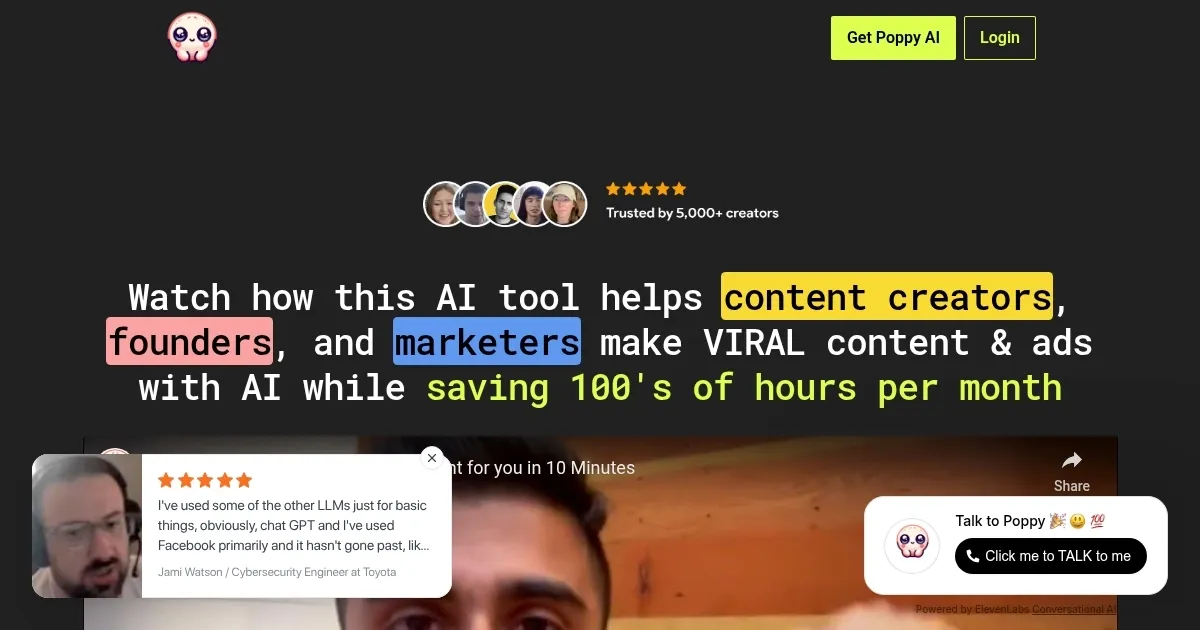
Homepage Screenshot 📸

Poppy AI screenshot

Video Overview 🎬

Poppy AI - Video Overview

What are the key features? ✨

  • Visual Canvas: Organizes ideas and content visually on a collaborative whiteboard.
  • Multi-Media Analysis: Processes videos, PDFs, images, and voice notes simultaneously.
  • Notion-like Editor: Simplifies text editing and content creation within the platform.
  • Multiplayer Collaboration: Enables real-time teamwork on AI-driven projects.
  • API Access: Allows power users to build custom AI agents for automation.

Who is it for? 🤔

Poppy AI is ideal for content creators, marketers, educators, and founders who manage large volumes of multimedia content and need a flexible, visual platform to organize and generate insights. Itโ€™s especially useful for neurodivergent users or those who find linear AI tools restrictive, offering a dynamic workspace to streamline workflows and boost productivity.

Examples of what you can use it for 💡

  • Content Creator: Repurposes YouTube videos into blog posts using AI-driven summaries.
  • Marketer: Crafts high-converting email sequences from analyzed competitor ads.
  • Educator: Organizes lecture notes and videos into structured, searchable archives.
  • Founder: Builds custom AI chatbots for customer engagement using API access.
  • Team Lead: Collaborates with a team on a shared canvas to brainstorm campaign ideas.

Pros & Cons ⚖️

  • Saves time on content creation.
  • Supports different media types.
  • Integrates with workflow tools.
  • Pricing may feel high.

FAQs 💬

What types of content can Poppy AI process?
Poppy AI handles videos, PDFs, images, voice memos, and text for analysis and content creation.
Is Poppy AI suitable for solo creators?
Yes, itโ€™s designed for both solo creators and teams, with features to streamline individual workflows.
Does Poppy AI require a paid ChatGPT subscription?
No, Poppy AI integrates ChatGPT and Claude independently, no separate subscription needed.
Can I collaborate with others on Poppy AI?
Yes, its multiplayer feature allows real-time collaboration on a shared canvas.
What is the refund policy?
Poppy AI offers a 30-day money-back guarantee if youโ€™re not satisfied.
How does Poppy AI compare to Jasper?
Poppy AI focuses on visual organization and multimedia, while Jasper specializes in text-based copywriting.
Is there a limit to file sizes I can upload?
The platform supports up to 200k tokens, handling large files like long videos or documents.
Can I export my work from Poppy AI?
Yes, you can export data in formats like JSON, CSV, plain text, or styled HTML.
Does Poppy AI integrate with other tools?
It integrates with Zapier and offers API access for custom automation.
Is Poppy AI beginner-friendly?
Itโ€™s user-friendly but may require some learning for advanced features; support offers 1:1 coaching.

Ready to try Poppy AI?

Streamlines content creation with AI-powered visual tools

Visit Poppy AI ↗

Poppy AI alternatives 🔗

  1. Slack AI Slack AI Search smarter, summarize conversations instantly, and be at your most productive
  2. FigJam AI FigJam AI Instantly visualize ideas, suggest best practices, and automate tedious tasks
  3. ClickUp Brain ClickUp Brain Automates workflows with contextual AI for tasks, meetings, and content creation
  4. Miro AI Miro AI Visual collaboration platform that lets you build the next big thing with a prompt and a chat
  5. Zoom AI Companion Zoom AI Companion Get high-quality results when drafting emails and chat messages, summarizing meetings and chat threads
  6. TurboScribe TurboScribe Transcribes audio and video files to accurate text instantly
Share
Poppy AI screenshot enlarged
Promote Poppy AI
light badge
Copy Embed Code
dark badge
Copy Embed Code
neutral badge
Copy Embed Code
Best AI Tools

Discover the best AI tools for any use case

Explore
  • Tool Categories
  • AI Use Cases
  • AI Events
  • AI News
  • Saved Tools
Company
  • About Us
  • Contact Us
  • Media & Partnerships
  • Suggest a Tool
Legal
  • Privacy Policy
  • Terms of Service
Copyright © 2026 Best AI Tools 415 Mission Street, 37th Floor, San Francisco, CA 94105