logo-darklogo-darklogo-darklogo-dark
  • Tool Categories
    • ๐ŸŽจArt & Creative Design505
    • ๐ŸขBusiness Management644
    • ๐Ÿ’ปCoding & Development515
    • ๐Ÿ‘ฎDetection83
    • ๐Ÿง General Use727
    • ๐ŸฅHealth & Wellness55
    • ๐Ÿ“ทImage & Photo Analysis100
    • ๐Ÿ–ผ๏ธImage Generation & Editing618
    • ๐Ÿ“Interior & Architectural Design37
    • ๐ŸŽ“Learning & Education483
    • โš–๏ธLegal & Finance90
    • ๐ŸŽญLifestyle & Entertainment236
    • ๐Ÿ“ขMarketing & Advertising627
    • ๐ŸŽงMusic & Audio138
    • ๐Ÿ‘”Office & Workplace1,014
    • ๐Ÿ”ฌResearch & Data Analysis372
    • ๐Ÿ‘ฅSocial Media245
    • ๐ŸŽฅVideo Generation & Editing426
    • ๐Ÿ‘ง๐ŸปVirtual Companion135
    • ๐ŸŽคVoice Generation & Editing381
    • โœ๏ธWriting & Editing808
    • All Categories
    • AI Use Cases
  • News
  • Events
    • Academic Conferences
    • Developer Conferences
    • Expos / Trade Shows
    • Industry Summits
    • Workshops / Training
    • All Events
    • Past Events
  • Saved Tools
  • Suggest a Tool
โœ•
Home › Image Generation & Editing › Image Upscaling› VanceAI
VanceAI

VanceAI

AI photo enhancer and editor

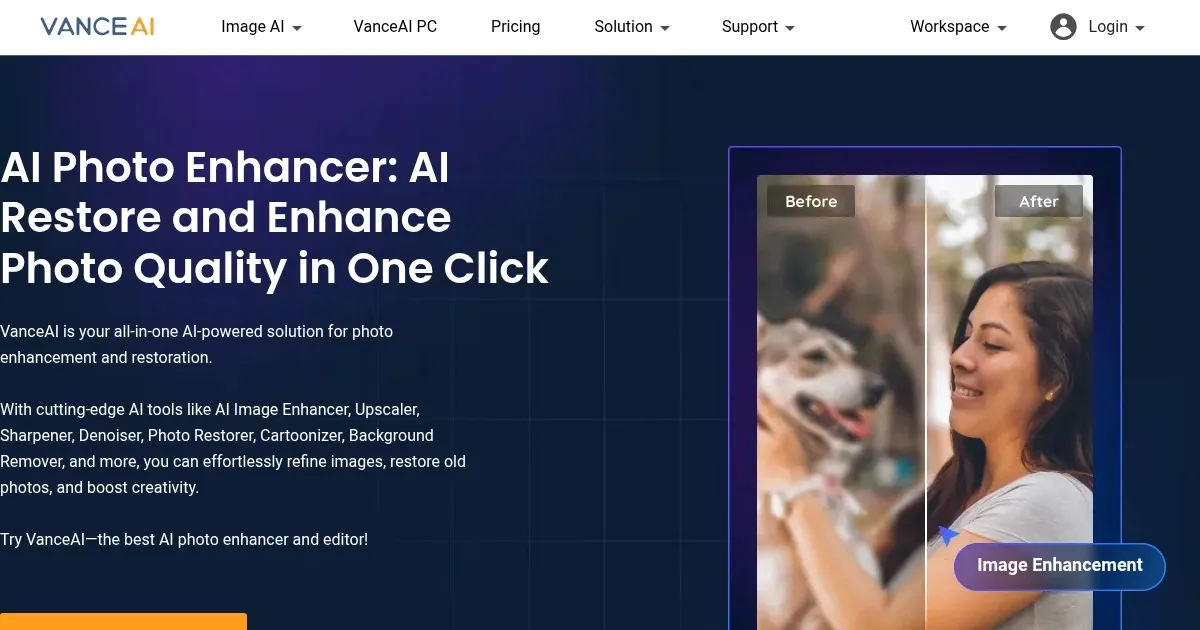
VanceAI is an AI-powered tool offering cool tools for photo enhancement, editing, and generation. For instance, it provides a range of solutions for enhancing images, such as upscaling, sharpening, denoising, and more. These tools are available online, and there’s also a downloadable software version for Windows — offering additional features like faster batch processing and real-time previews.

One of the key features of VanceAI is its use of Deep Convolutional Neural Networks (DCNN), which are trained on millions of images. This tech enables the platform to analyze and process photos smartly and quickly. Unlike traditional photo editing tools that rely on basic mathematical operations, VanceAI focuses on handling real image details through deep learning algorithms. This approach helps in producing high-quality enhancements that are more natural and detailed.

VanceAI also offers creative solutions for generating new visuals. Users can transform their photos or selfies into various creative styles, like cartoons, sketches, and anime. This is particularly useful for designers, marketers, or anyone looking to create unique and eye-catching images. The platform’s drag-and-drop interface and the ability to describe what you want make it easy and efficient to achieve creative design goals.

For e-commerce and online marketplaces, VanceAI provides a suite of tools specifically designed to enhance product images. To that end, it features a background generator, fashion model generator, and other AI-powered features to help with productivity and creativity in marketing and production. These tools are geared toward professionals like photographers, marketers, and business owners — enabling them to create high-quality images for websites, blogs, banners, and product displays.

In addition to these features, VanceAI also offers a comprehensive photo editor with basic editing tools like resizing, cropping, and rotating. More advanced AI-powered features include photo restoration, background and unwanted object removal, and enhancements.

All this makes VanceAI a versatile platform suitable for a wide range of users, from graphic designers and photographers to individuals working in e-commerce and other industries.

Visit VanceAI ↗
Categories
๐Ÿ–ผ๏ธ Image
โฌ†๏ธ Image Upscaling ๐Ÿ’Ž Image Enhancing ๐ŸŒŸ Photo Enhancing โœ‚๏ธ Background Removal ๐Ÿ› ๏ธ Photo Restoration โœ๏ธ Photo Editing ๐Ÿงน Object Removal ๐Ÿž๏ธ Background Generation ๐Ÿ–ผ๏ธ Image Generation ๐Ÿช„ Text to Image ๐ŸŽž๏ธ Photo Filtering
๐ŸŽจ Art
๐Ÿฆธ Cartoon Generation

Homepage Screenshot 📸

VanceAI screenshot

Video Overview 🎬

VanceAI - Video Overview

What are the key features? ✨

  • Photo enhancements: VanceAI lets you improve the quality of images by making them clearer, sharper, and more detailed.
  • Image generation: Turn your pictures into cartoons, sketches, or anime-style images. This is great for adding a unique touch to your photos, whether for personal use or for professional designs.
  • Tools for e-commerce: These tools are designed to improve product images, like removing backgrounds or generating images of fashion models.
  • Advanced AI tech: The platform uses advanced artificial intelligence, particularly Deep Convolutional Neural Networks (DCNN), to analyze and process images. It enables VanceAI to handle complex image processing tasks, like restoring old photos or enhancing details in a way that looks natural and realistic.
  • Photo editor: The included editor has tools for resizing, cropping, rotating images, and more. Plus, it offers more advanced options like background removal and photo restoration.

Who is it for? 🤔

VanceAI targets a broad market that includes professional photographers, graphic designers, and online business owners, particularly those in e-commerce. Additionally, the platform caters to general users who are interested in enhancing personal photos, whether for social media sharing or personal archives. Its range of AI-powered tools for photo editing, restoration, and creative transformation makes it suitable for both professional and personal use across various industries and hobbies.

Examples of what you can use it for 💡

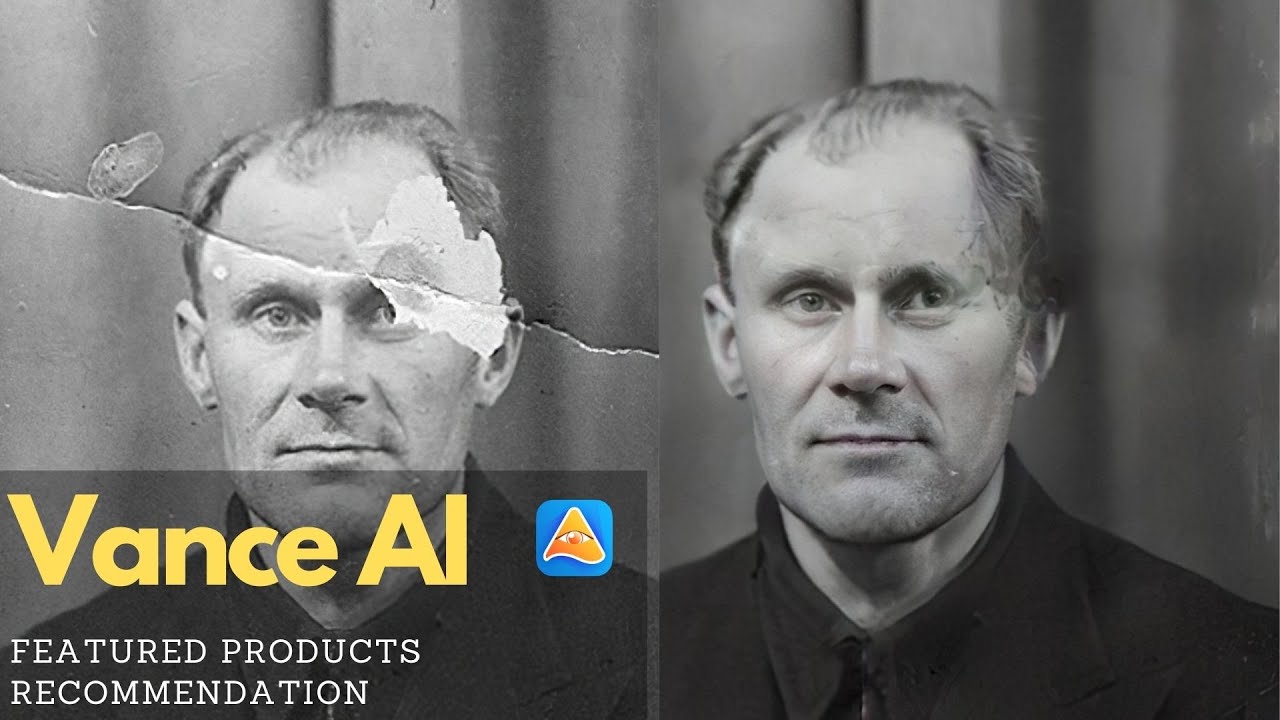
  • Enhancing old or damaged (family) photos with ease
  • Improve product images for online stores
  • Transform regular photos into different styles, like cartoons, sketches, or anime
  • Quick and efficient editing of photos with fancy filters
  • Enhance personal photos like selfies or vacation pictures

Pros & Cons ⚖️

  • Generate and edit images with AI
  • Add AI effects and filters to make things even better
  • "Regular" image editing is included, as well
  • Free version is rather limited

FAQs 💬

What types of images work best with VanceAI tools?
VanceAI handles a wide range including old scanned photos, low-resolution portraits, product shots, anime/artwork, and digital art. It excels at restoring damaged photos or upscaling compressed files while preserving natural details.
Does VanceAI work on mobile devices or only computers?
Yes, the online platform runs in any modern browser on phones, tablets, or computers, so you can upload and process images directly from your device without installing anything.
How does the AI Photo Restorer handle old black-and-white photos?
It removes scratches, tears, spots, and fading automatically, and there is a separate AI Photo Colorizer tool to add realistic colors to black-and-white images.
Can VanceAI remove or change backgrounds in photos?
The AI Background Remover quickly isolates subjects (people, objects, animals) and outputs transparent PNG files, ready for compositing or new backgrounds.
Is there a desktop version available?
Yes, VanceAI PC offers offline processing with faster batch handling and higher upscaling limits (up to 40x in some cases) for users who prefer working without internet.
How accurate is the upscaling for detailed subjects like faces or text?
The AI uses deep convolutional networks trained on millions of images, so it generally preserves facial features, edges, and text sharpness well, though complex patterns might need a test run.
Does VanceAI support batch processing for multiple images?
Yes, both online and desktop versions allow uploading and enhancing several images at once, which saves time for photographers or e-commerce users.
What file formats can I upload and download?
Common formats like JPG, PNG are supported for upload, with outputs typically in high-quality JPG or PNG (including transparent for background removal).
How does VanceAI compare to free open-source upscalers?
It offers more specialized models (e.g., for anime or restoration) and a simpler interface than many free tools, though open-source options like Upscayl provide local processing without any limits.
Is the processing fast enough for professional workflows?
Most single images process in seconds online, with desktop speeding up batches significantly, making it practical for quick edits or larger projects.

Ready to try VanceAI?

AI photo enhancer and editor

Visit VanceAI ↗

VanceAI alternatives 🔗

  1. Freepik AI Freepik AI Creates AI images and videos with fluid motion, detailed textures, and synced audio up to 1080p
  2. Pixelcut Pixelcut A suite of AI-powered image editing and upscaling tools
  3. Fotor Fotor Enhances and edits photos with AI-powered tools and creative features
  4. Cutout.Pro Cutout.Pro An AI-powered automatic visual design platform that saves time & money
  5. Pixlr Pixlr An AI-powered online photo editing and design platform, enabling everyone to create stunning designs
  6. Reimagine Reimagine A photo enhancement tool that digitizes, restores, colorizes, and animates old photographs using AI.
Share
VanceAI screenshot enlarged
Promote VanceAI
light badge
Copy Embed Code
dark badge
Copy Embed Code
neutral badge
Copy Embed Code
Best AI Tools

Discover the best AI tools for any use case

Explore
  • Tool Categories
  • AI Use Cases
  • AI Events
  • AI News
  • Saved Tools
Company
  • About Us
  • Contact Us
  • Media & Partnerships
  • Suggest a Tool
Legal
  • Privacy Policy
  • Terms of Service
Copyright © 2026 Best AI Tools 415 Mission Street, 37th Floor, San Francisco, CA 94105