logo-darklogo-darklogo-darklogo-dark
  • Tool Categories
    • ๐ŸŽจArt & Creative Design505
    • ๐ŸขBusiness Management644
    • ๐Ÿ’ปCoding & Development514
    • ๐Ÿ‘ฎDetection83
    • ๐Ÿง General Use728
    • ๐ŸฅHealth & Wellness55
    • ๐Ÿ“ทImage & Photo Analysis100
    • ๐Ÿ–ผ๏ธImage Generation & Editing618
    • ๐Ÿ“Interior & Architectural Design37
    • ๐ŸŽ“Learning & Education483
    • โš–๏ธLegal & Finance90
    • ๐ŸŽญLifestyle & Entertainment236
    • ๐Ÿ“ขMarketing & Advertising627
    • ๐ŸŽงMusic & Audio138
    • ๐Ÿ‘”Office & Workplace1,014
    • ๐Ÿ”ฌResearch & Data Analysis373
    • ๐Ÿ‘ฅSocial Media245
    • ๐ŸŽฅVideo Generation & Editing426
    • ๐Ÿ‘ง๐ŸปVirtual Companion135
    • ๐ŸŽคVoice Generation & Editing381
    • โœ๏ธWriting & Editing808
    • All Categories
    • AI Use Cases
  • News
  • Events
    • Academic Conferences
    • Developer Conferences
    • Expos / Trade Shows
    • Industry Summits
    • Workshops / Training
    • All Events
    • Past Events
  • Saved Tools
  • Suggest a Tool
โœ•
Home › Writing & Editing › Subtitle Generation› AutoCaption
AutoCaption

AutoCaption

Generates AI-powered video subtitles with customizable animations in seconds

AutoCaption is an AI-powered platform that generates and customizes subtitles for videos, optimized for social media platforms like Instagram, TikTok, and YouTube. It supports over 100 languages, offers fast rendering, and provides full editing capabilities for fonts, colors, and animations. The tool is tailored for vertical content at 1080×1920 resolution and includes features like animated emojis and savable templates. Its AI achieves approximately 99% accuracy for most content, making it a reliable choice for creators needing quick captions.

The platform’s core strength is its speed. Subtitles are generated in seconds, even for longer videos, thanks to efficient rendering technology. Users can customize subtitles with various fonts, colors, posiciรณn, and animations to align with their brand. The template feature allows saving settings for consistent use, a boon for frequent creators. Animated emojis can be added with one click, enhancing engagement on platforms like TikTok. The tool competes with Kapwing, VEED, and Media.io, but its focus on vertical content and emoji integration sets it apart.

Drawbacks include limited export options in the free tier, which may push users toward paid plans. Pricing is competitive with alternatives like Kapwing but requires a subscription for high-volume use. The AI occasionally struggles with heavy accents or complex dialogue, requiring manual edits. Widescreen video support is minimal, which may limit its appeal for traditional filmmakers. Recent user feedback on X praises its ease of use but notes occasional AI errors in niche languages.

The tool’s multilingual support is a key advantage, covering 100+ languages for global reach. The mobile app mirrors desktop functionality, enabling edits on the go. Full HD output ensures professional-quality results for social media. Compared to VEED.IO’s broader editing suite, AutoCaption prioritizes speed and simplicity.

Try the free tier to gauge its fit for your workflow. Focus on templates for efficiency, verify AI accuracy for unique audio, and consider the mobile app for flexibility. AutoCaption is ideal for social media creators needing fast, customizable subtitles.

Visit AutoCaption ↗
Categories
โœ๏ธ Writing
๐Ÿ’ฌ Subtitle Generation ๐Ÿท๏ธ Caption Generation
๐ŸŽค Voice
๐Ÿ’ฌ Speech-to-Text ๐Ÿ“ Transcriber ๐Ÿ”  Audio To Text
๐ŸŽฅ Video
โœ๏ธ Video Editing ๐Ÿ“ฒ Short Video Generation

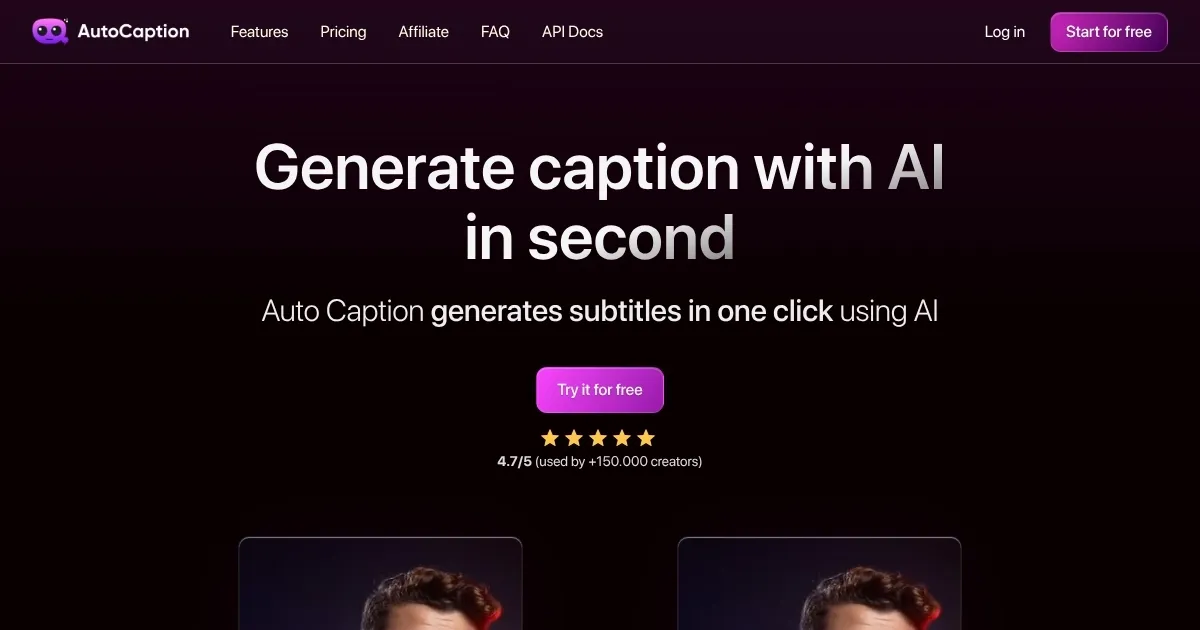
Homepage Screenshot 📸

AutoCaption screenshot

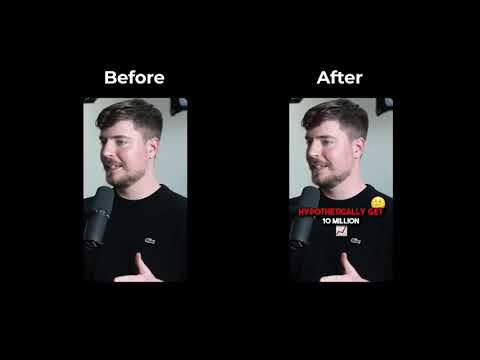
Video Overview 🎬

AutoCaption - Video Overview

What are the key features? ✨

  • AI Subtitle Generator: Creates subtitles in seconds with 99% accuracy across 100+ languages.
  • Customizable Subtitles: Edit fonts, colors, and animations to match brand aesthetics.
  • Animated Emojis: Add emojis with one click, adjusting size, position, and animations.
  • Template Saving: Save personal settings for consistent branding across videos.
  • Full HD Output: Optimized for vertical content at 1080x1920 resolution.

Who is it for? 🤔

AutoCaption is designed for social media content creators, small business owners, and influencers who produce vertical videos for platforms like Instagram, TikTok, and YouTube Shorts. It suits users needing quick, accurate subtitles in multiple languages to reach global audiences, particularly those prioritizing engagement through customizable and animated captions. Beginners and seasoned creators alike benefit from its intuitive interface and time-saving templates, though itโ€™s less suited for those working with widescreen formats or complex editing needs.

Examples of what you can use it for 💡

  • TikTok Creator: Adds animated emojis and subtitles to short videos for higher engagement.
  • Small Business Owner: Captions promotional Reels in multiple languages for global reach.
  • YouTube Shorts Producer: Uses templates for consistent branding across video series.
  • Instagram Influencer: Customizes subtitle fonts to match aesthetic for sponsored posts.
  • Content Marketer: Generates quick subtitles for client videos to meet tight deadlines.

Pros & Cons ⚖️

  • Supports 100+ languages
  • Easy customization options
  • Template saving feature
  • Weak with heavy accents
  • Emoji animations gimmicky

FAQs 💬

What languages does AutoCaption support?
AutoCaption supports over 100 languages, listed in the FAQ on their website.
How accurate is the AI subtitle generator?
The AI achieves about 99% accuracy for most content, though heavy accents may need edits.
Can I use AutoCaption for free?
Yes, a free tier is available, but export options are limited compared to paid plans.
Is AutoCaption suitable for widescreen videos?
It's optimized for vertical content (1080x1920), with limited widescreen support.
Can I edit subtitles after generation?
Yes, you can fully customize fonts, colors, animations, and emoji placements.
Does AutoCaption work on mobile devices?
A mobile app mirrors the desktop experience for on-the-go editing.
How fast is the subtitle rendering process?
Subtitles are generated in seconds, even for longer videos.
Can I save my subtitle settings?
Yes, the template feature lets you save settings for consistent branding.
Are animated emojis optional?
Yes, emojis can be added or skipped based on your preferences.
How does AutoCaption compare to competitors?
It's faster and more social-media-focused than Kapwing or VEED.IO but less versatile for complex edits.

Ready to try AutoCaption?

Generates AI-powered video subtitles with customizable animations in seconds

Visit AutoCaption ↗
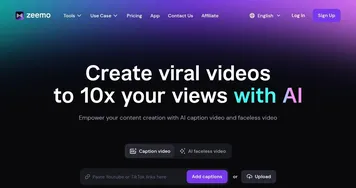

AutoCaption alternatives 🔗

  1. Vimeo AI Vimeo AI Creates polished videos from single recordings using AI edits and scripts
  2. CapCut Creative Suite CapCut Creative Suite Online creative suite for everyone to create stunning images and videos
  3. TurboScribe TurboScribe Transcribes audio and video files to accurate text instantly
  4. Loom AI Loom AI Record better video messages with automatic titles, summaries, share messages, and more
  5. VEED VEED Creates pro-level videos with AI-powered editing and collaboration tools
  6. Clipchamp Clipchamp Edit videos effortlessly with AI-powered tools and templates
Share
AutoCaption screenshot enlarged
Best AI Tools

Discover the best AI tools for any use case

Explore
  • Tool Categories
  • AI Use Cases
  • AI Events
  • AI News
  • Saved Tools
Company
  • About Us
  • Contact Us
  • Media & Partnerships
  • Suggest a Tool
Legal
  • Privacy Policy
  • Terms of Service
Copyright © 2026 Best AI Tools 415 Mission Street, 37th Floor, San Francisco, CA 94105