logo-darklogo-darklogo-darklogo-dark
  • Tool Categories
    • ๐ŸŽจArt & Creative Design505
    • ๐ŸขBusiness Management644
    • ๐Ÿ’ปCoding & Development515
    • ๐Ÿ‘ฎDetection83
    • ๐Ÿง General Use727
    • ๐ŸฅHealth & Wellness55
    • ๐Ÿ“ทImage & Photo Analysis100
    • ๐Ÿ–ผ๏ธImage Generation & Editing618
    • ๐Ÿ“Interior & Architectural Design37
    • ๐ŸŽ“Learning & Education483
    • โš–๏ธLegal & Finance90
    • ๐ŸŽญLifestyle & Entertainment236
    • ๐Ÿ“ขMarketing & Advertising627
    • ๐ŸŽงMusic & Audio138
    • ๐Ÿ‘”Office & Workplace1,014
    • ๐Ÿ”ฌResearch & Data Analysis372
    • ๐Ÿ‘ฅSocial Media245
    • ๐ŸŽฅVideo Generation & Editing426
    • ๐Ÿ‘ง๐ŸปVirtual Companion135
    • ๐ŸŽคVoice Generation & Editing381
    • โœ๏ธWriting & Editing808
    • All Categories
    • AI Use Cases
  • News
  • Events
    • Academic Conferences
    • Developer Conferences
    • Expos / Trade Shows
    • Industry Summits
    • Workshops / Training
    • All Events
    • Past Events
  • Saved Tools
  • Suggest a Tool
โœ•
Home › Image Generation & Editing › Image Enhancing› AVC AI
AVC AI

AVC AI

Use deep learning algorithm to improve and restore photo quality automatically and effortlessly

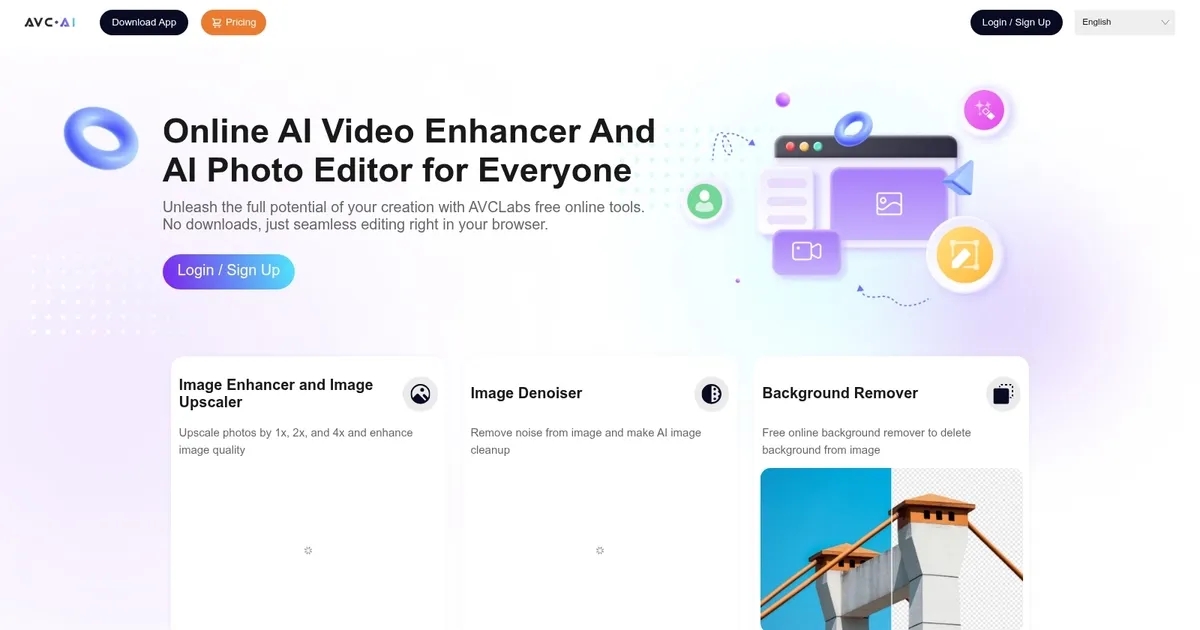
AVC AI is a comprehensive online image enhancer designed to improve photo quality through various deep learning algorithms. It offers a range of features, including upscaling low-resolution images to higher resolutions, denoising photos to remove grain and artifacts, restoring and refining facial details with facial recognition and enhancement, colorizing black and white photos, calibrating colors to make them look more natural, and removing backgrounds from images automatically.

In that sense, the tool caters to a wide spectrum of image improvement needs — from personal photo enhancement to professional-grade editing for advertising and print.

AVC AI supports various practical applications such as creating high-quality wallpapers, preparing images for printing, and improving portraits by automatically removing imperfections and adjusting color balance.

The tool is accessible through a web browser, and also offers downloadable versions for Windows, Mac, and Android devices.

Finally, we should mention it ensures user privacy by automatically deleting uploaded images after 24 hours.

Visit AVC AI ↗
Categories
๐Ÿ–ผ๏ธ Image
๐Ÿ’Ž Image Enhancing โฌ†๏ธ Image Upscaling ๐ŸŒŸ Photo Enhancing ๐Ÿ› ๏ธ Photo Restoration โœ‚๏ธ Background Removal ๐Ÿงน Object Removal
๐ŸŽฅ Video
โœจ Video Enhancing โฌ†๏ธ Video Upscaling

Homepage Screenshot 📸

AVC AI screenshot

Video Overview 🎬

AVC AI - Video Overview

What are the key features? ✨

  • Image Upscaler and Enhancer: Boosts photo resolution up to 4x while improving overall clarity and detail.
  • Video Upscaler and Enhancer: Converts low-resolution videos to higher quality, targeting 4K or 8K outputs with better sharpness.
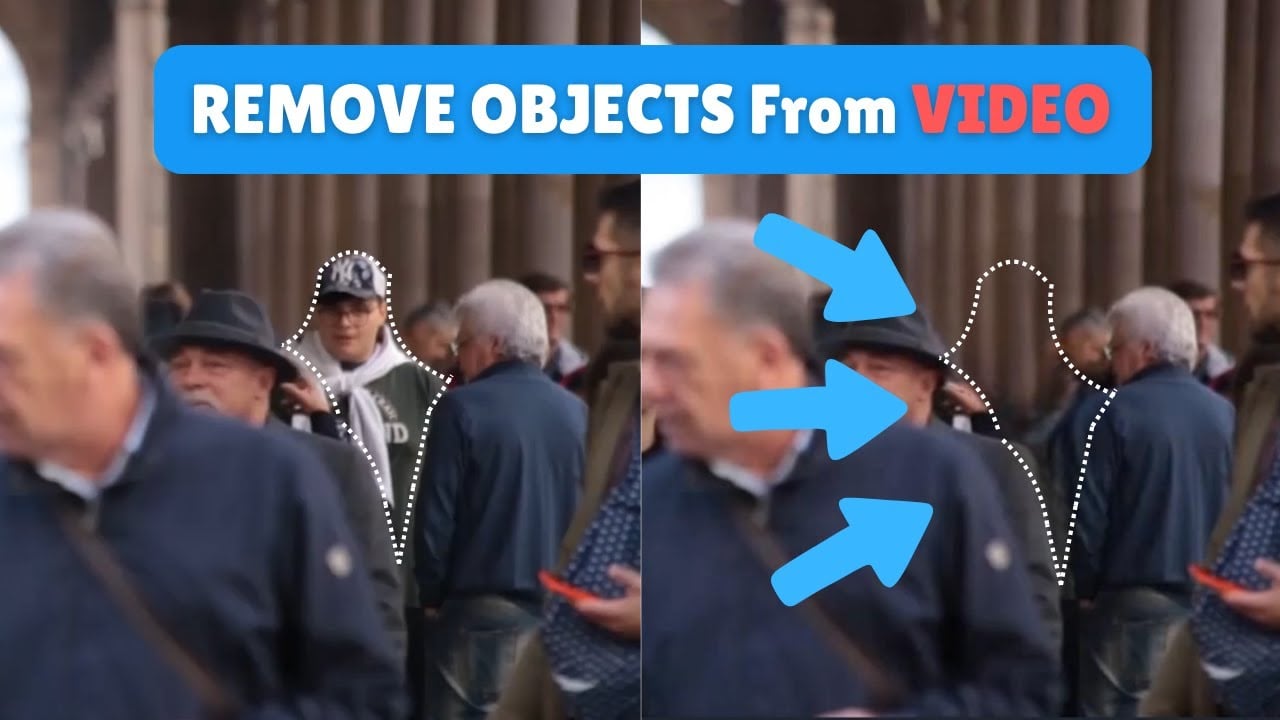
  • Object Remover: Automatically detects and erases unwanted people, objects, or watermarks from images and videos.
  • Background Remover: Provides one-click background deletion for photos, creating transparent or new-background results.
  • Video Stabilizer: Reduces camera shake in footage for smoother, more professional-looking videos.

Who is it for? 🤔

AVC.AI helps casual users, social media creators, family archivists, small business owners who shoot product photos, and anyone with old or low-quality media who wants quick improvements without learning complex software. It suits people who value browser convenience over advanced controls, especially those restoring personal memories, prepping visuals for online posts, or cleaning up short clips without a big time investment.

Examples of what you can use it for 💡

  • Home user: Revives old family photos by upscaling, denoising, and colorizing them for sharing or printing.
  • Content creator: Enhances short social media videos with stabilization and upscaling to look sharper on platforms.
  • Small business owner: Removes backgrounds and unwanted objects from product images to create clean listings quickly.
  • Genealogy enthusiast: Restores faded historical photos and videos to preserve family history with better clarity.
  • Freelance editor: Processes client-supplied low-res footage online for fast turnarounds without heavy desktop installs.

Pros & Cons ⚖️

  • Browser-based, no install needed
  • Free tools for basic tasks
  • Fast results on many files
  • Handles both photos and videos
  • Processing can be slow at peak times
  • Limited free credits for heavy use

FAQs 💬

Is AVC.AI completely free to use?
Some tools like background remover, video stabilizer, and basic object removal are free, but advanced or high-volume processing usually requires credits or a paid plan.
Do I need to download software to use AVC.AI?
No, everything runs in your web browser without any downloads, though a desktop app from AVCLabs is available separately for more advanced features.
What is the maximum resolution for upscaling?
Images can upscale up to 4x, while videos can reach toward 4K or 8K depending on the tool and input quality.
Can AVC.AI handle batch processing?
Yes, some tools support multiple files, but larger batches may require paid credits and longer wait times.
How does it compare to Topaz Video AI?
AVC.AI offers easier browser access and free trials, while Topaz provides more model customization and potentially finer results but requires installation and stronger hardware.
Is my uploaded content safe and private?
AVCLabs emphasizes data security with enterprise-level practices, and files are processed securely, though it's wise to review their privacy policy for details.
What file formats does it support?
Common image formats like JPG, PNG, and video formats like MP4, MOV are supported, though checking the tool page for specifics is recommended.
Can I colorize black-and-white videos?
Yes, related tools in the AVCLabs ecosystem handle video colorization, and some online features support similar enhancements for stills or short clips.

Ready to try AVC AI?

Use deep learning algorithm to improve and restore photo quality automatically and effortlessly

Visit AVC AI ↗
AVC AI alternatives 🔗

  1. Pixelcut Pixelcut A suite of AI-powered image editing and upscaling tools
  2. PhotoRoom PhotoRoom An AI-powered photo editing tool that removes backgrounds and enhances photos with user-friendly features.
  3. Fotor Fotor Enhances and edits photos with AI-powered tools and creative features
  4. Cutout.Pro Cutout.Pro An AI-powered automatic visual design platform that saves time & money
  5. Picsart Picsart A platform for creating, customizing, and sharing images and videos
  6. DeepAI DeepAI Generates images, videos, text, and music from simple text prompts
Share
AVC AI screenshot enlarged
Promote AVC AI
light badge
Copy Embed Code
dark badge
Copy Embed Code
neutral badge
Copy Embed Code
Best AI Tools

Discover the best AI tools for any use case

Explore
  • Tool Categories
  • AI Use Cases
  • AI Events
  • AI News
  • Saved Tools
Company
  • About Us
  • Contact Us
  • Media & Partnerships
  • Suggest a Tool
Legal
  • Privacy Policy
  • Terms of Service
Copyright © 2026 Best AI Tools 415 Mission Street, 37th Floor, San Francisco, CA 94105