Axiom.ai
Automate repetitive tasks within a browser without writing any code
Axiom.ai is a web automation tool that allows users to automate repetitive tasks within a browser without writing any code. It operates as a Chrome extension, enabling users to build custom bots that perform actions like data entry, web scraping, and form filling.
The tool is designed to help individuals and businesses streamline their workflows by handling mundane and time-consuming tasks, such as extracting data from websites or automating interactions like clicking, scrolling, or typing. In that sense, Axiom.ai is particularly useful for users who need to handle large volumes of data across various web platforms.
The tool’s interface allows users to create these automation workflows through a visual builder, making it accessible even to those without technical expertise. So, whether you need to scrape product data from e-commerce sites or automate content extraction from social media, Axiom.ai provides a flexible solution. In addition, it integrates with third-party platforms like Zapier, which further allows for even greater automation potential by connecting to other apps and services.
Axiom.ai is also easy to set up. The Chrome extension can be installed quickly, and users can start automating tasks immediately without additional software. However, Axiom.ai is limited to Chrome, meaning users of other browsers will need to adapt or switch.
The tool also offers robust security measures, with all processes occurring on the user’s local machine to ensure data privacy. No data is stored on Axiom’s servers, which is important for users concerned about sensitive information.
While it offers a free trial, Axiom.ai’s full range of features is unlocked through a paid subscription. And depending on what you’re trying to accomplish – it could be worth paying for. Check it out.
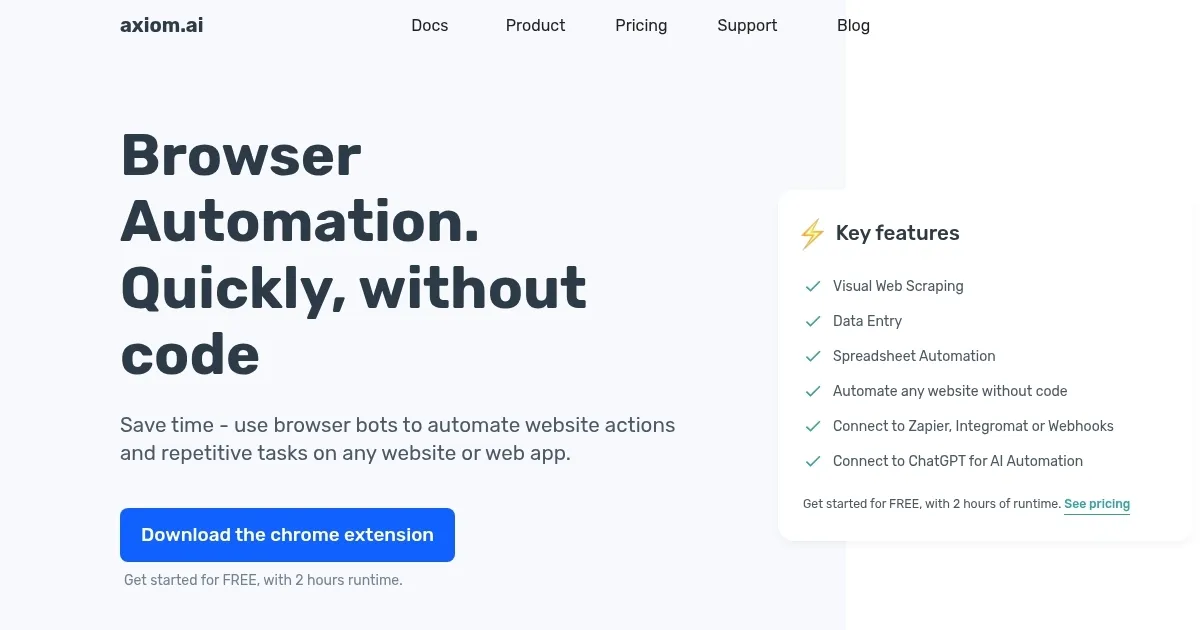
Homepage Screenshot 📸
Video Overview 🎬
What are the key features? ✨
- Easy automation: Axiom.ai offers no-code browser automation, allowing users to automate repetitive tasks on websites without technical skills.
- Web scraping: It provides web scraping capabilities that extract data from websites and send it to tools like Google Sheets.
- Integration with other tools: The platform integrates with popular apps like Zapier, Google Sheets, and ChatGPT for more seamless automation.
- Supported action: Axiom.ai provides the ability to automate actions like filling forms, clicking buttons, and downloading files.
- Customizable workflows: It offers customizable workflows designed to suit various business needs, from simple tasks to complex automation processes.
Who is it for? 🤔
Examples of what you can use it for 💡
- Automate data entry for large datasets
- Scrape information from websites, even ones requiring logins
- Streamline form-filling processes across multiple web platforms
- Generate sales reports by automatically gathering sales data from e-commerce platforms
- Reduce manual work by setting up workflows that run on schedules or trigger on events
Pros & Cons ⚖️
- No-code automation that simplifies web tasks without coding
- Automates repetitive tasks efficiently
- Frees up time for creative tasks
- Less flexibility for complex tasks
Ready to try Axiom.ai?
Automate repetitive tasks within a browser without writing any code
Visit Axiom.aiAxiom.ai alternatives 🔗