logo-darklogo-darklogo-darklogo-dark
  • Tool Categories
    • ๐ŸŽจArt & Creative Design505
    • ๐ŸขBusiness Management644
    • ๐Ÿ’ปCoding & Development515
    • ๐Ÿ‘ฎDetection83
    • ๐Ÿง General Use727
    • ๐ŸฅHealth & Wellness55
    • ๐Ÿ“ทImage & Photo Analysis100
    • ๐Ÿ–ผ๏ธImage Generation & Editing618
    • ๐Ÿ“Interior & Architectural Design37
    • ๐ŸŽ“Learning & Education483
    • โš–๏ธLegal & Finance90
    • ๐ŸŽญLifestyle & Entertainment236
    • ๐Ÿ“ขMarketing & Advertising627
    • ๐ŸŽงMusic & Audio138
    • ๐Ÿ‘”Office & Workplace1,014
    • ๐Ÿ”ฌResearch & Data Analysis372
    • ๐Ÿ‘ฅSocial Media245
    • ๐ŸŽฅVideo Generation & Editing426
    • ๐Ÿ‘ง๐ŸปVirtual Companion135
    • ๐ŸŽคVoice Generation & Editing381
    • โœ๏ธWriting & Editing808
    • All Categories
    • AI Use Cases
  • News
  • Events
    • Academic Conferences
    • Developer Conferences
    • Expos / Trade Shows
    • Industry Summits
    • Workshops / Training
    • All Events
    • Past Events
  • Saved Tools
  • Suggest a Tool
โœ•
Home › Office & Workplace › Document Generation› Documator
Documator

Documator

Summarizes and translates PDF documents quickly and accurately

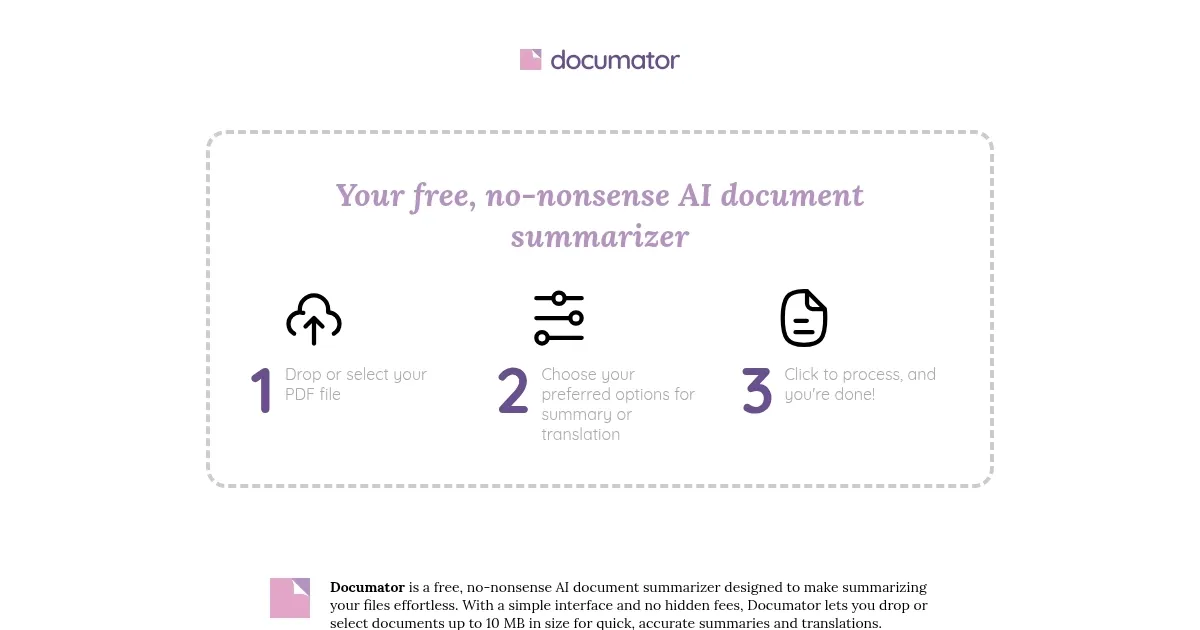
Documator is a free AI-powered tool that summarizes and translates PDF documents up to 10MB, using OpenAI’s GPT-4o for accurate, page-by-page results. It offers a simple interface where users upload PDFs via drag-and-drop or file selection. The tool provides three summary styles: Concise, Complete, and Outline, plus a Smart Overview mode for broad insights and a Page-by-Page mode for detailed breakdowns. It supports translations into English, Spanish, Portuguese, French, German, and Italian, making it useful for multilingual users. No registration or fees are required.

The tool processes documents quickly, often in seconds, and delivers clear summaries that capture key points. For example, a 20-page research paper can be condensed into a one-page outline, saving significant time. The translation feature aids users handling foreign texts, such as legal or academic documents. Documator’s interface is intuitive, requiring no technical expertise. It’s particularly effective for students, researchers, and professionals who need to process large volumes of PDFs efficiently.

Compared to competitors like PDFSummarizer.net, which includes chatbot features, or Linnk AI, which supports multiple file types, Documator focuses solely on PDFs. This narrow scope ensures reliability but limits versatility. ChatDOCย offers similar functionality with additional file format support, which may appeal to users needing flexibility. Documator’s free model stands out, as many competitors offer limited free tiers or require subscriptions.

The 10MB file size limit restricts its use for larger documents, such as lengthy eBooks or reports. Summaries may occasionally miss nuanced details in complex texts, requiring users to verify critical information. The translation feature, while accurate for general content, may not fully capture intricate phrasing. No malware or security issues have been reported, and the site uses a valid SSL certificate, ensuring safe access.

Users should start with smaller PDFs to test summary accuracy. Choose the Outline style for detailed reviews or Smart Overview for quick insights. Always cross-check summaries for critical documents to ensure no key details are missed.

Visit Documator ↗
Categories
๐Ÿ‘” Work
๐Ÿ“„ Document Generation ๐Ÿ“ค Document Extraction ๐Ÿ“• PDF
โœ๏ธ Writing
๐Ÿค– Writing Assistant

Homepage Screenshot 📸

Documator screenshot

What are the key features? ✨

  • Document Summarization: Generates concise summaries of PDF documents up to 10MB.
  • Multiple Summary Styles: Offers Concise, Complete, and Outline summary options.
  • Translation Capabilities: Translates summaries into English, Spanish, Portuguese, French, German, and Italian.
  • Page-by-Page Summaries: Provides detailed breakdowns following the documentโ€™s structure.
  • Smart Overview Mode: Delivers a broad, intelligent summary of the entire document.

Who is it for? 🤔

Documator is a valuable resource for students, researchers, educators, and professionals who regularly handle PDF documents, such as academic papers, business reports, or legal contracts. Its ability to quickly summarize and translate makes it ideal for those needing to process information efficiently, especially in multilingual or time-sensitive contexts.

Examples of what you can use it for 💡

  • Student: Summarizes lengthy research papers to focus on key points for study sessions.
  • Researcher: Extracts essential insights from academic PDFs for literature reviews.
  • Professional: Condenses business reports into concise summaries for team discussions.
  • Lawyer: Translates foreign legal documents into English for quick comprehension.
  • Educator: Creates outlines of educational materials for lesson planning.

Pros & Cons ⚖️

  • Free to use, no hidden costs.
  • Supports multiple summary styles.
  • Offers multilingual translations.
  • 10MB file size limit.
  • PDF-only, no other formats.

FAQs 💬

What file types does Documator support?
Documator supports only PDF files up to 10MB in size.
Is Documator really free to use?
Yes, Documator is completely free with no registration or hidden fees.
What summary styles are available?
Users can choose Concise, Complete, Outline, or Smart Overview modes.
Can Documator translate documents?
Yes, it translates summaries into English, Spanish, Portuguese, French, German, and Italian.
How accurate are the summaries?
Summaries are generally accurate but may miss nuances in complex documents.
Is there a file size limit?
Documator processes PDFs up to 10MB; larger files are not supported.
Does it require software installation?
No, Documator is a web-based tool, requiring only a browser.
How fast is the summarization process?
Summaries are generated in seconds, depending on file size and complexity.
Is Documator safe to use?
Yes, it has a valid SSL certificate and no reported malware issues.
Can I summarize multiple files at once?
No, Documator processes one PDF at a time.

Ready to try Documator?

Summarizes and translates PDF documents quickly and accurately

Visit Documator ↗

Documator alternatives 🔗

  1. DeepL DeepL Delivers remarkably natural AI translations that capture nuance better than most rivals
  2. Box AI Box AI An assistant that taps into your enterprise content and documents
  3. AWS HealthScribe AWS HealthScribe Automatically create clinical notes from patient-clinician conversations using generative AI
  4. ClickUp Brain ClickUp Brain Automates workflows with contextual AI for tasks, meetings, and content creation
  5. Gamma Gamma An AI tool for creating presentations, documents, or webpages.
  6. Notion AI Notion AI Streamlines work with AI-powered note-taking, app searches, and workflow automation
Share
Documator screenshot enlarged
Promote Documator
light badge
Copy Embed Code
dark badge
Copy Embed Code
neutral badge
Copy Embed Code
Best AI Tools

Discover the best AI tools for any use case

Explore
  • Tool Categories
  • AI Use Cases
  • AI Events
  • AI News
  • Saved Tools
Company
  • About Us
  • Contact Us
  • Media & Partnerships
  • Suggest a Tool
Legal
  • Privacy Policy
  • Terms of Service
Copyright © 2026 Best AI Tools 415 Mission Street, 37th Floor, San Francisco, CA 94105