logo-darklogo-darklogo-darklogo-dark
  • Tool Categories
    • 🎨Art & Creative Design505
    • 🏢Business Management644
    • 💻Coding & Development515
    • 👮Detection83
    • 🧠General Use727
    • 🏥Health & Wellness55
    • 📷Image & Photo Analysis100
    • 🖼️Image Generation & Editing618
    • 📐Interior & Architectural Design37
    • 🎓Learning & Education483
    • ⚖️Legal & Finance90
    • 🎭Lifestyle & Entertainment236
    • 📢Marketing & Advertising627
    • 🎧Music & Audio138
    • 👔Office & Workplace1,014
    • 🔬Research & Data Analysis372
    • 👥Social Media245
    • 🎥Video Generation & Editing426
    • 👧🏻Virtual Companion135
    • 🎤Voice Generation & Editing381
    • ✍️Writing & Editing808
    • All Categories
    • AI Use Cases
  • News
  • Events
    • Academic Conferences
    • Developer Conferences
    • Expos / Trade Shows
    • Industry Summits
    • Workshops / Training
    • All Events
    • Past Events
  • Saved Tools
  • Suggest a Tool
✕
Home › Writing & Editing › Summarizer› Linnk AI
Linnk AI

Linnk AI

Summarizes and translates documents instantly for efficient research

Linnk AI is an AI-powered research assistant that summarizes, translates, and analyzes documents and web content for students, academics, and professionals. It processes PDFs, Word, PowerPoint, Excel, and videos, delivering insights in seconds. The Smart Document Analysis feature extracts key findings, methodologies, and citations from complex texts, while the translation tool supports over 100 languages, preserving formatting and technical accuracy. The browser extension summarizes web pages instantly, and the mindmap generator visualizes document connections. A free version offers limited summarization and translation, with premium plans unlocking larger file sizes (up to 300MB) and more features.

The platform supports diverse file types, including scanned documents via OCR, though accuracy varies with low-quality scans. It’s ideal for researchers handling multilingual papers or professionals summarizing reports. The YouTube summarizer extracts insights from videos, a feature not commonly found in competitors like Genei or Liner. However, the free version’s 30MB file limit restricts larger documents, and there’s no mobile app or offline mode. Pricing is competitive, with plans starting at $15/month, though exact costs require contacting support.

Linnk AI’s data security is robust, with encrypted uploads and automatic deletion after processing. The citation generator streamlines academic work, supporting multiple styles. Compared to SummarizePaper, which focuses on arXiv, or PDF.ai, which emphasizes chat-based interaction, Linnk AI offers broader file compatibility. The mindmap feature aids visual learners but can overwhelm with dense documents. For best results, use clear, text-based files and start with the free version to test core features.

Visit Linnk AI ↗
Categories
✍️ Writing
📝 Summarizer
🎓 Education
🈸 Translation 📰 Article Summarization 🗺️ Mind Mapping
👔 Work
📑 PDF Summarizer 📕 PDF 📤 Document Extraction
🔬 Research
🔬 Research
🎥 Video
📋 Video Summarizer
👥 Social
📺 YouTube Summary
📷 Image Analysis
🔤 OCR

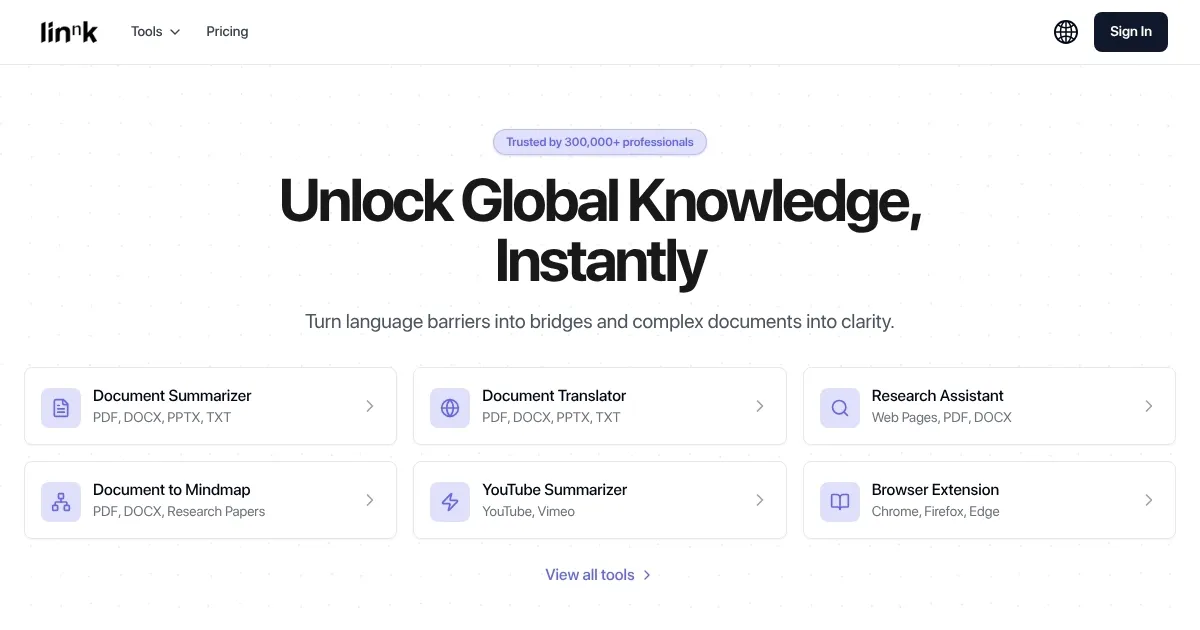
Homepage Screenshot 📸

Linnk AI screenshot

What are the key features? ✨

  • Smart Document Analysis: Extracts insights from papers and reports using context-aware AI.
  • Accurate Translation: Translates documents across 100+ languages while preserving formatting.
  • Research Assistant: Provides citation suggestions and literature review support.
  • YouTube Summarizer: Condenses video content into key insights for quick learning.
  • Mindmap Generator: Visualizes document connections for enhanced understanding.

Who is it for? 🤔

Linnk AI is designed for students, researchers, and professionals who manage large volumes of text or multilingual documents. It benefits academics summarizing research papers, corporate professionals analyzing global reports, and students conducting literature reviews. Its browser extension and YouTube summarizer make it valuable for anyone needing quick insights from web content or videos, especially non-native speakers or those with tight deadlines.

Examples of what you can use it for 💡

  • Researcher: Summarizes global papers to stay updated on trends.
  • Student: Generates citations and summaries for literature reviews.
  • Professional: Translates technical reports for cross-border work.
  • Educator: Extracts key points from lecture videos for teaching.
  • Analyst: Visualizes report connections with mindmaps for insights.

Pros & Cons ⚖️

  • Fast document summarization
  • Supports diverse file types
  • Browser extension for web use
  • 30MB limit in free version
  • OCR struggles with poor scans

FAQs 💬

What types of files can I upload to Linnk AI?
You can upload PDF, DOCX, PPTX, XLSX, EPUB, PNG, JPEG, and TXT files, including scanned documents with OCR support.
Is there a free version of Linnk AI available?
Yes, the free version offers limited summarization and translation previews, suitable for small files up to 30MB.
How accurate are Linnk AI’s translations?
Translations are highly accurate across 100+ languages, maintaining technical terms and document formatting.
Can Linnk AI summarize videos or web content?
Yes, it extracts key points from YouTube/Vimeo videos and summarizes web pages via a browser extension.
Is my data safe with Linnk AI?
All uploads are encrypted and automatically deleted after processing, ensuring data security.
Does Linnk AI work without an internet connection?
No, an active internet connection is required for all features and processing.
Is there a browser extension for Linnk AI?
Yes, extensions for Chrome, Firefox, and Edge enable web page summarization and translation.
What are the file size limits for free users?
Free users can process files up to 30MB, while premium plans support up to 300MB.
Can Linnk AI help with academic citations?
Yes, it generates accurate citations in multiple styles to streamline research tasks.
How does the mindmap feature assist users?
It creates visual graphs of document content, highlighting key concepts and their connections for easier understanding.

Ready to try Linnk AI?

Summarizes and translates documents instantly for efficient research

Visit Linnk AI ↗

Linnk AI alternatives 🔗

  1. Gemini Gemini Generates responses from text, images, audio, and video inputs using advanced multimodal AI
  2. Claude Claude Assists users in reasoning, coding, writing, and analyzing data with advanced AI models
  3. Brave Leo Brave Leo Assists with web queries, content creation, and document analysis in-browser
  4. Slack AI Slack AI Search smarter, summarize conversations instantly, and be at your most productive
  5. FigJam AI FigJam AI Instantly visualize ideas, suggest best practices, and automate tedious tasks
  6. Box AI Box AI An assistant that taps into your enterprise content and documents
Share
Linnk AI screenshot enlarged
Promote Linnk AI
light badge
Copy Embed Code
dark badge
Copy Embed Code
neutral badge
Copy Embed Code
Best AI Tools

Discover the best AI tools for any use case

Explore
  • Tool Categories
  • AI Use Cases
  • AI Events
  • AI News
  • Saved Tools
Company
  • About Us
  • Contact Us
  • Media & Partnerships
  • Suggest a Tool
Legal
  • Privacy Policy
  • Terms of Service
Copyright © 2026 Best AI Tools 415 Mission Street, 37th Floor, San Francisco, CA 94105