logo-darklogo-darklogo-darklogo-dark
  • Tool Categories
    • 🎨Art & Creative Design505
    • 🏢Business Management644
    • 💻Coding & Development515
    • 👮Detection83
    • 🧠General Use727
    • 🏥Health & Wellness55
    • 📷Image & Photo Analysis100
    • 🖼️Image Generation & Editing618
    • 📐Interior & Architectural Design37
    • 🎓Learning & Education483
    • ⚖️Legal & Finance90
    • 🎭Lifestyle & Entertainment236
    • 📢Marketing & Advertising627
    • 🎧Music & Audio138
    • 👔Office & Workplace1,014
    • 🔬Research & Data Analysis372
    • 👥Social Media245
    • 🎥Video Generation & Editing426
    • 👧🏻Virtual Companion135
    • 🎤Voice Generation & Editing381
    • ✍️Writing & Editing808
    • All Categories
    • AI Use Cases
  • News
  • Events
    • Academic Conferences
    • Developer Conferences
    • Expos / Trade Shows
    • Industry Summits
    • Workshops / Training
    • All Events
    • Past Events
  • Saved Tools
  • Suggest a Tool
✕
Home › Office & Workplace › PDF Summarizer› PDFSummarizer.net
PDFSummarizer.net

PDFSummarizer.net

Transforms PDFs into concise AI-generated summaries and enables interactive chats

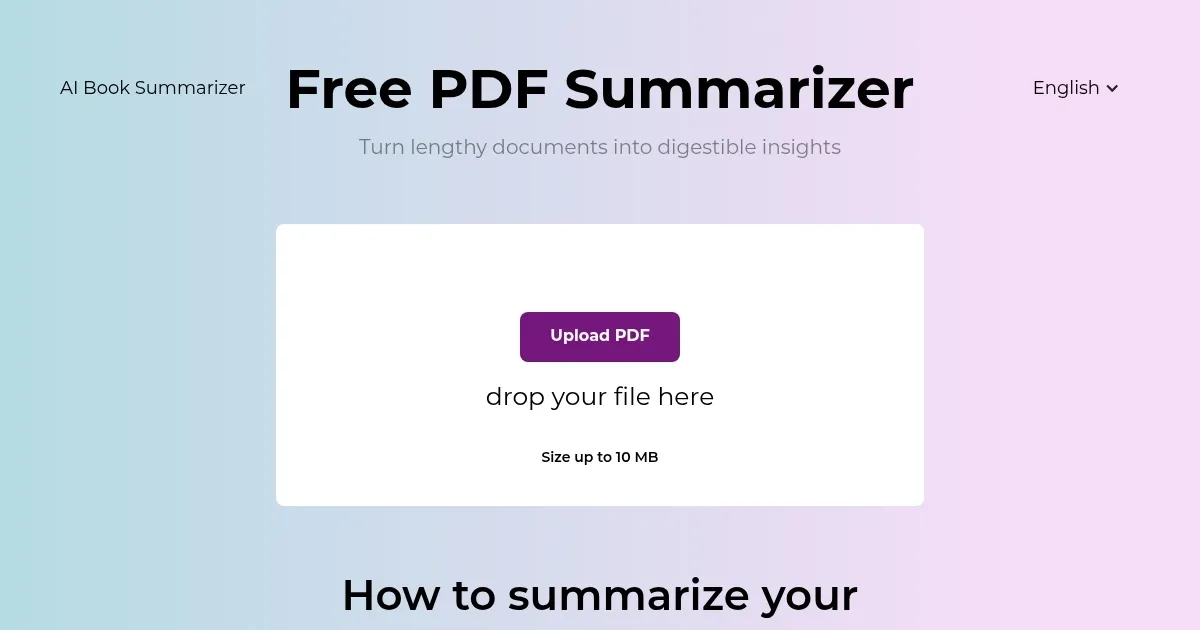
PDFSummarizer.net is a free web-based AI tool that processes uploaded PDF files to generate concise summaries, supports multilingual translations, and enables chat interactions for querying content.

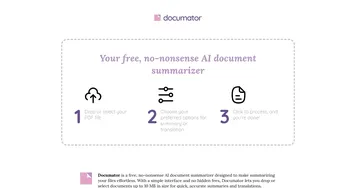
The tool operates through a three-step process. Users upload PDFs via drag-and-drop or file selection. The system then analyzes the document, displaying progress indicators like downloading, converting, and securing. Summaries appear in seconds, focusing on essential points from text-heavy files such as research papers, manuals, contracts, and essays.

Key features include instant summarization that extracts main ideas and highlights. The chat function allows users to ask questions, retrieve specific information with citations, translate sections, rephrase content, or generalize concepts. It supports multiple languages to address global needs and provides organized responses tied to original document sections.

In comparison to competitors, PDFSummarizer.net matches Smallpdf in free, no-signup access and speed but adds chat and translation capabilities absent in Smallpdfs basic overviews. Against NoteGPT, it offers similar text extraction and free usage but prioritizes privacy through non-storage of files, unlike NoteGPTs potential limits on advanced exports. General pricing remains free for all, with no mentioned paid upgrades, aligning with rivals basic tiers that cap heavy use.

Security measures involve HTTPS encryption for all interactions and no file retention post-processing. The tool functions across platforms, including Mac, without software installation. It handles various document types effectively but performs best on text-based PDFs.

Users benefit from time efficiency in grasping long content and improved accessibility for non-native languages. Potential drawbacks include slower processing for files over 100 pages and less accuracy with image-heavy or scanned documents.

For optimal use, upload files under 50 pages initially and use precise chat prompts to target sections, ensuring accurate and relevant outputs.

Visit PDFSummarizer.net ↗
Categories
👔 Work
📑 PDF Summarizer 📕 PDF 📤 Document Extraction
✍️ Writing
📝 Summarizer
🎓 Education
📰 Article Summarization 📔 Book Summarization

Homepage Screenshot 📸

PDFSummarizer.net screenshot

What are the key features? ✨

  • Instant Summarization: Generates concise AI overviews of PDF content in seconds to capture essential points.
  • Chat with PDF: Allows interactive queries to find, explain, or cite specific information from the document.
  • Multilingual Translation: Supports translation of sections into various languages to break down language barriers.
  • Content Rephrasing: Rephrases or generalizes text for clearer understanding while preserving original meaning.
  • Secure Processing: Uses HTTPS encryption and deletes files after use to maintain user privacy.

Who is it for? 🤔

This tool suits students tackling lengthy textbooks or research papers, professionals reviewing contracts and reports for quick insights, and researchers needing to extract key data from multilingual documents without full reads. It empowers anyone overwhelmed by information overload, from writers rephrasing ideas to global teams overcoming language hurdles, by streamlining access to vital content while prioritizing privacy and ease.

Examples of what you can use it for 💡

  • Student: Uploads a 100-page thesis PDF to get chapter summaries and chat for exam prep questions.
  • Researcher: Translates and summarizes foreign academic papers to identify relevant sections for literature reviews.
  • Professional: Rephrases contract clauses in a legal PDF to simplify explanations for team discussions.
  • Writer: Extracts key points from reference manuals to inspire article outlines without full reading.
  • Teacher: Generalizes essay content in student submissions to highlight main arguments for feedback.

Pros & Cons ⚖️

  • Free to use
  • Fast summaries
  • Multilingual support
  • File size limits
  • Image handling weak

FAQs 💬

What file types does PDFSummarizer.net support?
It primarily handles PDF files, including text-based documents like research papers and essays, but may struggle with heavily imaged or scanned ones.
Is PDFSummarizer.net really free?
Yes, the tool offers full access without any payment required, though usage might have unstated limits for heavy files.
How long does summarization take?
Most PDFs process in seconds, but larger files over 50 pages could take up to a minute.
Does it store my uploaded files?
No, files are not stored after processing, ensuring privacy through immediate deletion.
Can it handle non-English PDFs?
Yes, it supports multiple languages for summarization and translation into preferred languages.
What if the summary misses details?
Use the chat feature to query specifics, which pulls cited info from the original for accuracy.
Is it safe for sensitive documents?
Yes, HTTPS encryption protects data during upload and processing.
Does it work on mobile devices?
As a web tool, it functions on any browser-enabled device, including phones and tablets.
Can I translate the entire PDF?
It translates sections on request via chat, but full document translation depends on file size.
How accurate are the summaries?
They capture key points well for text content, with citations for verification, though complex jargon may need manual checks.

Ready to try PDFSummarizer.net?

Transforms PDFs into concise AI-generated summaries and enables interactive chats

Visit PDFSummarizer.net ↗
PDFSummarizer.net alternatives 🔗

  1. Box AI Box AI An assistant that taps into your enterprise content and documents
  2. Kimi Kimi An AI assistant that can interpret images, analyze code, and provide real-time information
  3. NotebookLM NotebookLM Transforms uploaded documents into interactive AI-powered research assistants
  4. NoteGPT NoteGPT Summarizes content, creates notes, and boosts learning with AI-powered tools
  5. LINER LINER A web-based tool that combines searching and collecting information in a user-friendly interface
  6. SciSpace SciSpace Your AI assistant to discover and understand research papers
Share
PDFSummarizer.net screenshot enlarged
Promote PDFSummarizer.net
light badge
Copy Embed Code
dark badge
Copy Embed Code
neutral badge
Copy Embed Code
Best AI Tools

Discover the best AI tools for any use case

Explore
  • Tool Categories
  • AI Use Cases
  • AI Events
  • AI News
  • Saved Tools
Company
  • About Us
  • Contact Us
  • Media & Partnerships
  • Suggest a Tool
Legal
  • Privacy Policy
  • Terms of Service
Copyright © 2026 Best AI Tools 415 Mission Street, 37th Floor, San Francisco, CA 94105