logo-darklogo-darklogo-darklogo-dark
  • Home
  • Browse
    • Assistant
    • Coding
    • Image
    • Productivity
    • Video
    • Voice
    • Writing
    • All Categories
    • AI Use Cases
  • Events
  • My Favorites
  • Suggest a Tool
✕
Home › Writing & Editing›
Published by Dusan Belic on August 30, 2023

Elephas

Elephas
Elephas Homepage
Categories Writing & Editing

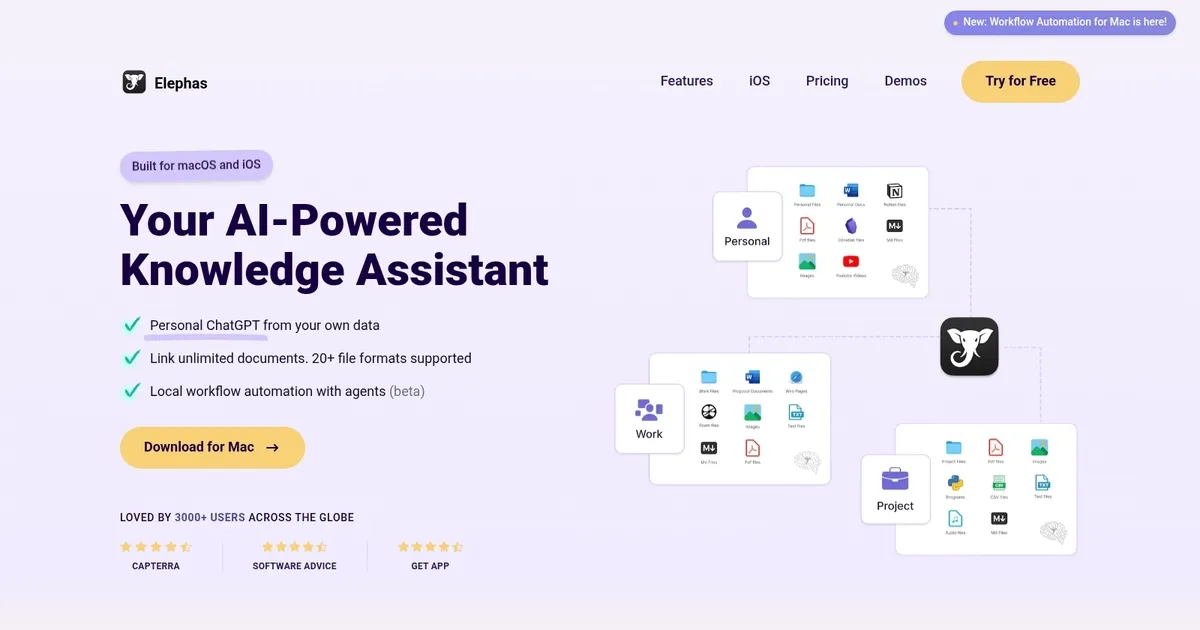
Elephas - screenshot

Personal AI writing assistant that works across your Mac, iPhone, and iPad

Elephas

Elephas is an AI writing assistant designed specifically for Mac users, with compatibility extending to iPhone and iPad devices. The software integrates the capabilities of ChatGPT across the user’s entire knowledge base, enabling a more efficient writing process for various tasks such as completing spreadsheets, summarizing articles, generating content for blogs, social media posts, and professional emails.

By utilizing data from various sources — including PDFs, Word documents, Notion, Obsidian, and webpages — Elephas aims to streamline personal knowledge management and support the creation of diverse content.

Furthermore, Elephas features the so-called “Super Brain” functionality that enhances idea distillation and expression, alongside a super-command bar to allow for interaction with ChatGPT across applications. It caters to a range of users, from marketers and content writers to business and technical professionals, by offering specific tools such as grammar correction, content summarization, and code writing assistance.

Lastly, we’ll mention that Elephas ensures privacy by not storing user data on its servers but on the user’s own computer. That’s a nice touch.

Elephas Homepage
Categories Writing & Editing

What are the key features? ⭐

  • Super Brains: focused, queryable knowledge collections built from your files with automatic citations
  • Super Command: system-wide AI shortcut for rewriting, summarizing, saving, and more in any app
  • Multi-format Import: handles PDFs, Office files, notes apps, Zoom, YouTube, voice, web pages, and code
  • Offline & Local Processing: full offline queries and strong privacy with on-device data control
  • Deliverable Generation: creates reports, presentations, mind maps, diagrams, and emails from your content

Who is it for? 🤔

Elephas helps Mac-centric knowledge workers—executives juggling decisions and past context, consultants pulling client history fast, researchers synthesizing papers and notes, lawyers retrieving case details, healthcare professionals referencing guidelines, engineers referencing specs, coaches organizing session insights, and customer support leads tracking recurring issues—who need accurate, source-backed answers from their own scattered files without relying on cloud-only tools or risky general-purpose chatbots.

Examples of what you can use it for 💭

  • Executive: quickly recall board or team decisions and commitments from past meetings and emails
  • Consultant: surface relevant client precedents, notes, and deliverables during calls or proposal writing
  • Researcher: query academic papers, articles, and personal annotations with precise source references
  • Lawyer: locate contract clauses, case notes, or correspondence instantly with citation trails
  • Content Creator: distill research, videos, or interviews into reusable summaries and key points

Pros & Cons ⚖️

  • Accurate cited answers
  • Mac-wide seamless access
  • Strong privacy & offline
  • Useful output formats
  • Initial indexing time
  • iOS still catching up

FAQs 💬

What platforms does Elephas run on?
Native app for Mac with sync to iPhone and iPad via iCloud. Full features require the direct download; Mac App Store version has restrictions.
Can Elephas work completely offline?
Yes, especially with local Ollama models, allowing queries and basic generation without any internet connection.
Which AI models does it support?
GPT-5, Claude, Gemini via your own API keys, plus local Ollama models for offline and privacy-focused use.
How private is my data?
Everything stays on your device by default, is encrypted, and is never sent to train models or shared with third parties.
How is Elephas different from NotebookLM?
Elephas offers native Mac speed, system-wide Super Command, offline capability, and broader file integrations compared with NotebookLM's browser-based, Google-tied approach.
What kinds of files can it import?
PDFs, Word, Excel, Markdown, code files, Apple Notes, Notion, Obsidian, DEVONthink, Zoom transcripts, YouTube videos, voice notes, and web captures.
Is there a free trial or version?
You can download and use Elephas with basic features for free; paid plans unlock unlimited Brains, advanced generation, and remove limits.
Can it create presentations?
Yes, it generates Keynote slide decks (with speaker notes), mind maps, diagrams, and other formatted deliverables directly from your Super Brain.
Who benefits most from Elephas?
Professionals who manage large amounts of documents, notes, and meeting records and need fast, trustworthy recall without constant manual searching.
Does Super Command work in every app?
It works across most Mac apps that accept text input, including Mail, Slack, Safari, Pages, Word, Notion, and many more.
Visit Elephas

Related tools ↙️

  1. CopyMonkey CopyMonkey Generates keyword-optimized Amazon listings in seconds
  2. Copyrocket Copyrocket Generates AI-driven content, images, voices, code, and more for creative and marketing tasks
  3. Kua.ai Kua.ai Generates SEO-optimized listings, blogs, and posts for multiple e-commerce channels
  4. Typeset Typeset Automates design and writing for ebooks, presentations, and social graphics quickly
  5. Just Think Just Think Generates AI content including chat responses, speech audio, artistic images, and animated videos
  6. BlogSEO AI BlogSEO AI Generates SEO-optimized blog content automatically in multiple languages
Last update: March 3, 2026
Share
Promote Elephas
light badge
Copy Embed Code
dark badge
Copy Embed Code
neutral badge
Copy Embed Code
About Us | Contact Us | Suggest an AI Tool | Privacy Policy | Terms of Service

Copyright © 2026 Best AI Tools
415 Mission Street, 37th Floor, San Francisco, CA 94105