logo-darklogo-darklogo-darklogo-dark
  • Tool Categories
    • ๐ŸŽจ Art
    • ๐Ÿข Business
    • ๐Ÿ’ป Coding
    • ๐Ÿ‘ฎ Detection
    • ๐Ÿง  General
    • ๐Ÿฅ Health
    • ๐Ÿ“ท Image Analysis
    • ๐Ÿ–ผ๏ธ Image
    • ๐Ÿ“ Architecture
    • ๐ŸŽ“ Education
    • โš–๏ธ Legal/Finance
    • ๐ŸŽญ Lifestyle
    • ๐Ÿ“ข Advertising
    • ๐ŸŽง Music
    • ๐Ÿ‘” Work
    • ๐Ÿ”ฌ Research
    • ๐Ÿ‘ฅ Social
    • ๐ŸŽฅ Video
    • ๐Ÿ‘ง๐Ÿป Companion
    • ๐ŸŽค Voice
    • โœ๏ธ Writing
    • All Categories
    • AI Use Cases
  • News
  • Events
    • Academic Conferences
    • Developer Conferences
    • Expos / Trade Shows
    • Industry Summits
    • Online Events
    • Workshops / Training
    • All Events
    • Past Events
  • Saved Tools
  • Suggest a Tool
โœ•
Home › Image Generation & Editing › Photo Editing› HitPaw Online
HitPaw Online

HitPaw Online

Enhances and edits photos, videos, and audio with AI-powered online tools for quick professional results.

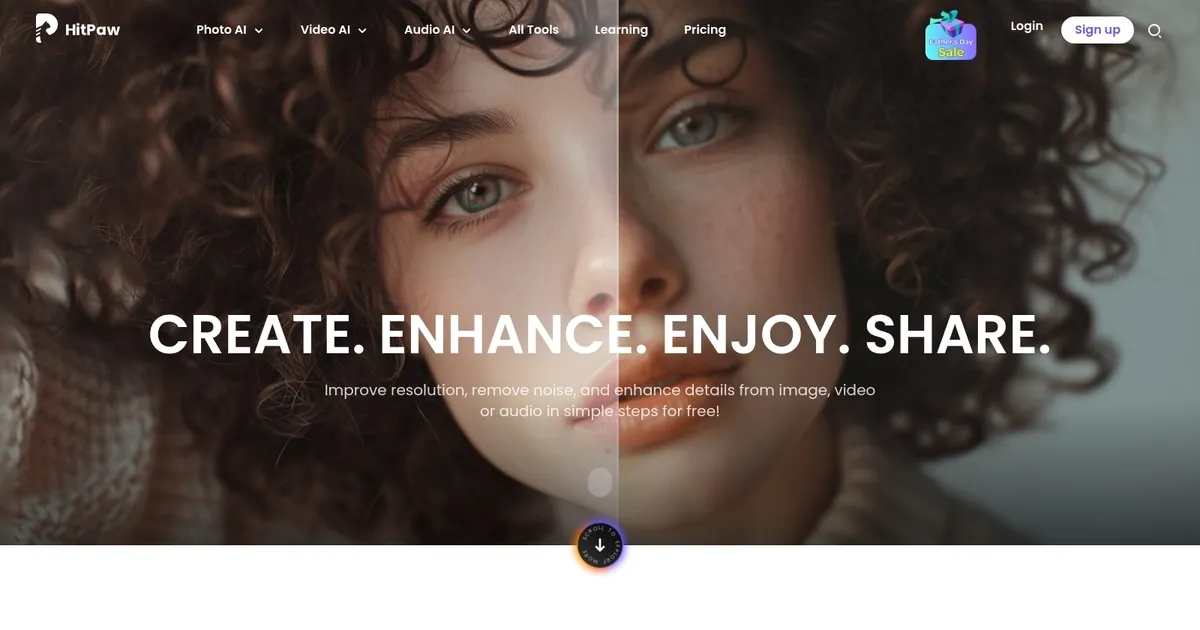
The HitPaw Online platform is an AI-powered editing suite designed to improve and enhance media files, including photos, videos, and audio clips. With a variety of tools tailored to different needs, users can easily upscale image resolution, remove image backgrounds with precision, animate old photos, remove objects from images, and even enhance videos up to 4K quality.

For audio, there are options for noise removal to improve clarity, as well as the ability to convert audio files across various formats. This platform aims to simplify the editing process by providing a one-stop solution for users looking to enhance their media with help of advanced AI tech.

The HitPaw Online platform caters to various uses, from personal lifestyle enhancements to marketing and educational purposes. It boasts cutting-edge AI technology for media enhancement, advanced security measures to protect user data, and streamlined workflow efficiency to save time.

The platform supports a global user base, offering tools like AI video translators that can instantly translate videos into over 35 languages and remove watermarks or unwanted text from media.

Previous users highlight the platform’s effectiveness in improving media quality, with many appreciating the responsive customer service and the high-quality results produced by AI tools.

Visit HitPaw Online ↗

Categories

๐Ÿ–ผ๏ธ Image

โœ๏ธ Photo Editing โœ‚๏ธ Background Removal ๐Ÿ’Ž Image Enhancing โฌ†๏ธ Image Upscaling ๐Ÿงน Object Removal ๐Ÿ’ง Watermark Removal ๐ŸŒŸ Photo Enhancing ๐Ÿ› ๏ธ Photo Restoration

๐ŸŽฅ Video

โœ๏ธ Video Editing โœจ Video Enhancing

๐ŸŽค Voice

๐ŸŽ›๏ธ Voice Changer

๐Ÿ“ท Image Analysis

๐Ÿ‘๏ธ Image Recognition

Screenshot 📸

HitPaw Online screenshot

Video Overview 🎬

What are the key features? ✨

  • AI Video Upscaler: Enhances video resolution up to 4K with improved details and smoother motion using AI algorithms.
  • Unblur Image: Restores sharpness and clarity to blurry or low-resolution photos with one-click AI processing.
  • Video Watermark Remover: Removes unwanted watermarks, text, or objects from videos without visible traces in most cases.
  • AI Photo Generator: Creates original artwork and images from text prompts in seconds.
  • Audio Enhancer: Improves audio quality by reducing noise and clarifying sound in videos, music, or recordings.

Who is it for? 🤔

HitPaw Online suits content creators who need fast fixes for social media posts, small business owners enhancing product images or promo videos, educators cleaning up lecture recordings, casual users restoring old family photos or footage, and anyone wanting professional-looking results without learning complex software or buying hardware. It's especially helpful for people working on the go with just a browser and internet connection.

Examples of what you can use it for 💡

  • Content Creator: Upscales short social media clips to 4K for sharper Instagram Reels or TikToks.
  • E-commerce Seller: Enhances product photos by unblurring details and upscaling resolution for better listings.
  • Family Archivist: Restores blurry old photos or removes watermarks from inherited videos to preserve memories.
  • Podcaster/Educator: Clarifies audio in recordings by reducing background noise for clearer lessons or episodes.
  • Graphic Designer: Generates quick AI art from prompts to use as placeholders or concept visuals.

Pros & Cons ⚖️

  • Easy browser access
  • Fast one-click results
  • Free tier available
  • Multiple AI tools
  • File size limits
  • Variable results

FAQs 💬

Is HitPaw Online completely free to use?
Basic features are free with limits on file size and processing. Paid credits or plans unlock higher limits and faster access.
Do I need to download any software?
No, everything runs directly in your web browser without installations.
What is the maximum resolution for video upscaling?
Videos can be upscaled to 4K, with some image tools supporting up to 8X enlargement.
Can it handle large files?
Free tier has restrictions, but paid options support larger uploads and longer videos.
How good is the watermark removal?
It works well on static or simple watermarks, though complex moving ones may leave faint artifacts.
Does it work on mobile devices?
Yes, the platform is mobile-friendly and functions in smartphone browsers.
Is my uploaded content private?
Files process on servers and are typically deleted after use, but review their privacy policy for details.
How does it compare to desktop tools?
It offers convenience over power, trading some advanced control for no-install ease.

Ready to try HitPaw Online?

Enhances and edits photos, videos, and audio with AI-powered online tools for quick professional results.

Visit HitPaw Online ↗

HitPaw Online alternatives 🔗

  1. Imagen Imagen Generates photorealistic images from detailed text prompts
  2. Black Forest Labs Black Forest Labs Generates high-quality images from text prompts with precision and speed
  3. Stable Diffusion Stable Diffusion Generates high-quality images from text prompts with versatile styles
  4. Adobe Express Adobe Express Creates on-brand content with AI-driven design and video tools
  5. Adobe Firefly Adobe Firefly Generates images, videos, audio, and vectors using AI.
  6. Freepik AI Freepik AI Creates AI images and videos with fluid motion, detailed textures, and synced audio up to 1080p
Share
HitPaw Online screenshot enlarged
Promote HitPaw Online
light badge
Copy Embed Code
dark badge
Copy Embed Code
neutral badge
Copy Embed Code
Best AI Tools

Discover the best AI tools for any use case

About Us | Contact Us | Suggest an AI Tool
Privacy Policy | Terms of Service
Copyright © 2026 Best AI Tools 415 Mission Street, 37th Floor, San Francisco, CA 94105