Letterly
Converts spoken words into polished text for notes, emails, and posts
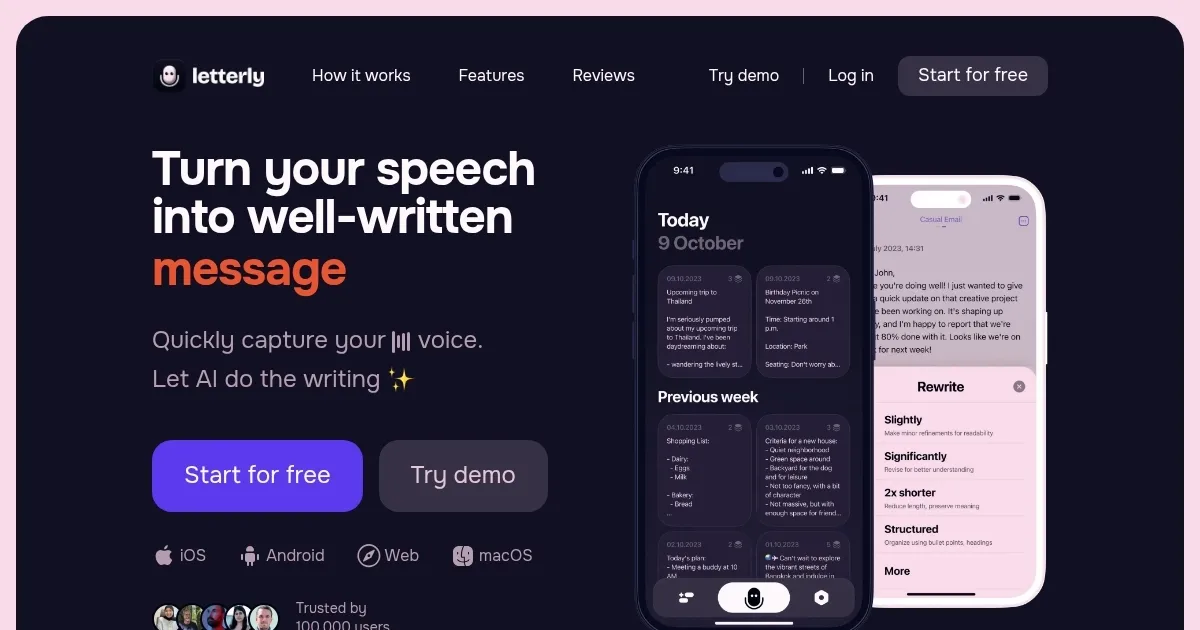
Letterly caught my eye the moment I landed on its sleek homepage, a promise of turning chaotic voice ramblings into polished text. It’s not just another speech-to-text app. It’s a productivity sidekick, one that listens to your unstructured thoughts and churns out emails, to-do lists, or social media posts in seconds. Built for iOS, Android, Web, and macOS, it’s got a broad reach, trusted by over 100,000 users. I think what makes it stand out is its AI, trained by linguists, that doesn’t just transcribe but rewrites your words into something you’d actually want to share.
The app’s core feature, the rewrite options, is where the magic happens. You speak, and Letterly offers over 25 ways to shape your words — think structured text with bullet points, a formal email, or even a snappy X post. I love how it recognizes over 90 languages automatically, so you can ramble in Spanish or Mandarin, and it’ll still deliver. The offline recording feature is a gem, letting you capture ideas mid-flight or in a remote cabin with no Wi-Fi. Syncing across devices? Seamless. Your notes live on your phone, Mac, or browser, ready when you are. The widget for one-tap recording is a small but brilliant touch, especially for those “I’ve got an idea!” moments.
But it’s not flawless. Some users on Reddit mention occasional hiccups with speaker separation in multi-speaker mode, where the app struggles to distinguish voices in noisy settings. Battery drain during long recordings — up to 90 minutes, a recent update — can also be a concern, especially on older devices. Compared to competitors like Otter, which excels in meeting transcriptions with robust speaker ID, or Dragon Anywhere, known for its high-accuracy dictation, Letterly’s strength lies in its creative rewriting rather than raw transcription. Otter’s pricing feels steeper for solo users, while Dragon’s subscription can be a commitment. Letterly’s pricing, while not public, seems to offer a free tier with in-app purchases, making it more accessible for casual users.
What surprised me? The Zapier integration. You can send your polished text to over 8,000 apps — Google Docs, Notion, you name it — with a single tap. It’s like having a personal assistant who knows every tool in your workflow. The audio player, updated in July 2025, lets you revisit recordings at variable speeds, a thoughtful addition for those who like to review their raw thoughts. Tags for organizing notes are another win, keeping your ideas from getting lost in the shuffle.
If you’re looking to try Letterly, start with the free demo on their site. Play with the rewrite options to see what fits your style — maybe a to-do list or a quick email. Test it in different settings to check voice recognition accuracy. It’s a tool that grows with you, so experiment and see how it can streamline your day.
Homepage Screenshot 📸
Video Overview 🎬
What are the key features? ✨
- Rewrite Options: Over 25 AI-driven styles, like formal emails or to-do lists, shape your speech into polished text.
- Offline Recording: Capture ideas anywhere without internet, ideal for travel or remote areas.
- Zapier Integration: Send notes to over 8,000 apps, like Google Docs or Notion, with one tap.
- Multi-Device Syncing: Access notes across iOS, Android, Web, and macOS seamlessly.
- Language Support: Automatically recognizes and transcribes over 90 languages.
Who is it for? 🤔
Examples of what you can use it for 💡
- Entrepreneur: Dictates business ideas during a commute, turning them into a structured plan.
- Content Creator: Records social media post ideas, converting them into polished X posts.
- Student: Captures lecture notes via voice, organizing them into bullet-point summaries.
- Professional: Speaks a rough email draft, transforming it into a formal message for clients.
- Journaler: Records daily thoughts, converting them into a gratitude journal entry.
Pros & Cons ⚖️
- Over 25 versatile rewrite options.
- Offline recording for flexibility.
- Seamless multi-device syncing.
- Integrates with 8,000+ apps.
- Multi-speaker mode struggles in noise.
- Battery drain on long recordings.
FAQs 💬
Ready to try Letterly?
Converts spoken words into polished text for notes, emails, and posts
Visit LetterlyLetterly alternatives 🔗