logo-darklogo-darklogo-darklogo-dark
  • Tool Categories
    • ๐ŸŽจArt & Creative Design505
    • ๐ŸขBusiness Management644
    • ๐Ÿ’ปCoding & Development515
    • ๐Ÿ‘ฎDetection83
    • ๐Ÿง General Use727
    • ๐ŸฅHealth & Wellness55
    • ๐Ÿ“ทImage & Photo Analysis100
    • ๐Ÿ–ผ๏ธImage Generation & Editing618
    • ๐Ÿ“Interior & Architectural Design37
    • ๐ŸŽ“Learning & Education483
    • โš–๏ธLegal & Finance90
    • ๐ŸŽญLifestyle & Entertainment236
    • ๐Ÿ“ขMarketing & Advertising627
    • ๐ŸŽงMusic & Audio138
    • ๐Ÿ‘”Office & Workplace1,014
    • ๐Ÿ”ฌResearch & Data Analysis372
    • ๐Ÿ‘ฅSocial Media245
    • ๐ŸŽฅVideo Generation & Editing426
    • ๐Ÿ‘ง๐ŸปVirtual Companion135
    • ๐ŸŽคVoice Generation & Editing381
    • โœ๏ธWriting & Editing808
    • All Categories
    • AI Use Cases
  • News
  • Events
    • Academic Conferences
    • Developer Conferences
    • Expos / Trade Shows
    • Industry Summits
    • Workshops / Training
    • All Events
    • Past Events
  • Saved Tools
  • Suggest a Tool
โœ•
Home › Office & Workplace › PDF› Papermark AI
Papermark AI

Papermark AI

Chat with documents and generate summaries using open-source AI

Papermark AI is an open-source platform for secure document sharing, real-time analytics, and AI-powered document interaction, designed as an alternative to DocSend. It enables users to share documents like pitch decks and PDFs with customizable permissions, track engagement with page-by-page analytics, and use AI to summarize content, answer questions, or generate investment memos. The platform uses AES-256 encryption for security and supports custom domains for branded sharing. It’s free to use with basic features, with paid plans for advanced functionality.

Key features include secure sharing, where users can set permissions and revoke access anytime. Real-time analytics provide detailed insights into viewer behavior, such as time spent on each page. The AI assistant allows users to interact with documents, offering summaries and contextual answers based on uploaded content. The open-source nature enables self-hosting and customization, appealing to developers and privacy-conscious users. Papermark AI supports various document types, including pitch decks, sales decks, and PDFs, making it versatile for professional use.

Compared to competitors like DocSend and PandaDoc, Papermark AI stands out for its open-source model and affordability. DocSend offers robust integrations with CRM tools, which Papermark lacks, while PandaDoc provides more advanced e-signature and workflow automation features. However, Papermark’s AI capabilities, such as document comparison and memo generation, give it an edge for users prioritizing interactivity and analytics over integrations.

Some users may find the platform’s AI summarization less reliable with complex or chart-heavy documents, as noted in reviews across the Internet. The self-hosting option, while powerful, requires technical expertise, which could deter non-technical users. The interface is user-friendly but lacks the polish of proprietary platforms. Community feedback on X highlights the platform’s potential, with users appreciating its transparency and frequent updates.

To get started, sign up for a free account and upload a document to test the sharing and analytics features. Experiment with the AI assistant by asking specific questions about your content. If you’re comfortable with technical setups, explore the self-hosting option via GitHub for full control. Lastly, you’ll want to monitor the platform’s community for new features and improvements.

Visit Papermark AI ↗
Categories
๐Ÿ‘” Work
๐Ÿ“• PDF ๐Ÿ“‘ PDF Summarizer ๐Ÿ“ค Document Extraction ๐Ÿ“„ Document Generation ๐Ÿ’ฌ Presentation Generation
โœ๏ธ Writing
๐Ÿ“ Summarizer

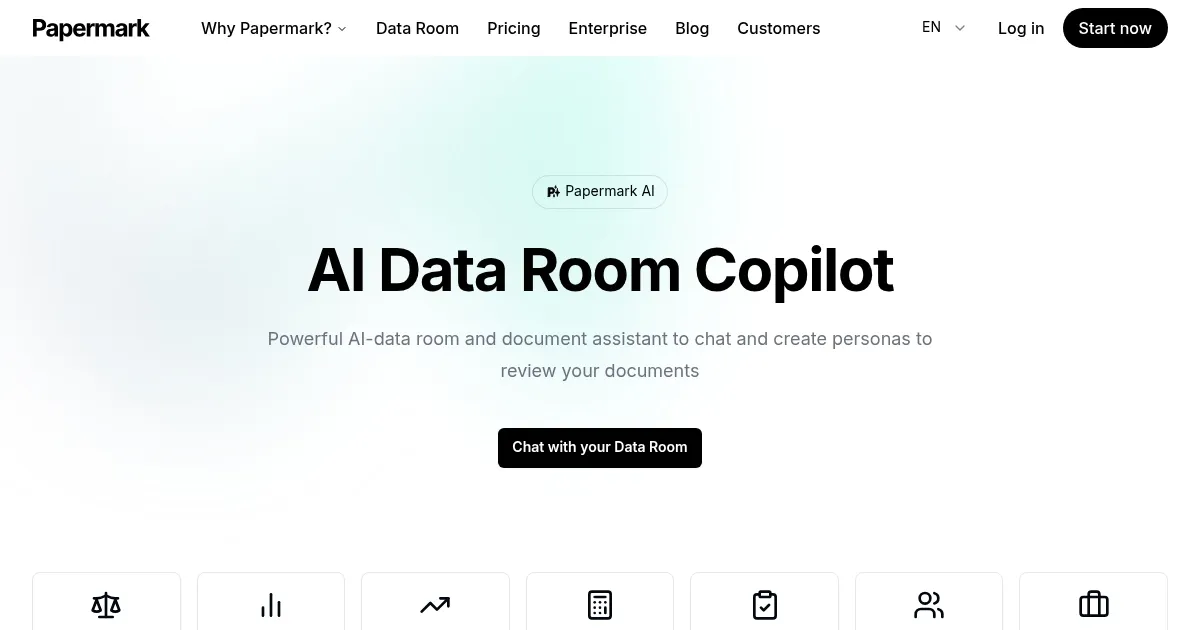
Homepage Screenshot 📸

Papermark AI screenshot

What are the key features? ✨

  • Secure Sharing: Control access and revoke permissions anytime for shared documents.
  • Real-Time Analytics: Track document engagement with detailed page-by-page insights.
  • AI-Powered Assistant: Chat with documents, generate summaries, and create investment memos.
  • Custom Domain Support: Use your own domain for a branded document-sharing experience.
  • Open-Source Flexibility: Self-host and customize the platform to meet specific needs.

Who is it for? 🤔

Papermark AI is ideal for startups, sales teams, investors, and non-profits who need a secure, cost-effective way to share and track documents while leveraging AI for insights. Its open-source nature appeals to developers and organizations prioritizing privacy and customization, while its analytics and AI features benefit professionals like founders refining pitch decks or researchers building knowledge bases from documents.

Examples of what you can use it for 💡

  • Startup Founder: Shares a pitch deck with investors and uses AI to summarize feedback.
  • Sales Professional: Tracks client engagement with sales decks via real-time analytics.
  • Investor: Chats with received pitch decks to quickly extract key information.
  • Researcher: Builds a knowledge base by summarizing and querying uploaded PDFs.
  • Developer: Self-hosts Papermark AI to customize document-sharing for a team.

Pros & Cons ⚖️

  • AI-driven document interaction.
  • Open-source and customizable.
  • Free tier for basic use.
  • AI can struggle with complex PDFs.
  • Self-hosting requires technical skills.

FAQs 💬

What is Papermark AI?
An open-source platform for secure document sharing, analytics, and AI interaction.
Is Papermark AI free to use?
Yes, it offers a free tier with basic features, with paid plans for advanced options.
Can I use my own domain with Papermark AI?
Yes, custom domains are supported for branded document sharing.
How secure is Papermark AI for sharing sensitive documents?
It uses AES-256 encryption and allows access control and revocation.
What types of documents can I upload to Papermark AI?
It supports PDFs, pitch decks, sales decks, and other document formats.
Can Papermark AI summarize my documents?
Yes, its AI can generate summaries and answer questions about uploaded content.
Is Papermark AI suitable for non-technical users?
The cloud version is user-friendly, but self-hosting requires technical expertise.
How does Papermark AI compare to DocSend?
Itโ€™s a cost-effective, open-source alternative with AI features but fewer integrations.
Can I self-host Papermark AI?
Yes, itโ€™s open-source, allowing self-hosting with customization options.
Does Papermark AI offer real-time analytics?
Yes, it provides detailed page-by-page analytics on document engagement.

Ready to try Papermark AI?

Chat with documents and generate summaries using open-source AI

Visit Papermark AI ↗

Papermark AI alternatives 🔗

  1. Box AI Box AI An assistant that taps into your enterprise content and documents
  2. Kimi Kimi An AI assistant that can interpret images, analyze code, and provide real-time information
  3. CoCounsel CoCounsel Tool for legal document review, research memos, deposition preparation, and contract analysis
  4. Monica Monica A browser extension powered by ChatGPT that acts as a chatbot assistant
  5. LINER LINER A web-based tool that combines searching and collecting information in a user-friendly interface
  6. SciSpace SciSpace Your AI assistant to discover and understand research papers
Share
Papermark AI screenshot enlarged
Promote Papermark AI
light badge
Copy Embed Code
dark badge
Copy Embed Code
neutral badge
Copy Embed Code
Best AI Tools

Discover the best AI tools for any use case

Explore
  • Tool Categories
  • AI Use Cases
  • AI Events
  • AI News
  • Saved Tools
Company
  • About Us
  • Contact Us
  • Media & Partnerships
  • Suggest a Tool
Legal
  • Privacy Policy
  • Terms of Service
Copyright © 2026 Best AI Tools 415 Mission Street, 37th Floor, San Francisco, CA 94105