logo-darklogo-darklogo-darklogo-dark
  • Tool Categories
    • 🎨Art & Creative Design505
    • 🏢Business Management644
    • 💻Coding & Development514
    • 👮Detection83
    • 🧠General Use728
    • 🏥Health & Wellness55
    • 📷Image & Photo Analysis100
    • 🖼️Image Generation & Editing618
    • 📐Interior & Architectural Design37
    • 🎓Learning & Education483
    • ⚖️Legal & Finance90
    • 🎭Lifestyle & Entertainment236
    • 📢Marketing & Advertising627
    • 🎧Music & Audio138
    • 👔Office & Workplace1,014
    • 🔬Research & Data Analysis373
    • 👥Social Media245
    • 🎥Video Generation & Editing426
    • 👧🏻Virtual Companion135
    • 🎤Voice Generation & Editing381
    • ✍️Writing & Editing808
    • All Categories
    • AI Use Cases
  • News
  • Events
    • Academic Conferences
    • Developer Conferences
    • Expos / Trade Shows
    • Industry Summits
    • Workshops / Training
    • All Events
    • Past Events
  • Saved Tools
  • Suggest a Tool
✕
Home › Video Generation & Editing › Animation Generation› QuickMagic
QuickMagic

QuickMagic

Converts videos into 3D animations using AI-driven motion capture

QuickMagic is an AI-powered motion capture tool that converts video footage into 3D animations without requiring specialized equipment. Users upload videos through a browser, and the AI processes them to generate motion data in formats like FBX, VMD, or BIP. It supports integration with 3D software such as Blender, Maya, and Unreal Engine. The tool targets animators, game developers, and VFX artists, offering a streamlined workflow for creating animations from everyday videos.

The tool’s AI analyzes videos to detect keyframes and extract motion data, focusing on upper-body and hand movements. It supports single and multi-character capture, with precise hand tracking for detailed animations. Export formats are compatible with industry-standard software, ensuring flexibility. QuickMagic claims a 30% productivity increase, supported by user reviews on sites like Creati.ai. The browser-based interface, optimized for Chrome, allows users to upload, process, and preview animations quickly. A 4-digit Captcha sent to email ensures secure account setup.

Limitations exist. QuickMagic does not capture lower-body motion, which restricts its use for full-body animations. Video quality impacts accuracy — low-resolution or poorly lit footage yields suboptimal results. Competitors like Move AI and DeepMotion offer full-body capture, giving them an edge for complex projects. QuickMagic’s pricing appears more affordable, based on external reviews, though specific plans are available on their website.

The tool’s hand capture feature stands out, accurately tracking finger movements for realistic animations. Its simplicity appeals to beginners, but professionals may want more advanced controls. Integration with Unity and Maya ensures broad applicability. User feedback on CGDive highlights its ease for small-scale projects. No facial capture is a notable gap, limiting expressiveness.

For optimal results, use high-quality videos and focus on upper-body movements. Check QuickMagic’s site for pricing and test with simple clips to understand its capabilities.

Visit QuickMagic ↗
Categories
🎥 Video
🎞️ Animation Generation 📹 Video Generation 🎠 Animated Video 🤖 Avatar Video Generation ✏️ Video Editing
🎨 Art
🧊 3D Modeling 🧑‍🎨 Design Assistant

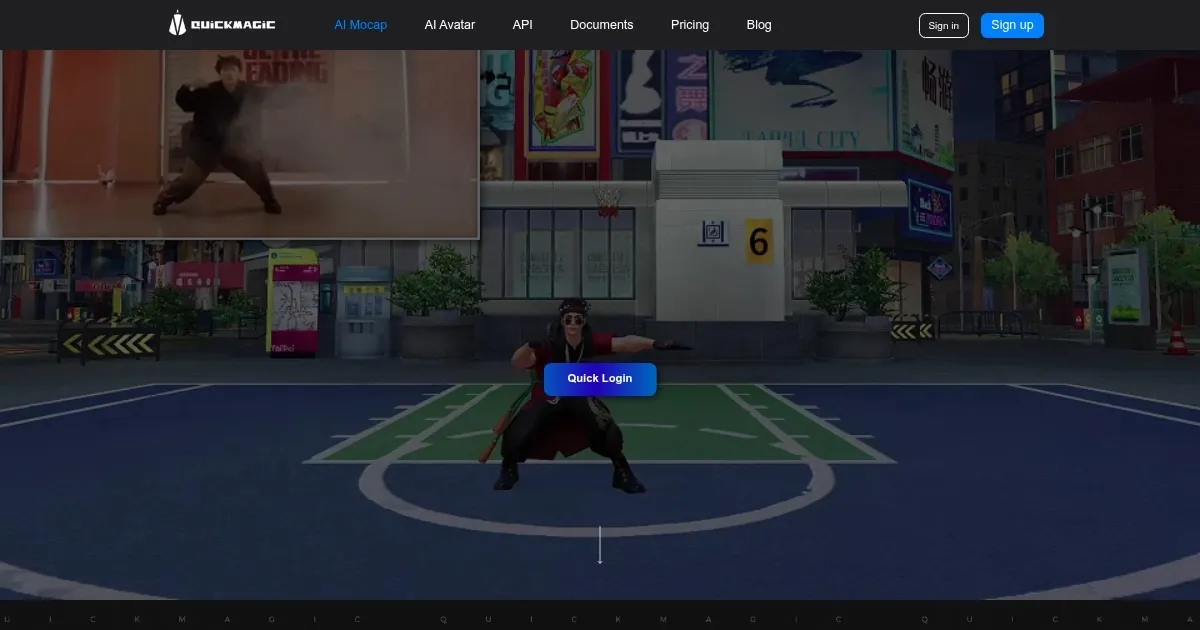
Homepage Screenshot 📸

QuickMagic screenshot

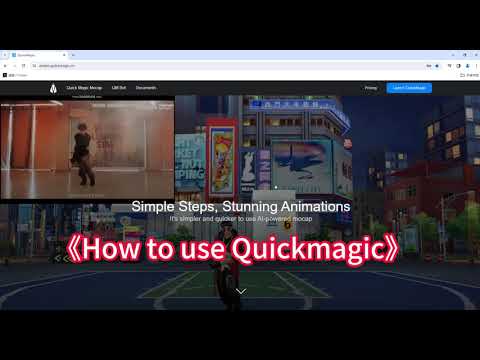
Video Overview 🎬

QuickMagic - Video Overview

What are the key features? ✨

  • AI Motion Capture: Extracts motion data from videos without specialized equipment.
  • Keyframe Detection: Automatically identifies critical frames for efficient animation production.
  • Export Formats: Supports FBX, VMD, BIP, and UE formats for compatibility with 3D software.
  • Hand Capture: Tracks precise hand and finger movements for realistic animations.
  • Browser-Based Interface: Enables easy video uploads and animation previews via Chrome.

Who is it for? 🤔

QuickMagic is designed for indie game developers, animators, and VFX artists seeking an affordable, user-friendly way to create 3D animations from videos. It’s ideal for small studios or freelancers who lack access to professional motion capture setups but need quick, high-quality results for projects like games, short films, or virtual reality experiences. Beginners benefit from its simplicity, while pros appreciate its integration with tools like Unity and Maya, though they may find its upper-body focus limiting.

Examples of what you can use it for 💡

  • Indie Game Developer: Uses QuickMagic to animate characters for a mobile game using smartphone footage.
  • Animator: Creates short film animations by converting dance videos into 3D models.
  • VFX Artist: Generates motion data for visual effects in commercials from simple video clips.
  • VR Developer: Produces interactive character movements for virtual reality experiences.
  • Content Creator: Animates digital avatars for social media videos using self-recorded footage.

Pros & Cons ⚖️

  • Simplifies motion capture process.
  • Supports multiple export formats.
  • Precise hand movement tracking.
  • Limited advanced control options.
  • No facial expression capture.

FAQs 💬

What is QuickMagic?
QuickMagic is an AI tool that converts videos into 3D animations using motion capture technology.
Do I need special equipment?
No, QuickMagic requires only a video, no motion capture suits or cameras needed.
What video formats work best?
High-quality, well-lit videos in MP4 or similar formats yield the best results.
Which software is compatible?
QuickMagic exports to FBX, VMD, BIP, and UE, working with Blender, Maya, Unity, and Unreal Engine.
Can beginners use QuickMagic?
Yes, its simple interface is beginner-friendly, though 3D software knowledge helps.
Does it support full-body capture?
Currently, QuickMagic focuses on upper-body and hand capture, not lower-body.
How fast is the animation process?
Animations are generated in about a minute, depending on video length.
Is Chrome required to use QuickMagic?
Chrome is recommended for the best experience, but other browsers may work.
Can I preview animations?
Yes, QuickMagic offers a preview feature before downloading the animation.

Ready to try QuickMagic?

Converts videos into 3D animations using AI-driven motion capture

Visit QuickMagic ↗

QuickMagic alternatives 🔗

  1. Kling AI Kling AI Generates cinematic videos from text or images with realistic motion
  2. Veo Veo Generates high-quality videos with audio from text or image prompts
  3. Runway Runway Generates and edits AI-powered videos from text prompts
  4. Sora Sora Generates hyperrealistic videos from text prompts with synchronized audio
  5. Deep Nostalgia Deep Nostalgia An AI-driven service that animates photos, making it seem as though people are moving and expressing emotions.
  6. PixVerse PixVerse An AI-driven tool designed to help users create fancy videos with ease
Share
QuickMagic screenshot enlarged
Best AI Tools

Discover the best AI tools for any use case

Explore
  • Tool Categories
  • AI Use Cases
  • AI Events
  • AI News
  • Saved Tools
Company
  • About Us
  • Contact Us
  • Media & Partnerships
  • Suggest a Tool
Legal
  • Privacy Policy
  • Terms of Service
Copyright © 2026 Best AI Tools 415 Mission Street, 37th Floor, San Francisco, CA 94105