logo-darklogo-darklogo-darklogo-dark
  • Tool Categories
    • 🎨 Art
    • 🏢 Business
    • 💻 Coding
    • 👮 Detection
    • 🧠 General
    • 🏥 Health
    • 📷 Image Analysis
    • 🖼️ Image
    • 📐 Architecture
    • 🎓 Education
    • ⚖️ Legal/Finance
    • 🎭 Lifestyle
    • 📢 Advertising
    • 🎧 Music
    • 👔 Work
    • 🔬 Research
    • 👥 Social
    • 🎥 Video
    • 👧🏻 Companion
    • 🎤 Voice
    • ✍️ Writing
    • All Categories
    • AI Use Cases
  • News
  • Events
    • Academic Conferences
    • Developer Conferences
    • Expos / Trade Shows
    • Industry Summits
    • Online Events
    • Workshops / Training
    • All Events
    • Past Events
  • Saved Tools
  • Suggest a Tool
✕
Home › Video Generation & Editing › Video Editing› Snapy AI
Snapy AI

Snapy AI

Auto-edits long videos into social media shorts with AI prompts

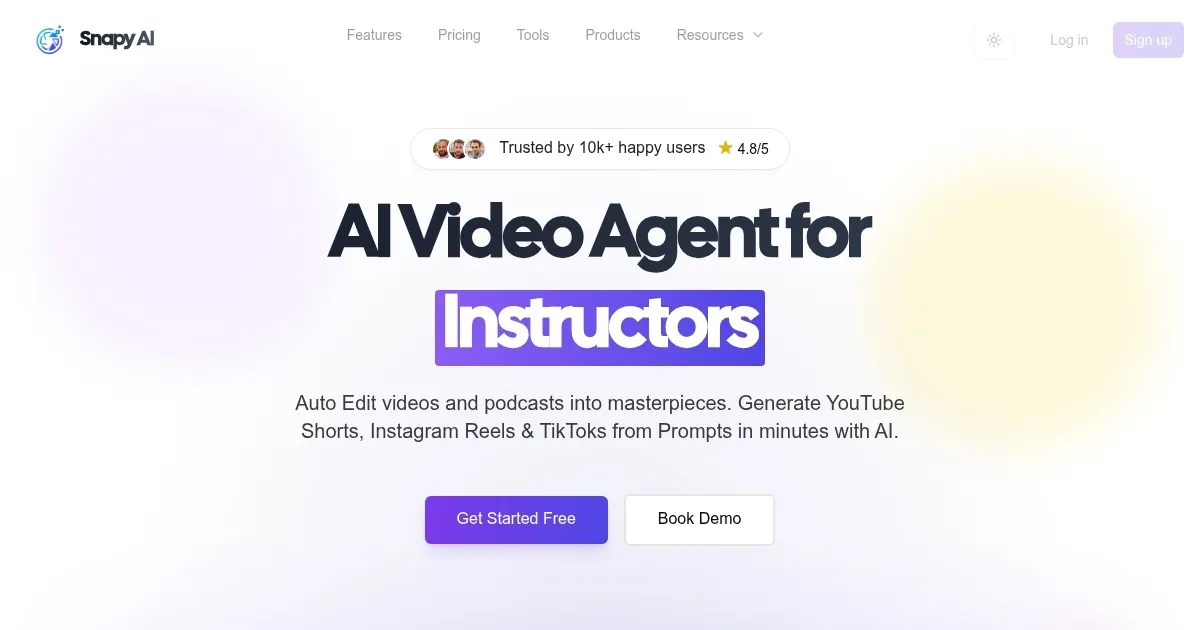
Snapy AI is an AI driven platform that automates video and audio editing for short form content. It processes uploads to generate clips optimized for YouTube Shorts, Instagram Reels, and TikTok. Core tools include the AI Auto Editor for extracting key moments with added captions and transitions. The AI Silence Remover detects and eliminates pauses while maintaining speech flow. Users access these via a web interface that supports common formats like MP4 and MP3.

The AI Shorts Generator creates videos from text prompts, allowing customization of style and length. Export options cover multiple resolutions up to 1080p on paid plans. The AI Video Dubber supports over 20 languages with voice synthesis and lip sync technology. This enables content localization without manual dubbing. The PPT to Video Converter turns slides into videos by incorporating animations and voiceovers.

The AI Video Background Remover applies one click removal for clean composites. It works without green screens and outputs transparent backgrounds. The AI Background Noise Remover filters audio distractions in recordings. Plans range from free with watermarks and limits to pro tiers with higher credits and features like voice cloning. Compared to Descript, Snapy AI prioritizes short form automation over full transcription suites.

Users report fast processing times, often under 15 minutes for short inputs. Strengths include ease for beginners and time savings on repetitive tasks. Limitations involve occasional over editing in silence removal and credit based usage that requires monitoring. Against InVideo, it offers stronger audio tools but fewer pre built templates. The platform integrates bulk processing on higher plans.

For best results, users specify detailed prompts and review outputs before export. Start with the free plan to assess fit, then upgrade based on volume needs. This approach maximizes value across creator levels.

Visit Snapy AI ↗

Categories

🎥 Video

✏️ Video Editing ✂️ Long To Short Video Generation 📲 Short Video Generation 📋 Video Summarizer

🎤 Voice

📝 Transcriber 💬 Speech-to-Text 🔠 Audio To Text

✍️ Writing

💬 Subtitle Generation

Screenshot 📸

Snapy AI screenshot

Video Overview 🎬

What are the key features? ✨

  • AI Auto Editor: Analyzes videos to identify highlights and assemble shorts with captions and transitions.
  • AI Silence Remover: Detects silent gaps in audio and removes them while preserving natural timing.
  • AI Shorts Generator: Converts text prompts into customizable short videos for social platforms.
  • AI Video Dubber: Dubs content into 20+ languages using realistic voices and lip sync.
  • AI Background Noise Remover: Filters out unwanted sounds from recordings to enhance clarity.

Who is it for? 🤔

Snapy.ai suits content creators, educators, and small businesses who need quick ways to repurpose long videos into bite sized social media posts. It helps instructors turn lectures into engaging clips, marketers craft ads from raw footage, and podcasters trim episodes without tech headaches. Beginners find the prompt based controls approachable, while pros value the time savings on routine edits. If you produce weekly content but lack editing hours, this tool streamlines your flow and boosts output.

Examples of what you can use it for 💡

  • Instructor: Converts lecture recordings into short tutorial clips with auto captions for online courses.
  • Podcaster: Removes silences from episodes to create tight reels that hook listeners fast.
  • Marketer: Dubs promo videos into multiple languages to reach global audiences seamlessly.
  • YouTuber: Transforms long vlogs into viral shorts using text prompts for trending styles.
  • Business owner: Edits product demos by removing backgrounds for clean social showcases.

Pros & Cons ⚖️

  • Fast processing
  • Easy for beginners
  • Multi language support
  • Time saving automation
  • Credit limits apply
  • Occasional over edits

FAQs 💬

What formats does Snapy.ai support?
It handles MP4, MOV, AVI for video and MP3, WAV for audio, with up to 2GB uploads on standard plans.
How long does processing take?
Short videos under 10 minutes finish in 5 to 15 minutes, longer ones up to an hour.
Can I customize outputs?
Yes, use prompts for style, tone, and effects, plus save templates for branding.
What platforms does it optimize for?
YouTube Shorts, Instagram Reels, TikTok, plus LinkedIn and Facebook adjustments.
Is captioning included?
Automatic captions come standard, with translation and style options available.
How do credits work?
Each plan provides monthly credits for processing, they roll over if unused.
Does it support bulk uploads?
Higher plans include bulk features for multiple files at once.
What if the output needs tweaks?
Regenerate with refined prompts or manual adjustments post export.
Is there a mobile app?
Access works via web on mobile browsers, no dedicated app yet.
How secure are uploads?
Files process securely with deletion after completion, compliant with privacy standards.

Ready to try Snapy AI?

Auto-edits long videos into social media shorts with AI prompts

Visit Snapy AI ↗

Snapy AI alternatives 🔗

  1. Runway Runway Generates and edits AI-powered videos from text prompts
  2. Canva Magic Design Canva Magic Design Generates custom, on-brand designs from text prompts or uploaded media in seconds.
  3. Adobe Express Adobe Express Creates on-brand content with AI-driven design and video tools
  4. Vimeo AI Vimeo AI Creates polished videos from single recordings using AI edits and scripts
  5. CapCut Creative Suite CapCut Creative Suite Online creative suite for everyone to create stunning images and videos
  6. Loom AI Loom AI Record better video messages with automatic titles, summaries, share messages, and more
Share
Snapy AI screenshot enlarged
Promote Snapy AI
light badge
Copy Embed Code
dark badge
Copy Embed Code
neutral badge
Copy Embed Code
Best AI Tools

Discover the best AI tools for any use case

About Us | Contact Us | Suggest an AI Tool
Privacy Policy | Terms of Service
Copyright © 2026 Best AI Tools 415 Mission Street, 37th Floor, San Francisco, CA 94105