logo-darklogo-darklogo-darklogo-dark
  • Tool Categories
    • ๐ŸŽจArt & Creative Design505
    • ๐ŸขBusiness Management644
    • ๐Ÿ’ปCoding & Development515
    • ๐Ÿ‘ฎDetection83
    • ๐Ÿง General Use727
    • ๐ŸฅHealth & Wellness55
    • ๐Ÿ“ทImage & Photo Analysis100
    • ๐Ÿ–ผ๏ธImage Generation & Editing618
    • ๐Ÿ“Interior & Architectural Design37
    • ๐ŸŽ“Learning & Education483
    • โš–๏ธLegal & Finance90
    • ๐ŸŽญLifestyle & Entertainment236
    • ๐Ÿ“ขMarketing & Advertising627
    • ๐ŸŽงMusic & Audio138
    • ๐Ÿ‘”Office & Workplace1,014
    • ๐Ÿ”ฌResearch & Data Analysis372
    • ๐Ÿ‘ฅSocial Media245
    • ๐ŸŽฅVideo Generation & Editing426
    • ๐Ÿ‘ง๐ŸปVirtual Companion135
    • ๐ŸŽคVoice Generation & Editing381
    • โœ๏ธWriting & Editing808
    • All Categories
    • AI Use Cases
  • News
  • Events
    • Academic Conferences
    • Developer Conferences
    • Expos / Trade Shows
    • Industry Summits
    • Workshops / Training
    • All Events
    • Past Events
  • Saved Tools
  • Suggest a Tool
โœ•
Home › Office & Workplace › Meeting Assistant› TimeSkip
TimeSkip

TimeSkip

Creates SEO-optimized YouTube video chapters in seconds

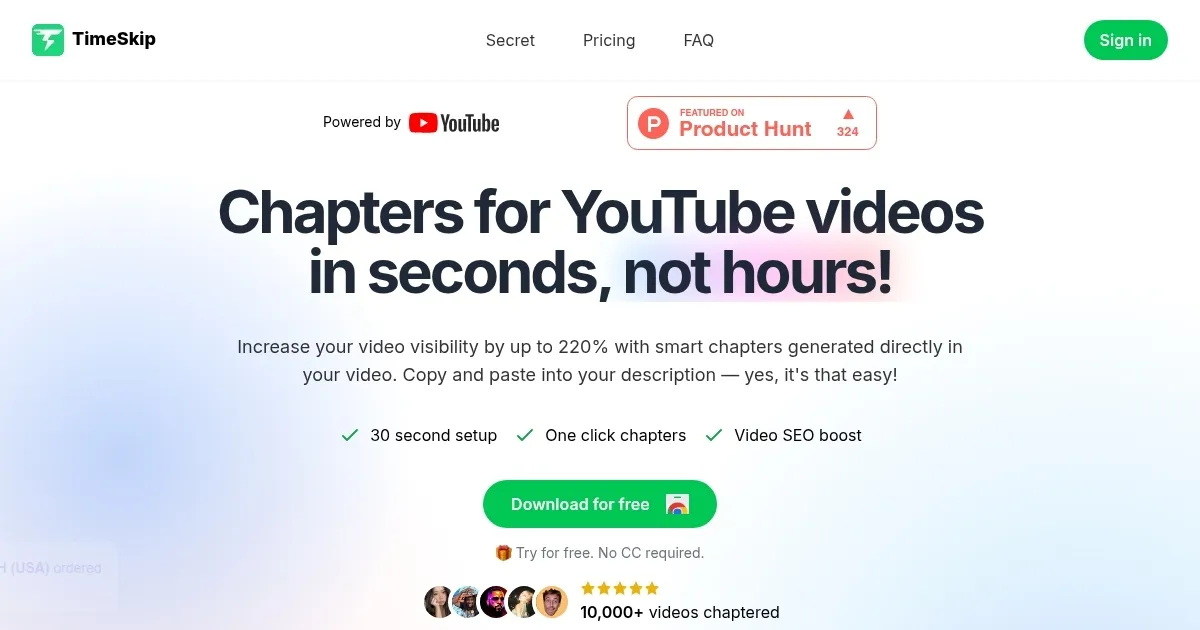
TimeSkip is an AI tool for YouTube creators, allowing them to make their videos more discoverable, more engaging — without the tedious grind of manual timestamping. As a Chrome extension, it slots right into the YouTube player, generating chapters for a one-hour video in about five seconds. That’s not just fast — it’s a game-changer for creators juggling content production and optimization. I think it’s the kind of tool that makes you wonder how you ever managed without it, especially if you’re churning out podcasts, tutorials, or webinars where structure matters.

The magic lies in its simplicity. Load a video, click the TimeSkip icon, and watch it churn out chapters with SEO-optimized titles using long-tail keywords. These aren’t just random splits; they’re crafted to boost your video’s ranking on YouTube and Google search results. Studies suggest videos with chapters see up to 2.2 times better engagement metrics, like comment-to-view ratios, and TimeSkip leans into that data hard. It supports any YouTube video with closed captions, public or private, covering everything from cooking demos to coding tutorials. The one-click timestamp copying feature? It’s a small touch that saves big time, letting you paste chapters directly into your video description.

But it’s not flawless. Some users might find the reliance on closed captions limiting — poor or missing captions can throw off the chapter quality. And while it’s marketed as a time-saver, you’ll still need to review the generated chapters to ensure they align with your video’s flow. If you’re expecting perfection out of the box, you might be disappointed. The pricing tiers — ranging from a basic plan to a lifetime option — are competitive with tools like TubeBuddy or vidIQ, but the lack of transparent pricing on the site can feel like a hurdle for budget-conscious creators.

What surprises is how seamlessly TimeSkip integrates with your workflow. No need to upload videos to external sites or fiddle with clunky interfaces — it lives in the YouTube player. I was also impressed by its affiliate program, offering 50% commissions, which could be a nice perk for creators with a following. Compared to competitors like Subscribr, which focuses more on broad analytics, TimeSkip zeros in on chapters with laser precision, making it a niche but powerful tool.

For creators, the real win is engagement. Viewers love chapters for easy navigation, and TimeSkip delivers that without forcing you to become an SEO expert. My advice? Install the extension, test it on a few videos, and tweak the output to match your style. If you’re creating long-form content, this tool could be your secret weapon for climbing search rankings.

Visit TimeSkip ↗
Categories
๐Ÿ‘” Work
๐Ÿค Meeting Assistant ๐Ÿ—’๏ธ Note Taking โšก Work Productivity โœ… Task Management ๐Ÿ“… Calendar
๐ŸŽค Voice
๐Ÿ“ Transcriber
๐Ÿข Business
๐Ÿ“‹ Project Management

Homepage Screenshot 📸

TimeSkip screenshot

Video Overview 🎬

TimeSkip - Video Overview

What are the key features? ✨

  • Instant Chapter Generation: Creates video chapters in seconds using AI algorithms.
  • SEO-Optimized Titles: Crafts chapter titles with long-tail keywords for better search rankings.
  • One-Click Timestamp Copying: Allows easy copying of timestamps for video descriptions.
  • YouTube Player Integration: Generates chapters directly within the YouTube player.
  • Affiliate Program: Offers 50% commissions for users who promote TimeSkip.

Who is it for? 🤔

TimeSkip is designed for YouTube creators producing long-form content like podcasts, tutorials, webinars, educational lectures, or interviews, who want to improve video discoverability and viewer engagement without spending hours on manual timestamping. Itโ€™s especially useful for small to medium-sized creators or busy professionals managing multiple aspects of content creation, as it simplifies SEO optimization and integrates directly with the YouTube player.

Examples of what you can use it for 💡

  • Podcaster: Adds chapters to episodes for easy navigation of topics.
  • Tutorial Creator: Breaks down step-by-step guides into clear segments.
  • Educator: Organizes lectures into timestamped sections for students.
  • Webinar Host: Enhances viewer retention with structured chapters.
  • Vlogger: Boosts searchability with keyword-rich chapter titles.

Pros & Cons ⚖️

  • Fast chapter generation
  • Boosts video SEO
  • YouTube player integration
  • Relies on captions
  • Generic titles possible

FAQs 💬

What is TimeSkip?
TimeSkip is a Chrome extension for generating SEO-optimized YouTube video chapters.
Does it work with all YouTube videos?
It works with any YouTube video that has closed captions, public or private.
How fast does it generate chapters?
It processes a one-hour video in about five seconds on average.
Is it free to use?
TimeSkip offers a free tier with limited features and paid plans for more usage.
Can I edit the generated chapters?
Yes, you can review and tweak chapters before adding them to your video.
Does it support videos without captions?
No, TimeSkip requires closed captions to generate chapters.
How does it improve SEO?
It uses long-tail keywords in chapter titles to boost search rankings.
Is it compatible with other platforms?
No, itโ€™s designed specifically for YouTube videos.
What types of content work best?
Podcasts, tutorials, webinars, and educational videos benefit most.

Ready to try TimeSkip?

Creates SEO-optimized YouTube video chapters in seconds

Visit TimeSkip ↗

TimeSkip alternatives 🔗

  1. Slack AI Slack AI Search smarter, summarize conversations instantly, and be at your most productive
  2. FigJam AI FigJam AI Instantly visualize ideas, suggest best practices, and automate tedious tasks
  3. ClickUp Brain ClickUp Brain Automates workflows with contextual AI for tasks, meetings, and content creation
  4. Miro AI Miro AI Visual collaboration platform that lets you build the next big thing with a prompt and a chat
  5. Zoom AI Companion Zoom AI Companion Get high-quality results when drafting emails and chat messages, summarizing meetings and chat threads
  6. TurboScribe TurboScribe Transcribes audio and video files to accurate text instantly
Share
TimeSkip screenshot enlarged
Promote TimeSkip
light badge
Copy Embed Code
dark badge
Copy Embed Code
neutral badge
Copy Embed Code
Best AI Tools

Discover the best AI tools for any use case

Explore
  • Tool Categories
  • AI Use Cases
  • AI Events
  • AI News
  • Saved Tools
Company
  • About Us
  • Contact Us
  • Media & Partnerships
  • Suggest a Tool
Legal
  • Privacy Policy
  • Terms of Service
Copyright © 2026 Best AI Tools 415 Mission Street, 37th Floor, San Francisco, CA 94105