logo-darklogo-darklogo-darklogo-dark
  • Tool Categories
    • 🎨Art & Creative Design505
    • 🏢Business Management644
    • 💻Coding & Development515
    • 👮Detection83
    • 🧠General Use727
    • 🏥Health & Wellness55
    • 📷Image & Photo Analysis100
    • 🖼️Image Generation & Editing618
    • 📐Interior & Architectural Design37
    • 🎓Learning & Education483
    • ⚖️Legal & Finance90
    • 🎭Lifestyle & Entertainment236
    • 📢Marketing & Advertising627
    • 🎧Music & Audio138
    • 👔Office & Workplace1,014
    • 🔬Research & Data Analysis372
    • 👥Social Media245
    • 🎥Video Generation & Editing426
    • 👧🏻Virtual Companion135
    • 🎤Voice Generation & Editing381
    • ✍️Writing & Editing808
    • All Categories
    • AI Use Cases
  • News
  • Events
    • Academic Conferences
    • Developer Conferences
    • Expos / Trade Shows
    • Industry Summits
    • Workshops / Training
    • All Events
    • Past Events
  • Saved Tools
  • Suggest a Tool
✕
Home › Voice Generation & Editing › Transcriber› Trint
Trint

Trint

Upload any audio or video files let convert every word into 30+ languages with up to 99% accuracy

Trint is an AI-powered tool that will transcribe audio and video to text in over 30 languages.

The service was developed by the Emmy Award-winning journalist Jeff Kofman, who got tired of manual transcription grinding stories to a halt. And so he decided to change that with the help of AI.

Trint was born to allow anyone to upload any audio or video files, or capture content live, and convert every word into text with up to 99% accuracy.

After that, there is the option to edit, playback and search transcripts just like a text document — as well as to pull quotes from multiple transcripts and create articles, podcasts, scripts and soundbites.

All this is available for individuals and teams, allowing multiple users to collaborate in real time, share using granular access permissions and create Shared Drives to make sign-offs quick and easy.

Trint also has a mobile app, using which you can capture audio from your phone, and transcribe moments as they happen.

The tool is used by such organizations as BBC, AP, The Washington Post, Der Spiegel, PBS News Hour, Thomson Reuters, and Financial Times, among others.

Visit Trint ↗
Categories
🎤 Voice
📝 Transcriber 💬 Speech-to-Text 🔠 Audio To Text
👔 Work
🤝 Meeting Assistant 🗒️ Note Taking
🎓 Education
🈸 Translation
✍️ Writing
💬 Subtitle Generation

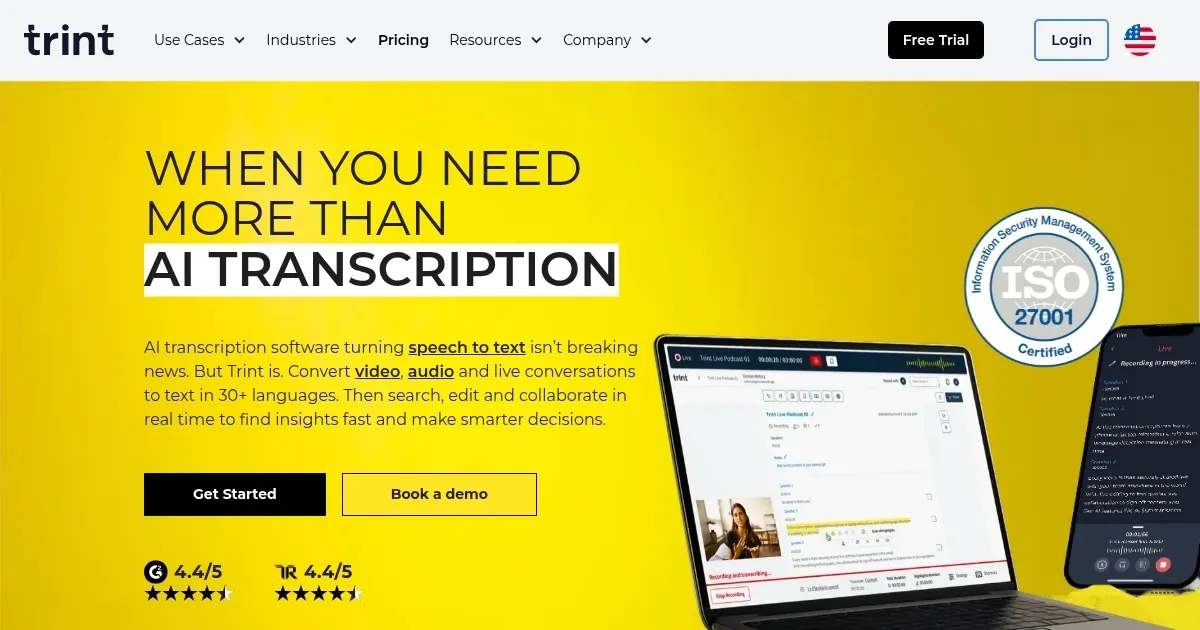
Homepage Screenshot 📸

Trint screenshot

Video Overview 🎬

Trint - Video Overview

What are the key features? ✨

  • Developed by the master of storytelling: Trint's founder Jeff Kofman spent more than 30 years as an Emmy Award-winning journalist and got tired of manual transcription grinding stories to a halt. And so he decided to change that with the help of AI.
  • Makes transcriptions easy: Upload any audio or video files, or capture content live, and Trint will convert every word into more than 30 languages with up to 99% accuracy.
  • Modify to perfection: Verify, edit, playback and search transcripts just like a text doc. Then, pull quotes from multiple transcripts and use editorial tools to create articles, podcasts, scripts and soundbites.
  • Collaborate in real time: Work together in real time with highlight and comment tools to make teamwork simple. Share using granular access permissions and create Shared Drives to make sign-offs quick and easy.
  • Integrate into your workflow: Export into multiple formats or integrate with other platforms for seamless workflows. Boost accessibility and global reach with closed captions and AI translations into 30+ languages.
  • Mobile app: Capture audio from your phone, transcribe in real time and share with colleagues anytime, anywhere.

Who is it for? 🤔

Trint is made for everyone who needs to transcribe audio and video files. Instead of doing it manually, it uses AI for the job. Trint has a mobile app, allowing users to "transcribe moments as they happen." Also, it supports teams so that multiple users can edit and share transcriptions in real time. The tool supports more than 30 languages and is already being used by some of the world's best-known newsrooms, such as those operated by BBC, AP, The Washington Post, Der Spiegel, PBS News Hour, Thomson Reuters, and Financial Times, among others.

Examples of what you can use it for 💡

  • Transcribe audio and video files in 30+ languages
  • Edit transcribed text like any other document from Trint
  • Record audio and video and transcribe in real time with a mobile app
  • Jointly create perfect articles with collaboration tools

Pros & Cons ⚖️

  • Makes transcriptions easy
  • Great for newsrooms (many are already using it)
  • Multi-language support
  • AI transcriptions are not always super accurate

FAQs 💬

What is Trint mainly used for?
Trint transcribes audio and video into editable text, supports live transcription, and helps with editing, searching, and collaborating on content like interviews or meetings.
How accurate is Trint's transcription?
It claims up to 99% accuracy with clear audio and speech, but real results often range from 90-95%, depending on quality, accents, and background noise.
Does Trint support multiple languages?
Yes, it transcribes in more than 40 languages and translates into over 70, with automatic language detection for mixed-language content.
Can Trint transcribe live audio?
Absolutely, Trint Live captures and transcribes interviews, speeches, video calls, or microphone input in real time, sharing transcripts instantly with teams.
Is there a mobile app for Trint?
Yes, the mobile app lets you record and transcribe on the go, with full editing and collaboration features.
Who is Trint best suited for?
Journalists, podcasters, media teams, law firms, and production crews who need fast, collaborative transcription and content tools.
Does Trint have AI features beyond basic transcription?
Yes, an AI assistant summarizes transcripts, finds quotes, identifies insights, and helps locate key moments automatically.
How does Trint handle collaboration?
Teams edit, comment, highlight, and share transcripts in real time, just like a shared document.
What file formats does Trint accept?
It supports common formats like MP3, MP4, WAV, M4A, and AAC for easy uploads.
Is Trint secure for sensitive content?
Yes, it's ISO 27001 certified, stores data in the EU or US, and doesn't use user content to train AI.

Ready to try Trint?

Upload any audio or video files let convert every word into 30+ languages with up to 99% accuracy

Visit Trint ↗

Trint alternatives 🔗

  1. AWS HealthScribe AWS HealthScribe Automatically create clinical notes from patient-clinician conversations using generative AI
  2. Vimeo AI Vimeo AI Creates polished videos from single recordings using AI edits and scripts
  3. Zoom AI Companion Zoom AI Companion Get high-quality results when drafting emails and chat messages, summarizing meetings and chat threads
  4. TurboScribe TurboScribe Transcribes audio and video files to accurate text instantly
  5. Loom AI Loom AI Record better video messages with automatic titles, summaries, share messages, and more
  6. VEED VEED Creates pro-level videos with AI-powered editing and collaboration tools
Share
Trint screenshot enlarged
Promote Trint
light badge
Copy Embed Code
dark badge
Copy Embed Code
neutral badge
Copy Embed Code
Best AI Tools

Discover the best AI tools for any use case

Explore
  • Tool Categories
  • AI Use Cases
  • AI Events
  • AI News
  • Saved Tools
Company
  • About Us
  • Contact Us
  • Media & Partnerships
  • Suggest a Tool
Legal
  • Privacy Policy
  • Terms of Service
Copyright © 2026 Best AI Tools 415 Mission Street, 37th Floor, San Francisco, CA 94105