logo-darklogo-darklogo-darklogo-dark
  • Tool Categories
    • ๐ŸŽจArt & Creative Design505
    • ๐ŸขBusiness Management644
    • ๐Ÿ’ปCoding & Development515
    • ๐Ÿ‘ฎDetection83
    • ๐Ÿง General Use727
    • ๐ŸฅHealth & Wellness55
    • ๐Ÿ“ทImage & Photo Analysis100
    • ๐Ÿ–ผ๏ธImage Generation & Editing618
    • ๐Ÿ“Interior & Architectural Design37
    • ๐ŸŽ“Learning & Education483
    • โš–๏ธLegal & Finance90
    • ๐ŸŽญLifestyle & Entertainment236
    • ๐Ÿ“ขMarketing & Advertising627
    • ๐ŸŽงMusic & Audio138
    • ๐Ÿ‘”Office & Workplace1,014
    • ๐Ÿ”ฌResearch & Data Analysis372
    • ๐Ÿ‘ฅSocial Media245
    • ๐ŸŽฅVideo Generation & Editing426
    • ๐Ÿ‘ง๐ŸปVirtual Companion135
    • ๐ŸŽคVoice Generation & Editing381
    • โœ๏ธWriting & Editing808
    • All Categories
    • AI Use Cases
  • News
  • Events
    • Academic Conferences
    • Developer Conferences
    • Expos / Trade Shows
    • Industry Summits
    • Workshops / Training
    • All Events
    • Past Events
  • Saved Tools
  • Suggest a Tool
โœ•
Home › Voice Generation & Editing › Transcriber› WhisperTranscribe
WhisperTranscribe

WhisperTranscribe

Converts audio and video into accurate text transcripts in minutes

WhisperTranscribe, built on OpenAI’s Whisper AI, is a tool that promises to turn your audio or video into text faster than you can say “transcription.” It’s not just about slapping words onto a page, it’s about making your media work smarter, whether you’re a podcaster, marketer, or researcher. The tool’s core strength lies in its ability to churn out transcripts with 95% accuracy, even when your audio has background noise or multiple speakers. You can upload files in formats like MP3, MP4, or WAV, or even paste a YouTube link and let it rip. In my research, I found users raving about its speed, a 60-minute file often takes just 3-4 minutes to process. That’s quicker than most competitors, like Otter.ai or Descript, which can lag on longer files.

What sets WhisperTranscribe apart is its Magic Chat feature. Imagine having a conversation with your transcript, asking it to summarize key points or generate a blog post. It’s like having a clever assistant who’s read your entire script. The tool also supports over 55 languages, from Arabic to Welsh, making it a global player. Flexible export options, like SRT or Word, let you tailor outputs for subtitles or reports. Plus, the AI Clip Detector finds shareable moments for social media, a boon for content creators looking to go viral on TikTok or LinkedIn.

Not everything’s perfect, though. Some users on Reddit noted that speaker identification can get wonky, sometimes mixing up who said what, especially in chaotic group discussions. The 1GB file size limit for direct uploads might also cramp your style if you’re working with massive video files, though compressing or using YouTube links can sidestep this. And while the free trial offers 60 minutes of transcription, you’ll need to pony up for more extensive use, though pricing feels competitive compared to Sonix or Trint, which often demand subscriptions.

The interface is a high point, clean, intuitive, and designed for non-techies. You don’t need to be a coding wizard to navigate it. I also love that your data stays local, with SSL/TLS encryption ensuring privacy, a big deal for professionals handling sensitive info. One surprise? The ability to fine-tune transcripts with custom spelling for names or places, which saves time on cleanup.

If you’re diving into WhisperTranscribe, start with the free trial to test its accuracy on your audio. Play with the Magic Chat to see how it can repurpose your content. For larger files, compress them first or use the YouTube link feature to avoid upload headaches. Check your settings to set the right language for better results.

Visit WhisperTranscribe ↗
Categories
๐ŸŽค Voice
๐Ÿ“ Transcriber ๐Ÿ’ฌ Speech-to-Text ๐Ÿ”  Audio To Text ๐Ÿ—ฃ๏ธ Speech Recognition ๐ŸŽ™๏ธ Podcast
โœ๏ธ Writing
๐Ÿ’ฌ Subtitle Generation ๐Ÿ“ Summarizer
๐Ÿ‘” Work
๐Ÿค Meeting Assistant

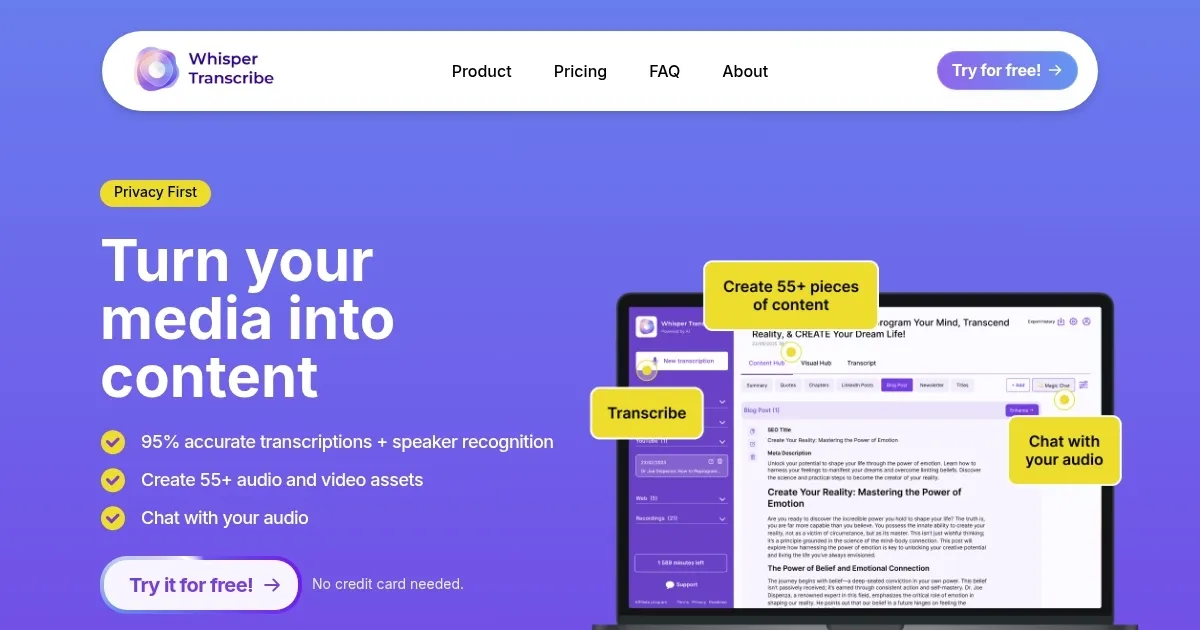
Homepage Screenshot 📸

WhisperTranscribe screenshot

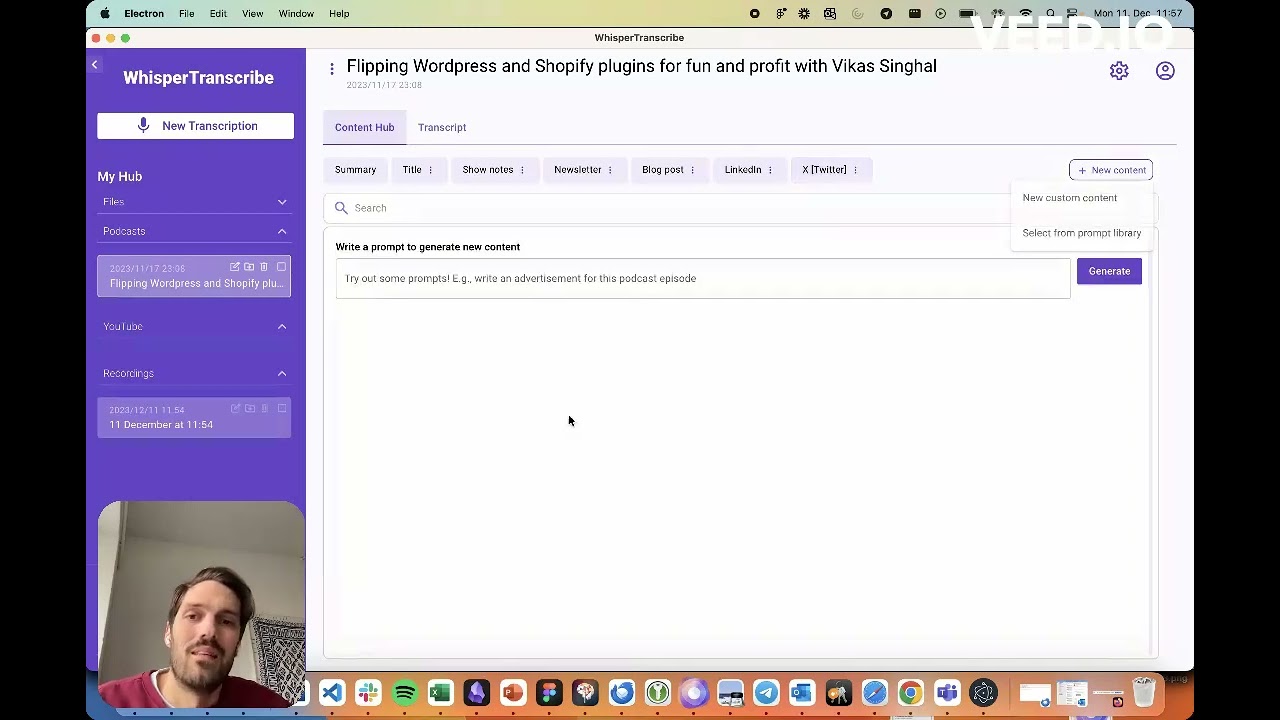
Video Overview 🎬

WhisperTranscribe - Video Overview

What are the key features? ✨

  • Magic Chat: Interact with transcripts to generate summaries or content.
  • AI Clip Detector: Identifies engaging moments for social media sharing.
  • Multilingual Support: Transcribes audio in over 55 languages with high accuracy.
  • Flexible Exports: Download transcripts as SRT, VTT, TXT, or Word formats.
  • Custom Spelling: Add specific terms or names to improve transcription accuracy.

Who is it for? 🤔

WhisperTranscribe is ideal for content creators, podcasters, marketers, researchers, and educators who need fast, accurate transcription of audio or video files. Its multilingual support suits global teams or creators targeting diverse audiences, while its content generation features benefit those repurposing media into social posts, blogs, or reports. Professionals handling sensitive data, like those in healthcare or legal fields, will appreciate its privacy-focused local storage.

Examples of what you can use it for 💡

  • Podcaster: Transcribes episodes to create show notes or social media clips.
  • Marketer: Generates blog posts or LinkedIn content from webinar recordings.
  • Researcher: Converts interview audio into text for analysis or reports.
  • Educator: Creates subtitles for lecture videos to improve accessibility.
  • Content Creator: Uses AI Clip Detector to find viral moments for TikTok.

Pros & Cons ⚖️

  • Fast transcription, 60-min file in 3-4 min.
  • Supports 55+ languages for global use.
  • Free 60-minute trial, no payment required.
  • 1GB limit for direct file uploads.
  • Slang or accents may reduce accuracy.

FAQs 💬

What audio formats does WhisperTranscribe support?
It accepts MP3, MP4, WAV, WEBM, MPEG, and more, plus YouTube/Vimeo links.
How accurate is the transcription?
It achieves 95% accuracy for clear audio, even with background noise or accents.
Can I transcribe multiple languages?
Yes, it supports over 55 languages, including Arabic, Spanish, and Japanese.
Is my data private?
All files and transcripts are stored locally with SSL/TLS encryption.
How long does transcription take?
A 60-minute file typically transcribes in 3-4 minutes.
Is there a free trial?
Yes, you get 60 minutes of free transcription without payment details.
Can I edit transcripts?
Yes, the text-based editor lets you tweak transcripts easily.
Does it work offline?
No, an internet connection is needed for cloud-based processing.
Whatโ€™s the file size limit?
Direct uploads are capped at 1GB, but YouTube links bypass this.
Can I generate content from transcripts?
Yes, Magic Chat creates summaries, posts, or reports from your transcript.

Ready to try WhisperTranscribe?

Converts audio and video into accurate text transcripts in minutes

Visit WhisperTranscribe ↗

WhisperTranscribe alternatives 🔗

  1. AWS HealthScribe AWS HealthScribe Automatically create clinical notes from patient-clinician conversations using generative AI
  2. Vimeo AI Vimeo AI Creates polished videos from single recordings using AI edits and scripts
  3. Zoom AI Companion Zoom AI Companion Get high-quality results when drafting emails and chat messages, summarizing meetings and chat threads
  4. TurboScribe TurboScribe Transcribes audio and video files to accurate text instantly
  5. Loom AI Loom AI Record better video messages with automatic titles, summaries, share messages, and more
  6. VEED VEED Creates pro-level videos with AI-powered editing and collaboration tools
Share
WhisperTranscribe screenshot enlarged
Promote WhisperTranscribe
light badge
Copy Embed Code
dark badge
Copy Embed Code
neutral badge
Copy Embed Code
Best AI Tools

Discover the best AI tools for any use case

Explore
  • Tool Categories
  • AI Use Cases
  • AI Events
  • AI News
  • Saved Tools
Company
  • About Us
  • Contact Us
  • Media & Partnerships
  • Suggest a Tool
Legal
  • Privacy Policy
  • Terms of Service
Copyright © 2026 Best AI Tools 415 Mission Street, 37th Floor, San Francisco, CA 94105