logo-darklogo-darklogo-darklogo-dark
  • Tool Categories
    • 🎨Art & Creative Design505
    • 🏢Business Management644
    • 💻Coding & Development515
    • 👮Detection83
    • 🧠General Use727
    • 🏥Health & Wellness55
    • 📷Image & Photo Analysis100
    • 🖼️Image Generation & Editing618
    • 📐Interior & Architectural Design37
    • 🎓Learning & Education483
    • ⚖️Legal & Finance90
    • 🎭Lifestyle & Entertainment236
    • 📢Marketing & Advertising627
    • 🎧Music & Audio138
    • 👔Office & Workplace1,014
    • 🔬Research & Data Analysis372
    • 👥Social Media245
    • 🎥Video Generation & Editing426
    • 👧🏻Virtual Companion135
    • 🎤Voice Generation & Editing381
    • ✍️Writing & Editing808
    • All Categories
    • AI Use Cases
  • News
  • Events
    • Academic Conferences
    • Developer Conferences
    • Expos / Trade Shows
    • Industry Summits
    • Workshops / Training
    • All Events
    • Past Events
  • Saved Tools
  • Suggest a Tool
✕
Home › Art & Creative Design › Sketch Generation› Vizcom
Vizcom

Vizcom

An AI tool that turns your sketches into stunning concept drawings in seconds

Vizcom is a fancy design tool enabling users to translate 2D sketches into high-quality renderings and explore infinite design variations. With features aimed at bridging the gap between initial concepts and immersive visuals, it offers a suite of tools that blend familiarity with innovation.

Users can work collaboratively in shared workspaces, access a library of curated rendering styles, import 3D models, and control textures with ease — all while organizing their designs with robust layer support. Vizcom encourages rapid iteration and creative exploration, supported by familiar drawing tools and the ability to inject personal 3D assets.

Vizcom emphasizes security and user control while ensuring users retain full ownership of their creations. backed by industry-leading encryption and an always-on security team.

Lastly, we’ll mention the Vizcom community, which provides a space for designers to connect, share inspiration, and stay updated on the latest features. If you plan to use Vizcom, you’ll definitely want to participate in this community, as well.

Visit Vizcom ↗
Categories
🎨 Art
✏️ Sketch Generation ✍️ Drawing 🧑‍🎨 Design Assistant 🖼️ Design Generation 🌅 Illustration Generation 🧊 3D Modeling 🎨 Art Generation
🖼️ Image
🖼️ Image Generation 🎨 Style Transferring

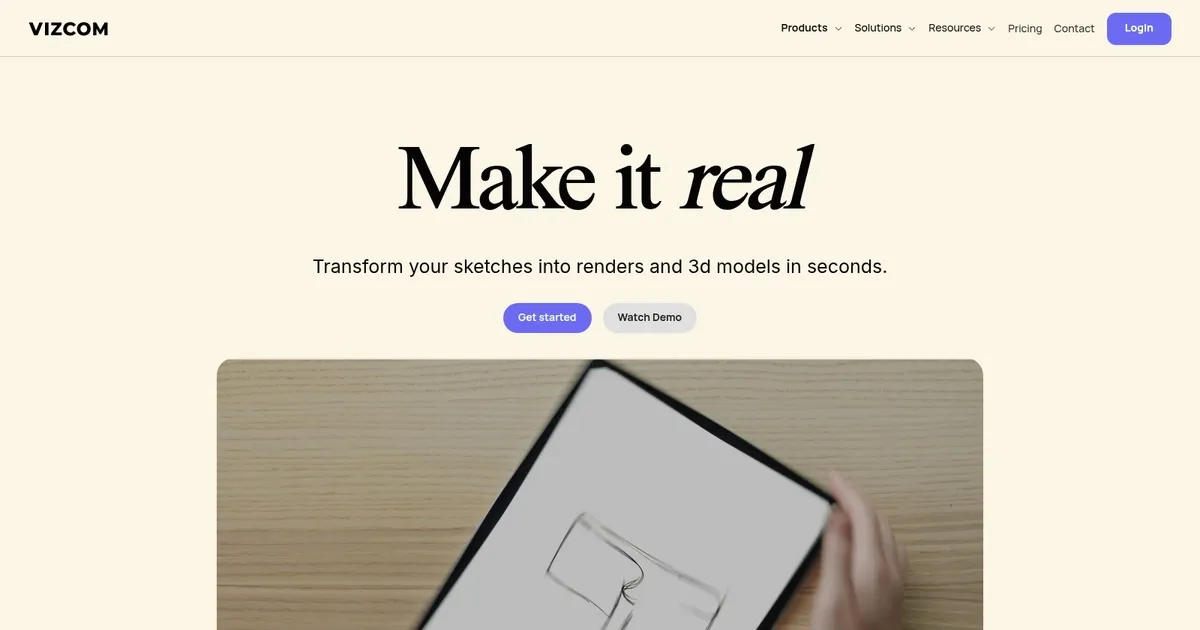
Homepage Screenshot 📸

Vizcom screenshot

Video Overview 🎬

What are the key features? ✨

  • Render: Instantly converts sketches or descriptions into photorealistic 3D renders.
  • Animate: Adds motion and storytelling to designs with simple directional instructions.
  • Make 3D: Generates high-quality 3D models directly from 2D renders.
  • Enhance: Brings out finer details and improves overall rendering quality.
  • Palette/Form/Style: Allows quick changes to colors, shapes, and aesthetic styles using natural language.

Who is it for? 🤔

Vizcom helps product designers, industrial designers, concept artists, and design teams who need to move fast from initial sketches to polished visuals. Freelancers exploring ideas, small studios iterating concepts, and larger brand teams sharing secure renders all find value here. Anyone frustrated by slow traditional rendering benefits most, especially in fields like footwear, automotive, outdoor gear, or consumer products.

Examples of what you can use it for 💡

  • Product designer: Quickly turns rough sketches into photorealistic renders to present multiple variations during early ideation.
  • Footwear concept artist: Generates detailed trail shoe visualizations with material and terrain adjustments for client feedback.
  • Industrial design team: Animates product concepts to show motion and function in short clips for internal reviews.
  • Furniture designer: Drops 3D models into scenes, swaps materials like wood or metal, and explores lighting options instantly.
  • Freelance vehicle designer: Converts hand-drawn car sketches into realistic renders and 3D views to build portfolios rapidly.

Pros & Cons ⚖️

  • Lightning-fast sketch-to-render
  • Intuitive natural language edits
  • Strong privacy on paid plans
  • Useful animation and 3D tools
  • Occasional AI over-interpretation
  • Limited free tier exports

FAQs 💬

What kind of inputs does Vizcom accept?
Vizcom works with hand-drawn sketches, digital line drawings, text descriptions, images, and existing 3D models.
Is Vizcom suitable for beginners?
Yes, the interface is straightforward and tutorials help new users start rendering sketches quickly.
Does Vizcom offer a free plan?
Yes, a free tier exists for testing basic features, though paid plans unlock more capabilities and privacy.
Can teams collaborate in Vizcom?
Yes, shared workspaces support real-time collaboration with role-based access like admin, editor, and viewer.
How does Vizcom handle privacy?
Paid users' content remains private and confidential, not used for AI training.
What file formats can I export?
Exports include high-resolution images, with paid plans offering more options and quality.
Does Vizcom generate actual 3D models?
Yes, the Make 3D feature creates usable 3D models from 2D renders.
Is Vizcom web-based or downloadable?
Vizcom runs entirely in the browser, accessible on desktop, laptop, or tablet.

Ready to try Vizcom?

An AI tool that turns your sketches into stunning concept drawings in seconds

Visit Vizcom ↗


Vizcom alternatives 🔗

  1. Clip Studio Paint Clip Studio Paint An AI-drive digital art tool with an extensive suite of features, options, and more
  2. AutoDraw AutoDraw Is an AI drawing tool that pairs AI and machine learning with drawings from talented artists
  3. Uizard Uizard Generates editable UI prototypes from text prompts and sketches in minutes.
  4. Shakker Shakker Create stunning images, even masterpieces, using artificial intelligence
  5. Visily Visily Create software wireframes from sketches, screenshots, templates, and more
  6. Autodraft Autodraft An AI-powered platform that can transform text prompts into vivid visuals
Share
Vizcom screenshot enlarged
Promote Vizcom
light badge
Copy Embed Code
dark badge
Copy Embed Code
neutral badge
Copy Embed Code
Best AI Tools

Discover the best AI tools for any use case

Explore
  • Tool Categories
  • AI Use Cases
  • AI Events
  • AI News
  • Saved Tools
Company
  • About Us
  • Contact Us
  • Media & Partnerships
  • Suggest a Tool
Legal
  • Privacy Policy
  • Terms of Service
Copyright © 2026 Best AI Tools 415 Mission Street, 37th Floor, San Francisco, CA 94105