logo-darklogo-darklogo-darklogo-dark
  • Tool Categories
    • ๐ŸŽจArt & Creative Design505
    • ๐ŸขBusiness Management644
    • ๐Ÿ’ปCoding & Development515
    • ๐Ÿ‘ฎDetection83
    • ๐Ÿง General Use727
    • ๐ŸฅHealth & Wellness55
    • ๐Ÿ“ทImage & Photo Analysis100
    • ๐Ÿ–ผ๏ธImage Generation & Editing618
    • ๐Ÿ“Interior & Architectural Design37
    • ๐ŸŽ“Learning & Education483
    • โš–๏ธLegal & Finance90
    • ๐ŸŽญLifestyle & Entertainment236
    • ๐Ÿ“ขMarketing & Advertising627
    • ๐ŸŽงMusic & Audio138
    • ๐Ÿ‘”Office & Workplace1,014
    • ๐Ÿ”ฌResearch & Data Analysis372
    • ๐Ÿ‘ฅSocial Media245
    • ๐ŸŽฅVideo Generation & Editing426
    • ๐Ÿ‘ง๐ŸปVirtual Companion135
    • ๐ŸŽคVoice Generation & Editing381
    • โœ๏ธWriting & Editing808
    • All Categories
    • AI Use Cases
  • News
  • Events
    • Academic Conferences
    • Developer Conferences
    • Expos / Trade Shows
    • Industry Summits
    • Workshops / Training
    • All Events
    • Past Events
  • Saved Tools
  • Suggest a Tool
โœ•
Home › Office & Workplace › Agent› ComputerX
ComputerX

ComputerX

Automates computer tasks using natural language commands for enhanced productivity

ComputerX is an AI-powered tool that automates computer tasks by processing natural language commands, enabling users to handle web research, data visualization, and report generation efficiently. Launched in 2024 by a San Francisco startup, it serves professionals and individuals seeking to streamline digital workflows. The tool’s core strength lies in its ability to interpret plain English instructions, turning them into actionable outputs across text, tables, images, and code.

The natural language interface allows users to type requests like “summarize recent tech news” or “create a chart from this dataset,” and ComputerX delivers results quickly. It supports tasks like travel planning, market research, and basic coding, with outputs exportable in formats like PDF or HTML. The tool operates across web, desktop, and mobile platforms, ensuring flexibility. User feedback on sites like aipure.ai highlights its ease of use, with 62,158 monthly visits in July 2025, reflecting growing popularity.

Compared to competitors like Zapier and Tableau, ComputerX offers a broader, less specialized feature set. Zapier focuses on app integrations, while Tableau excels in advanced data visualization, but ComputerX combines simplicity with versatility. Its freemium model provides free access to basic features, with premium plans unlocking advanced capabilities, making it cost-competitive.

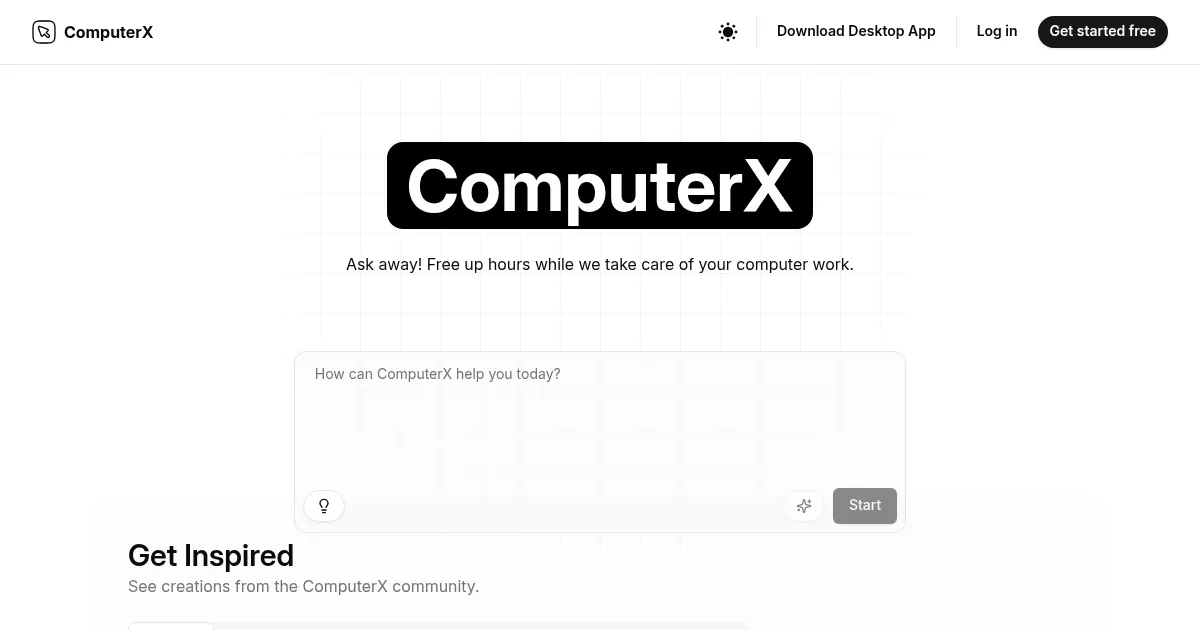
Limitations exist. Users report occasional inaccuracies in complex tasks, requiring precise phrasing to avoid errors. The website lacks detailed technical specs, which may frustrate advanced users. A stable internet connection is necessary for optimal performance, as noted in reviews on automateed.com. The “Get Inspired” section on the website offers practical examples, helping users explore its capabilities.

For best results, begin with simple tasks like data summaries or price comparisons to understand the tool’s strengths. Use clear, specific commands to minimize errors, and leverage the community examples for creative ideas. Regularly check for updates, as the tool is still evolving.

Visit ComputerX ↗
Categories
๐Ÿ‘” Work
๐Ÿ”— Agent โšก Work Productivity โœ… Task Management
๐Ÿข Business
๐Ÿ”„ Workflow
๐Ÿง  General
๐Ÿค– Assistant
๐Ÿ’ป Coding
๐ŸŒ Browser

Homepage Screenshot 📸

ComputerX screenshot

Video Overview 🎬

ComputerX - Video Overview

What are the key features? ✨

  • Natural Language Interface: Converts plain English commands into automated tasks.
  • Automated Task Execution: Handles web research, data analysis, and content creation.
  • Visualization Capabilities: Generates charts and graphs from user-provided data.
  • Cross-Platform Support: Works on web, desktop, and mobile for seamless access.
  • Export Options: Outputs results in text, tables, images, or code formats like PDF and HTML.

Who is it for? 🤔

ComputerX is designed for professionals, small business owners, and students who need to automate repetitive computer tasks without deep technical expertise. Its natural language interface makes it accessible for those managing data analysis, research, or planning, while its cross-platform support suits users working across devices, from freelancers streamlining market research to students creating quick data visualizations.

Examples of what you can use it for 💡

  • Freelancer: Automates client research by compiling pricing data into reports.
  • Student: Creates visual charts from study data for academic projects.
  • Small Business Owner: Plans business trips by comparing flight and hotel prices.
  • Content Creator: Summarizes news articles into digests for blog posts.
  • Developer: Generates basic HTML code for simple web applications.

Pros & Cons ⚖️

  • Easy-to-use natural language interface
  • Cross-platform accessibility
  • Flexible output formats
  • Learning curve for complex tasks
  • Limited technical documentation

FAQs 💬

What tasks can ComputerX handle?
ComputerX automates web research, data visualization, travel planning, and basic coding tasks.
Is ComputerX free to use?
It offers a freemium model with basic features free and premium plans for advanced functions.
Does it work on mobile devices?
Yes, ComputerX supports web, desktop, and mobile platforms for flexible access.
How accurate are the results?
Results are generally accurate but may require precise phrasing for complex tasks.
Can it export data?
Yes, outputs can be exported as text, tables, images, or code like PDF and HTML.
Is technical expertise required?
No, its natural language interface is designed for users with minimal technical skills.
How does it compare to Zapier?
ComputerX is less specialized but simpler, focusing on broad task automation.
Can it handle coding tasks?
Yes, it can generate basic code, like HTML for simple apps or games.
Is internet required?
A stable internet connection is needed for optimal performance.
Where can I find usage examples?
The โ€œGet Inspiredโ€ section on the website offers real user examples.

Ready to try ComputerX?

Automates computer tasks using natural language commands for enhanced productivity

Visit ComputerX ↗

ComputerX alternatives 🔗

  1. Gemini Gemini Generates responses from text, images, audio, and video inputs using advanced multimodal AI
  2. Claude Claude Assists users in reasoning, coding, writing, and analyzing data with advanced AI models
  3. Windsurf Windsurf Empowers developers with AI-driven code generation and real-time collaboration.
  4. Poe Poe Aggregates top AI models for seamless chatting and bot creation
  5. Replit AI Replit AI Transforms natural language prompts into fully deployable apps using AI agents
  6. Google AI Studio Google AI Studio Prototypes AI solutions using Gemini models in a browser-based IDE
Share
ComputerX screenshot enlarged
Promote ComputerX
light badge
Copy Embed Code
dark badge
Copy Embed Code
neutral badge
Copy Embed Code
Best AI Tools

Discover the best AI tools for any use case

Explore
  • Tool Categories
  • AI Use Cases
  • AI Events
  • AI News
  • Saved Tools
Company
  • About Us
  • Contact Us
  • Media & Partnerships
  • Suggest a Tool
Legal
  • Privacy Policy
  • Terms of Service
Copyright © 2026 Best AI Tools 415 Mission Street, 37th Floor, San Francisco, CA 94105