logo-darklogo-darklogo-darklogo-dark
  • Tool Categories
    • ๐ŸŽจArt & Creative Design505
    • ๐ŸขBusiness Management644
    • ๐Ÿ’ปCoding & Development515
    • ๐Ÿ‘ฎDetection83
    • ๐Ÿง General Use727
    • ๐ŸฅHealth & Wellness55
    • ๐Ÿ“ทImage & Photo Analysis100
    • ๐Ÿ–ผ๏ธImage Generation & Editing618
    • ๐Ÿ“Interior & Architectural Design37
    • ๐ŸŽ“Learning & Education483
    • โš–๏ธLegal & Finance90
    • ๐ŸŽญLifestyle & Entertainment236
    • ๐Ÿ“ขMarketing & Advertising627
    • ๐ŸŽงMusic & Audio138
    • ๐Ÿ‘”Office & Workplace1,014
    • ๐Ÿ”ฌResearch & Data Analysis372
    • ๐Ÿ‘ฅSocial Media245
    • ๐ŸŽฅVideo Generation & Editing426
    • ๐Ÿ‘ง๐ŸปVirtual Companion135
    • ๐ŸŽคVoice Generation & Editing381
    • โœ๏ธWriting & Editing808
    • All Categories
    • AI Use Cases
  • News
  • Events
    • Academic Conferences
    • Developer Conferences
    • Expos / Trade Shows
    • Industry Summits
    • Workshops / Training
    • All Events
    • Past Events
  • Saved Tools
  • Suggest a Tool
โœ•
Home › Office & Workplace › Document Extraction› Rossum
Rossum

Rossum

Automates transactional document processing with AI, boosting efficiency

Rossum is an AI-powered platform that automates transactional document processing, extracting data from invoices, purchase orders, and more with high accuracy. Its proprietary Transactional Large Language Model (T-LLM), Rossum Aurora, processes documents in 276 languages, including handwriting, without templates. The platform supports multiple channels like email, EDI, and scanners, integrating with ERPs such as SAP, Coupa, and Workday. It achieves up to 92.6% accuracy after 20 documents, as seen in Adyen’s case study, and offers features like automated validation, duplicate detection, and performance reporting.

Key functionalities include document splitting, intelligent data extraction, and automated workflows. Rossum Aurora learns from user feedback, improving accuracy in real time. It handles complex line items, such as nested tables, and supports multi-language documents with zero hallucinations. The platform’s cloud-native design ensures scalability, while its low-code interface allows business users to customize workflows without heavy IT involvement. Security features include SOC-1, SOC-2, and ISO/IEC 27001:2013 compliance, ensuring data safety.

Compared to ABBYY and Kofax, Rossum excels in template-free processing, making it more adaptable to dynamic document layouts. ABBYY relies on templates, which can limit flexibility, while Kofax’s enterprise focus may feel heavy for smaller teams. Rossum’s pricing is competitive but leans toward larger businesses, with plans starting at a higher tier than some lighter competitors like Docparser.

Users appreciate the platform’s speed, with a 65% reduction in processing time and 82% less validation effort, per case studies. The reporting dashboard provides insights into metrics like turnaround time and error rates. However, the initial setup can be complex for intricate workflows, and some users report a learning curve for advanced features like custom business rules. The 14-day trial offers a good way to test functionality with real documents.

For bestposting, try the free trial and focus on one specific workflow, like invoice processing, to gauge its fit. Contact Rossum’s support team for setup guidance, as they’re known for quick responses. This ensures you maximize the trial and align the tool with your business needs.

Visit Rossum ↗
Categories
๐Ÿ‘” Work
๐Ÿ“ค Document Extraction ๐Ÿ“• PDF ๐Ÿ–จ๏ธ Scanning ๐Ÿ“ File
๐Ÿ“ท Image Analysis
๐Ÿ”ค OCR
๐Ÿข Business
๐Ÿ”„ Workflow ๐Ÿข Enterprise
โš–๏ธ Legal/Finance
๐Ÿงพ Accounting

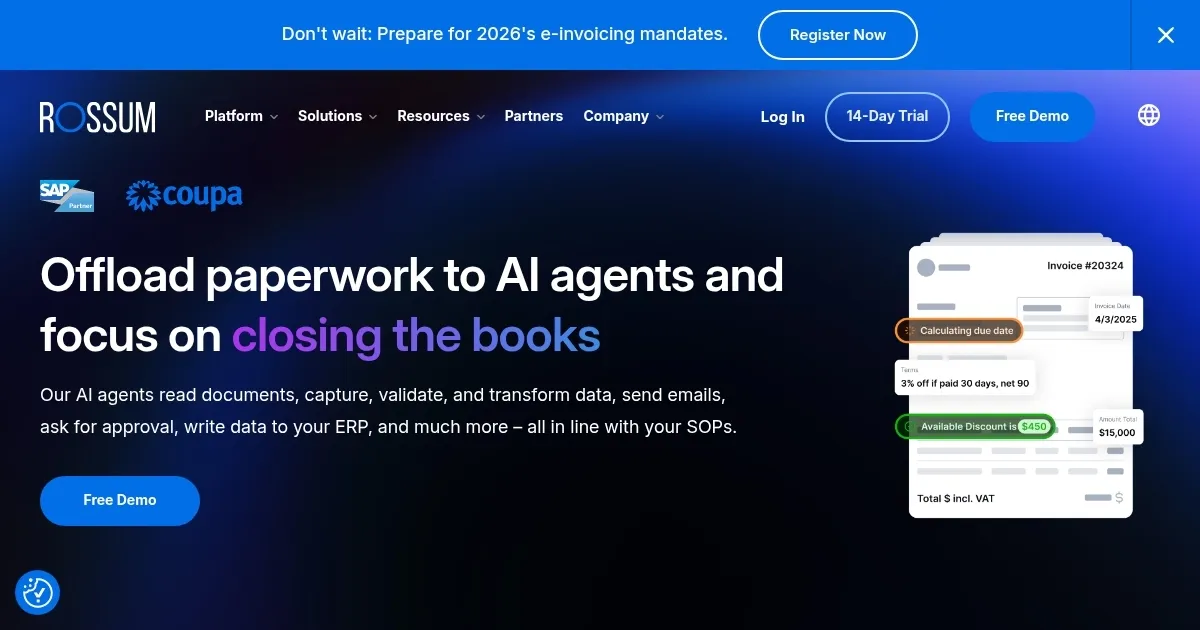
Homepage Screenshot 📸

Rossum screenshot

Video Overview 🎬

Rossum - Video Overview

What are the key features? ✨

  • Rossum Aurora: AI engine extracts data with 92.6% accuracy after 20 documents.
  • Intelligent Mailbox: Sorts documents and filters spam across multiple channels.
  • Custom Business Logic: Allows tailored workflows for specific business needs.
  • Seamless Integrations: Connects with ERPs like SAP, Coupa, and Workday.
  • Performance Reporting: Tracks metrics like error rates and processing time.

Who is it for? 🤔

Rossum is great for businesses handling large volumes of transactional documents, such as invoices and purchase orders, particularly in industries like finance, logistics, manufacturing, and retail. It suits organizations seeking to automate complex workflows, reduce manual data entry, and integrate with ERPs like SAP or Workday. From startups to global enterprises, itโ€™s a fit for teams aiming to boost efficiency and accuracy.

Examples of what you can use it for 💡

  • Accounts Payable Team: Automates invoice processing and approval workflows.
  • Supply Chain Manager: Validates order and delivery documents for accuracy.
  • IT Department: Deploys a low-code, cloud-native solution for scalability.
  • Retail Business: Processes POs and packing lists to streamline vendor tasks.
  • Shared Service Center: Manages high-volume document workflows efficiently.

Pros & Cons ⚖️

  • High accuracy with AI learning
  • Supports 276 languages
  • Strong ERP integrations
  • Complex initial setup

FAQs 💬

What types of documents can Rossum process?
Rossum handles invoices, purchase orders, bills of lading, and more across various formats.
Does Rossum support handwritten documents?
Yes, it processes handwriting in 30 languages with continuous learning.
How fast is Rossumโ€™s implementation?
As a cloud-native platform, it deploys quickly with minimal IT setup.
Is Rossum secure for sensitive data?
It complies with SOC-1, SOC-2, ISO/IEC 27001:2013, and GDPR standards.
Can Rossum integrate with my ERP?
Yes, it integrates with SAP, Coupa, Workday, NetSuite, and more.
What is the free trial like?
The 14-day trial lets you test document processing and AI learning.
How does Rossum compare to traditional OCR?
Unlike OCR, Rossumโ€™s AI understands context, reducing errors.
Can Rossum handle complex line items?
Yes, it extracts nested tables and complex data in seconds.
Is Rossum suitable for small businesses?
Itโ€™s best for high-volume document processing, but scalable for smaller firms.

Ready to try Rossum?

Automates transactional document processing with AI, boosting efficiency

Visit Rossum ↗
Rossum alternatives 🔗

  1. Box AI Box AI An assistant that taps into your enterprise content and documents
  2. ChatRTX ChatRTX Allows users to create a personalized LLM chatbot by using their own data on their own computer
  3. CoCounsel CoCounsel Tool for legal document review, research memos, deposition preparation, and contract analysis
  4. ChatPDF ChatPDF An online tool that enables users to interact with their PDF documents as if it were a human
  5. LightPDF LightPDF Ask anything about your documents, get summaries, outlines, and answers instantly
  6. Firecrawl Firecrawl A powerful tool designed to simplify web scraping and crawling
Share
Rossum screenshot enlarged
Promote Rossum
light badge
Copy Embed Code
dark badge
Copy Embed Code
neutral badge
Copy Embed Code
Best AI Tools

Discover the best AI tools for any use case

Explore
  • Tool Categories
  • AI Use Cases
  • AI Events
  • AI News
  • Saved Tools
Company
  • About Us
  • Contact Us
  • Media & Partnerships
  • Suggest a Tool
Legal
  • Privacy Policy
  • Terms of Service
Copyright © 2026 Best AI Tools 415 Mission Street, 37th Floor, San Francisco, CA 94105