Simular
Automates computer tasks with AI agents that mimic human interactions
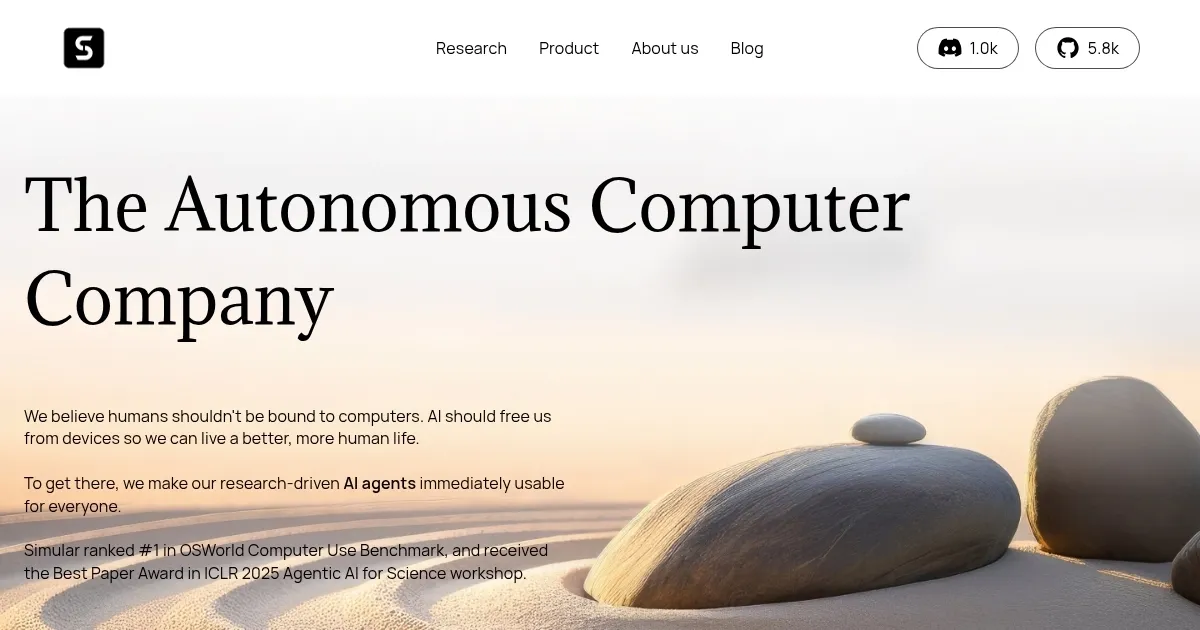
Simular AI was launched with the idea to free you from the drudgery of repetitive computer tasks. Founded by ex-DeepMind researchers, this tool delivers AI agents that click, type, and navigate your desktop or browser with eerie precision, mimicking human behavior. Agent S2, their flagship framework, powers these autonomous agents, blending fast neural networks with deliberate symbolic reasoning. Think of it as a digital assistant that doesn’t just fetch coffee but takes over your keyboard and mouse to get real work done. From filling spreadsheets to drafting emails, Simular tackles tasks that would otherwise chain you to your screen. It’s not perfect, but it’s a glimpse into a future where computers might just run themselves.
What sets Simular apart is its ability to operate natively on your device, not some distant cloud server. This local approach, using an embedded WebKit browser, means faster performance and tighter security. You can watch every action unfold, inspectable and editable, which is a refreshing change from the black-box AI systems we’re used to. The tool shines in scenarios like automating data entry — say, pulling YouTube influencer stats into a Google Sheet — or turning a dense research paper into a snappy X thread with images. It’s open-source, too, a nod to transparency that developers and tinkerers will love. Recent benchmarks, like a 34.5% success rate on 50-step tasks in OSWorld, show it outpacing heavyweights like OpenAI’s Operator and Anthropic’s Claude 3.7.
But Simular isn’t flawless. Complex, multi-step tasks can trip it up — think planning a 50-step workflow where it might misclick or misinterpret a UI element. Some users report occasional glitches when switching between environments, like a hiccup loading complex assets. The learning curve, while not steep, demands patience, especially if you’re new to automation tools. Documentation is solid but could use more real-world examples to ease onboarding. Compared to competitors like The Browser Company’s Dia, which focuses on browser-based tasks, or Perplexity‘s Comet, Simular’s cross-platform versatility gives it an edge, though it lacks the polish of more established players.
The pricing structure is flexible, with a free tier for basic use and premium plans unlocking advanced features like team workflows. It’s competitively priced, especially given the open-source framework, but costs can creep up for heavy users needing extra compute. What might surprise you is Simular’s human-in-the-loop approach. Unlike fully autonomous systems, it lets you intervene, like a co-pilot, ensuring you’re never out of control. This balance of automation and oversight feels smart, almost obvious, yet it’s rare in the AI space.
For anyone drowning in repetitive tasks, Simular is worth a spin. Start with the free version, play with simple automations like file organization, and check their GitHub for tutorials. If you’re a developer, dive into Agent S2’s codebase to customize it. Keep expectations realistic — complex workflows need babysitting — but this tool could save you hours.
Homepage Screenshot 📸
What are the key features? ✨
- Agent S2 Framework: Combines neural and symbolic reasoning for human-like computer interaction.
- Local Execution: Runs natively via WebKit browser for speed and security.
- Natural Language Commands: Allows task automation through plain English instructions.
- Cross-Platform Support: Works seamlessly on macOS, Windows, and Linux.
- Transparent Execution: Every action is inspectable and editable for user control.
Who is it for? 🤔
Examples of what you can use it for 💡
- Marketer: Automates populating Google Sheets with social media influencer stats.
- Researcher: Converts academic papers into engaging X thread posts with images.
- Small Business Owner: Drafts and sends cold emails using CRM data extraction.
- Developer: Creates custom scripts to automate repetitive coding tasks.
- Freelancer: Organizes files and syncs calendars using natural language commands.
Pros & Cons ⚖️
- Automates complex tasks
- Open-source framework
- Cross-platform support
- Human-in-the-loop control
- Struggles with multi-step tasks
- Occasional UI glitches
FAQs 💬
Ready to try Simular?
Automates computer tasks with AI agents that mimic human interactions
Visit SimularSimular alternatives 🔗